Space-Time Prediction of Bike Share Demand: Philadelphia Indego

Author

Jinheng Cen, Henry Yang

Published

December 7, 2025


Setup

Load Libraries

Code
# Core tidyverse
library(tidyverse)
library(lubridate)

# Spatial data
library(sf)
library(tigris)

# Census data
library(tidycensus)

# Weather data
library(riem)  # For Philadelphia weather from ASOS stations

# Visualization
library(viridis)
library(gridExtra)
library(knitr)
library(kableExtra)

# here!
library(here)
# Get rid of scientific notation. We gotta look good!
options(scipen = 999)

Define Themes

Code
plotTheme <- theme(
  plot.title = element_text(size = 14, face = "bold"),
  plot.subtitle = element_text(size = 10),
  plot.caption = element_text(size = 8),
  axis.text.x = element_text(size = 10, angle = 45, hjust = 1),
  axis.text.y = element_text(size = 10),
  axis.title = element_text(size = 11, face = "bold"),
  panel.background = element_blank(),
  panel.grid.major = element_line(colour = "#D0D0D0", size = 0.2),
  panel.grid.minor = element_blank(),
  axis.ticks = element_blank(),
  legend.position = "right"
)

mapTheme <- theme(
  plot.title = element_text(size = 14, face = "bold"),
  plot.subtitle = element_text(size = 10),
  plot.caption = element_text(size = 8),
  axis.line = element_blank(),
  axis.text = element_blank(),
  axis.ticks = element_blank(),
  axis.title = element_blank(),
  panel.background = element_blank(),
  panel.border = element_blank(),
  panel.grid.major = element_line(colour = 'transparent'),
  panel.grid.minor = element_blank(),
  legend.position = "right",
  plot.margin = margin(1, 1, 1, 1, 'cm'),
  legend.key.height = unit(1, "cm"),
  legend.key.width = unit(0.2, "cm")
)

palette5 <- c("#eff3ff", "#bdd7e7", "#6baed6", "#3182bd", "#08519c")

Set Census API Key

Code
census_api_key("ba33e51bc7f9bbf247d76be557bdef8d36278508", overwrite = TRUE, install = TRUE)

Data Import & Preparation

Load Indego Trip Data (Q2 2025)

Code
# Read Q1 2024 data
indego <- read_csv("data/indego-trips-2024-q2.csv")

# Quick look at the data
#glimpse(indego)

Examine the Data Structure

Code
# How many trips?
cat("Total trips in Q2 2024:", nrow(indego), "\n")
Total trips in Q2 2024: 368091 
Code
# Date range
cat("Date range:", 
    min(mdy_hm(indego$start_time)), "to", 
    max(mdy_hm(indego$start_time)), "\n")
Date range: 1711929600 to 1719791760 
Code
# How many unique stations?
cat("Unique start stations:", length(unique(indego$start_station)), "\n")
Unique start stations: 255 
Code
# Trip types
table(indego$trip_route_category)

   One Way Round Trip 
    342299      25792 
Code
# Passholder types
table(indego$passholder_type)

 Day Pass  Indego30 Indego365 
    20926    231909    115256 
Code
# Bike types
table(indego$bike_type)

electric standard 
  216497   151594 

Create Time Bins

Code
indego <- indego %>%
  mutate(
    # Parse datetime
    start_datetime = mdy_hm(start_time),
    end_datetime = mdy_hm(end_time),
    
    # Create hourly bins
    interval60 = floor_date(start_datetime, unit = "hour"),
    
    # Extract time features
    week = week(interval60),
    month = month(interval60, label = TRUE),
    dotw = wday(interval60, label = TRUE),
    hour = hour(interval60),
    date = as.Date(interval60),
    
    # Create useful indicators
    weekend = ifelse(dotw %in% c("Sat", "Sun"), 1, 0),
    rush_hour = ifelse(hour %in% c(7, 8, 9, 16, 17, 18), 1, 0)
  )

# Look at temporal features
head(indego %>% select(start_datetime, interval60, week, dotw, hour, weekend))
# A tibble: 6 × 6
  start_datetime      interval60           week dotw   hour weekend
  <dttm>              <dttm>              <dbl> <ord> <int>   <dbl>
1 2024-04-01 00:00:00 2024-04-01 00:00:00    14 Mon       0       0
2 2024-04-01 00:03:00 2024-04-01 00:00:00    14 Mon       0       0
3 2024-04-01 00:04:00 2024-04-01 00:00:00    14 Mon       0       0
4 2024-04-01 00:04:00 2024-04-01 00:00:00    14 Mon       0       0
5 2024-04-01 00:06:00 2024-04-01 00:00:00    14 Mon       0       0
6 2024-04-01 00:07:00 2024-04-01 00:00:00    14 Mon       0       0

Exploratory Analysis

Trips Over Time

Code
# Daily trip counts
daily_trips <- indego %>%
  group_by(date) %>%
  summarize(trips = n())

ggplot(daily_trips, aes(x = date, y = trips)) +
  geom_line(color = "#3182bd", linewidth = 1) +
  geom_smooth(se = FALSE, color = "red", linetype = "dashed") +
  labs(
    title = "Indego Daily Ridership - Q2 2024",
    subtitle = "Winter demand patterns in Philadelphia",
    x = "Date",
    y = "Daily Trips",
    caption = "Source: Indego bike share"
  ) +
  plotTheme

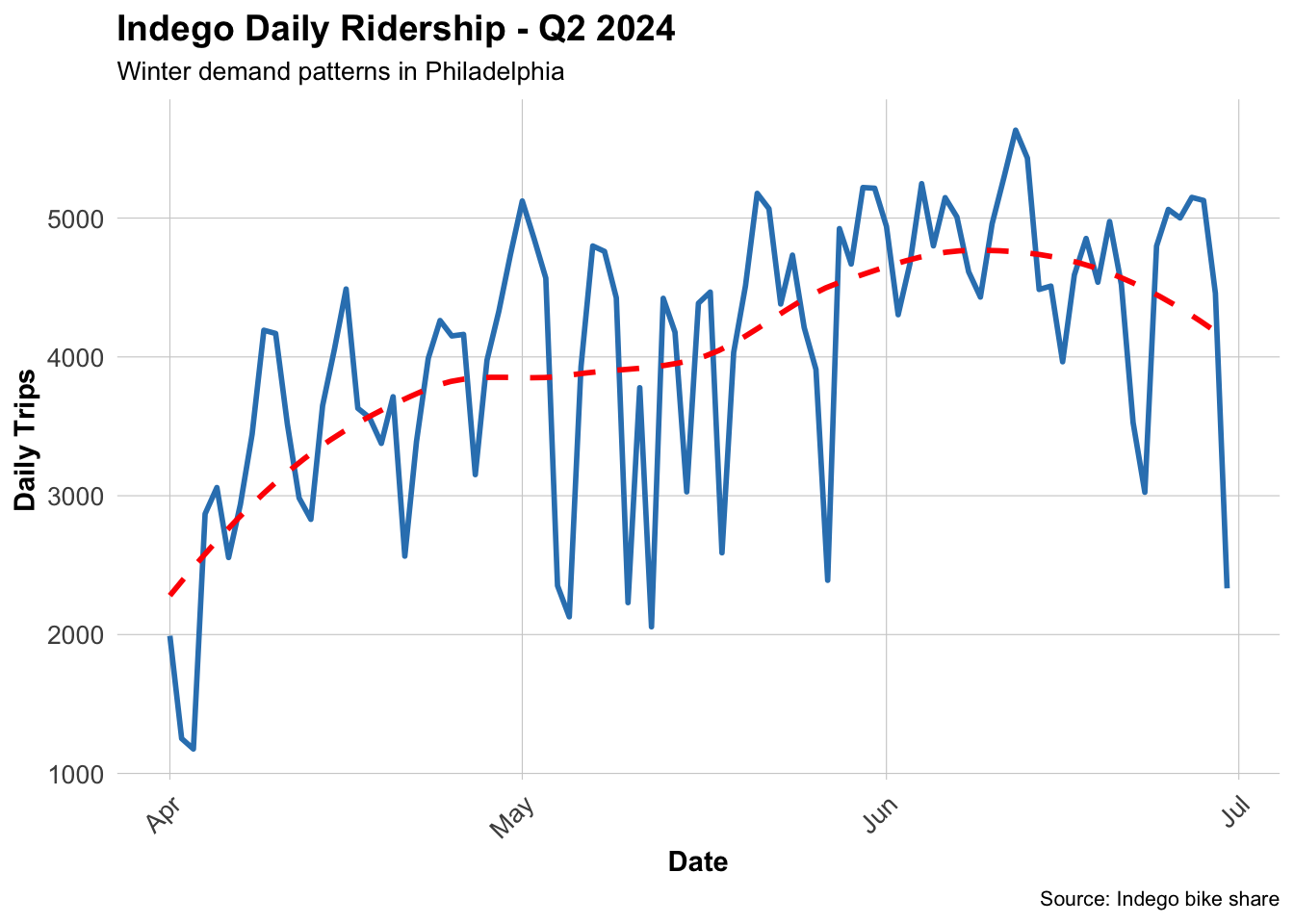
Question: What patterns do you see? How does ridership change over time?

Ridership fluctuates within a certain range but continues to grow.

Hourly Patterns

Code
# Average trips by hour and day type
hourly_patterns <- indego %>%
  group_by(hour, weekend) %>%
  summarize(avg_trips = n() / n_distinct(date)) %>%
  mutate(day_type = ifelse(weekend == 1, "Weekend", "Weekday"))

ggplot(hourly_patterns, aes(x = hour, y = avg_trips, color = day_type)) +
  geom_line(linewidth = 1.2) +
  scale_color_manual(values = c("Weekday" = "#08519c", "Weekend" = "#6baed6")) +
  labs(
    title = "Average Hourly Ridership Patterns",
    subtitle = "Clear commute patterns on weekdays",
    x = "Hour of Day",
    y = "Average Trips per Hour",
    color = "Day Type"
  ) +
  plotTheme

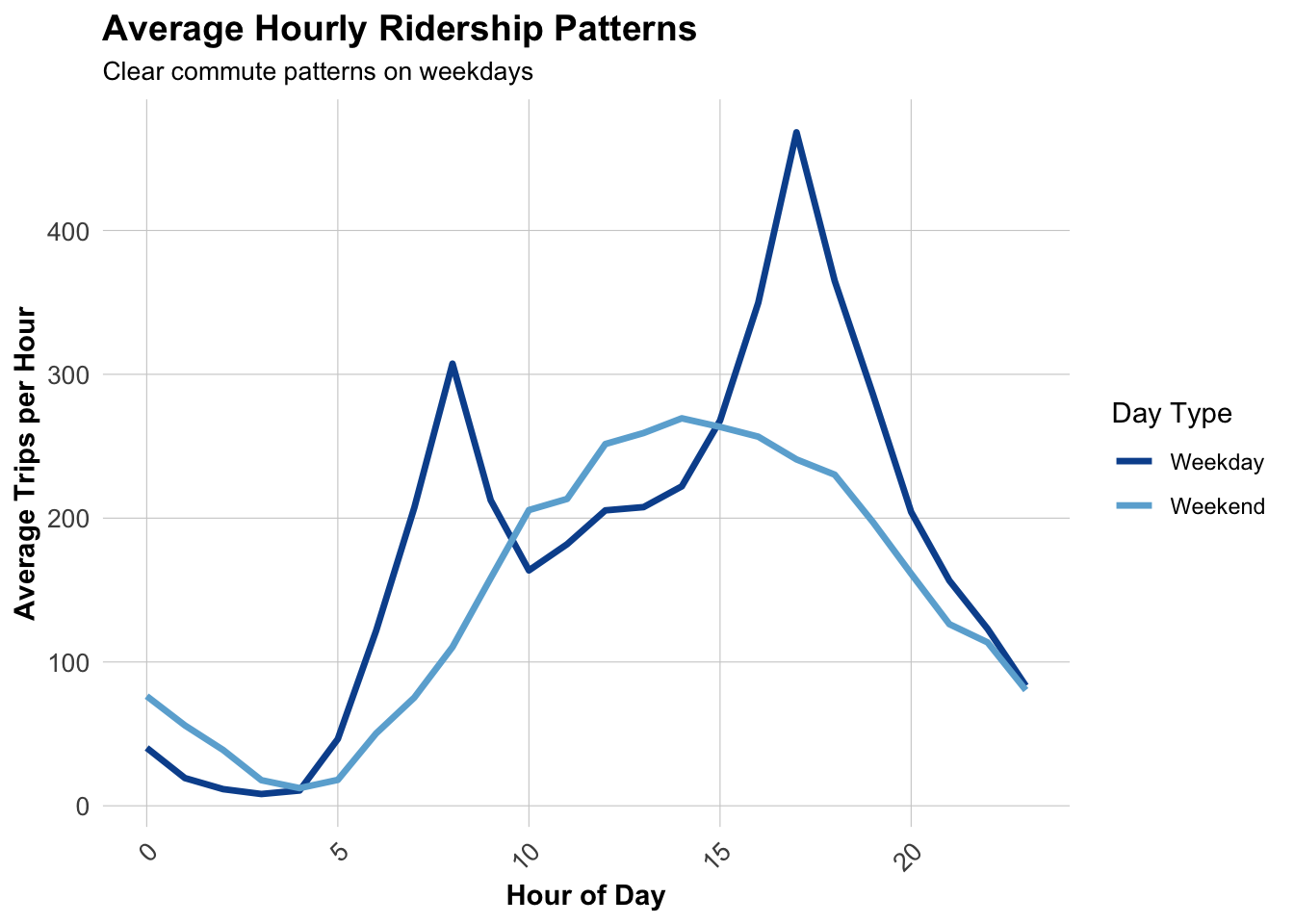
Question: When are the peak hours? How do weekends differ from weekdays?

There are two peak hours on weekdays: 8-9 a.m. and 4-7 p.m. There is one peak hour on weekends: 2-6 p.m.The number of trips during peak hours on weekdays is significantly higher, and the changes are more sudden.

Top Stations

Code
# Most popular origin stations
top_stations <- indego %>%
  count(start_station, start_lat, start_lon, name = "trips") %>%
  arrange(desc(trips)) %>%
  head(20)

kable(top_stations, 
      caption = "Top 20 Indego Stations by Trip Origins",
      format.args = list(big.mark = ",")) %>%
  kable_styling(bootstrap_options = c("striped", "hover"))
Top 20 Indego Stations by Trip Origins
start_station start_lat start_lon trips
3,010 39.94711 -75.16618 6,115
3,032 39.94527 -75.17971 5,231
3,295 39.95028 -75.16027 4,451
3,359 39.94888 -75.16978 4,248
3,022 39.95472 -75.18323 4,070
3,028 39.94061 -75.14958 4,052
3,066 39.94561 -75.17348 4,047
3,054 39.96250 -75.17420 3,847
3,020 39.94855 -75.19007 3,792
3,208 39.95048 -75.19324 3,661
3,052 39.94732 -75.15695 3,651
3,012 39.94218 -75.17747 3,573
3,163 39.94974 -75.18097 3,558
3,244 39.93865 -75.16674 3,549
3,185 39.95169 -75.15888 3,523
3,007 39.94517 -75.15993 3,492
3,059 39.96244 -75.16121 3,470
3,362 39.94816 -75.16226 3,443
3,101 39.94295 -75.15955 3,425
3,063 39.94633 -75.16980 3,404

Get Philadelphia Spatial Context

Load Philadelphia Census Data

Code
# Get Philadelphia census tracts
philly_census <- get_acs(
  geography = "tract",
  variables = c(
    "B01003_001",  # Total population
    "B19013_001",  # Median household income
    "B08301_001",  # Total commuters
    "B08301_010",  # Commute by transit
    "B02001_002",  # White alone
    "B25077_001"   # Median home value
  ),
  state = "PA",
  county = "Philadelphia",
  year = 2022,
  geometry = TRUE,
  output = "wide",
  progress = "FALSE"
) %>%
  rename(
    Total_Pop = B01003_001E,
    Med_Inc = B19013_001E,
    Total_Commuters = B08301_001E,
    Transit_Commuters = B08301_010E,
    White_Pop = B02001_002E,
    Med_Home_Value = B25077_001E
  ) %>%
  mutate(
    Percent_Taking_Transit = (Transit_Commuters / Total_Commuters) * 100,
    Percent_White = (White_Pop / Total_Pop) * 100
  ) %>%
  st_transform(crs = 4326)  # WGS84 for lat/lon matching

# Check the data
#glimpse(philly_census)

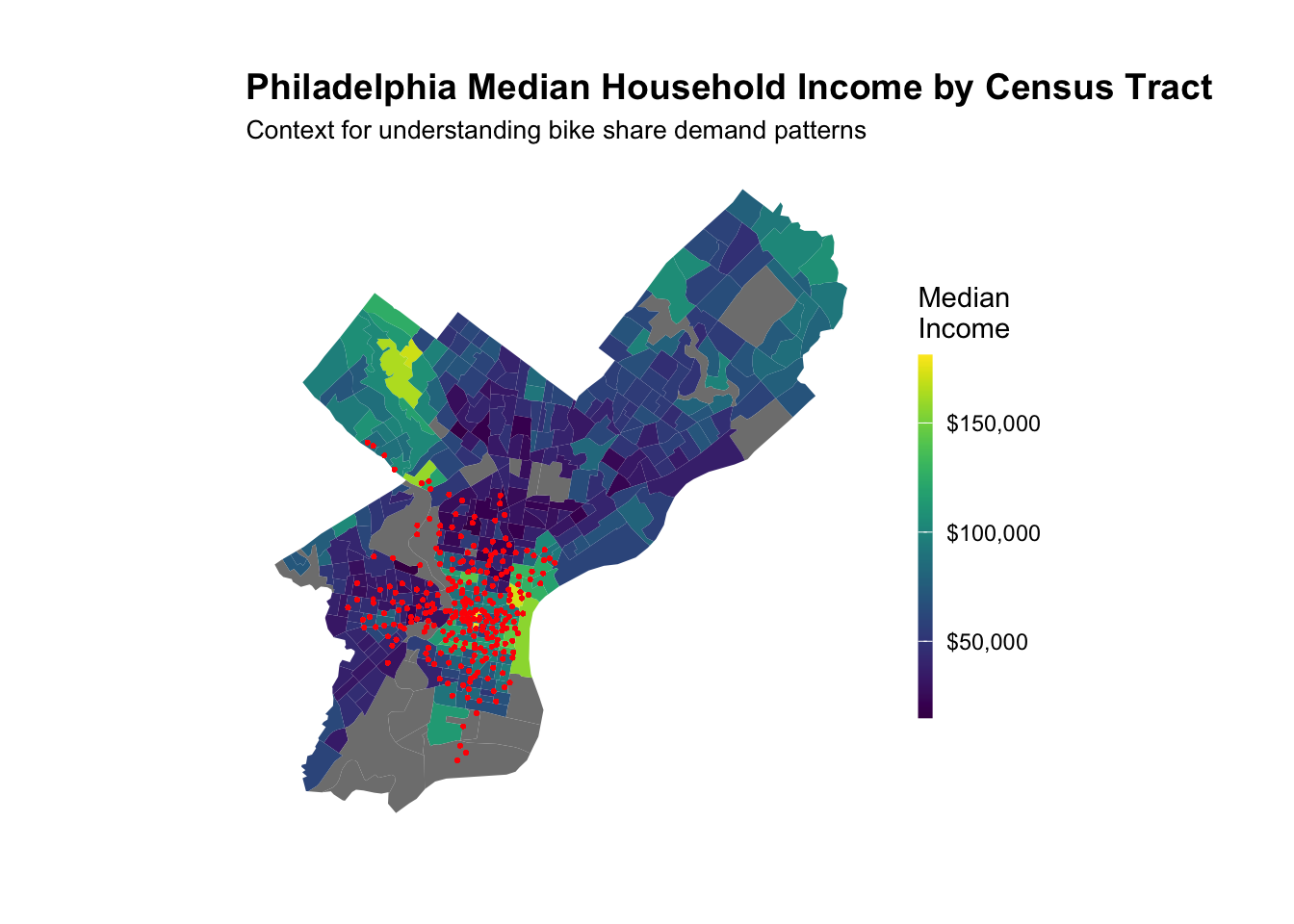
Map Philadelphia Context

Code
# Map median income
ggplot() +
  geom_sf(data = philly_census, aes(fill = Med_Inc), color = NA) +
  scale_fill_viridis(
    option = "viridis",
    name = "Median\nIncome",
    labels = scales::dollar
  ) +
  labs(
    title = "Philadelphia Median Household Income by Census Tract",
    subtitle = "Context for understanding bike share demand patterns"
  ) +
  # Stations 
  geom_point(
    data = indego,
    aes(x = start_lon, y = start_lat),
    color = "red", size = 0.25, alpha = 0.6
  ) +
  mapTheme

Join Census Data to Stations

Code
# Create sf object for stations
stations_sf <- indego %>%
  distinct(start_station, start_lat, start_lon) %>%
  filter(!is.na(start_lat), !is.na(start_lon)) %>%
  st_as_sf(coords = c("start_lon", "start_lat"), crs = 4326)

# Spatial join to get census tract for each station
stations_census <- st_join(stations_sf, philly_census, left = TRUE) %>%
  st_drop_geometry()

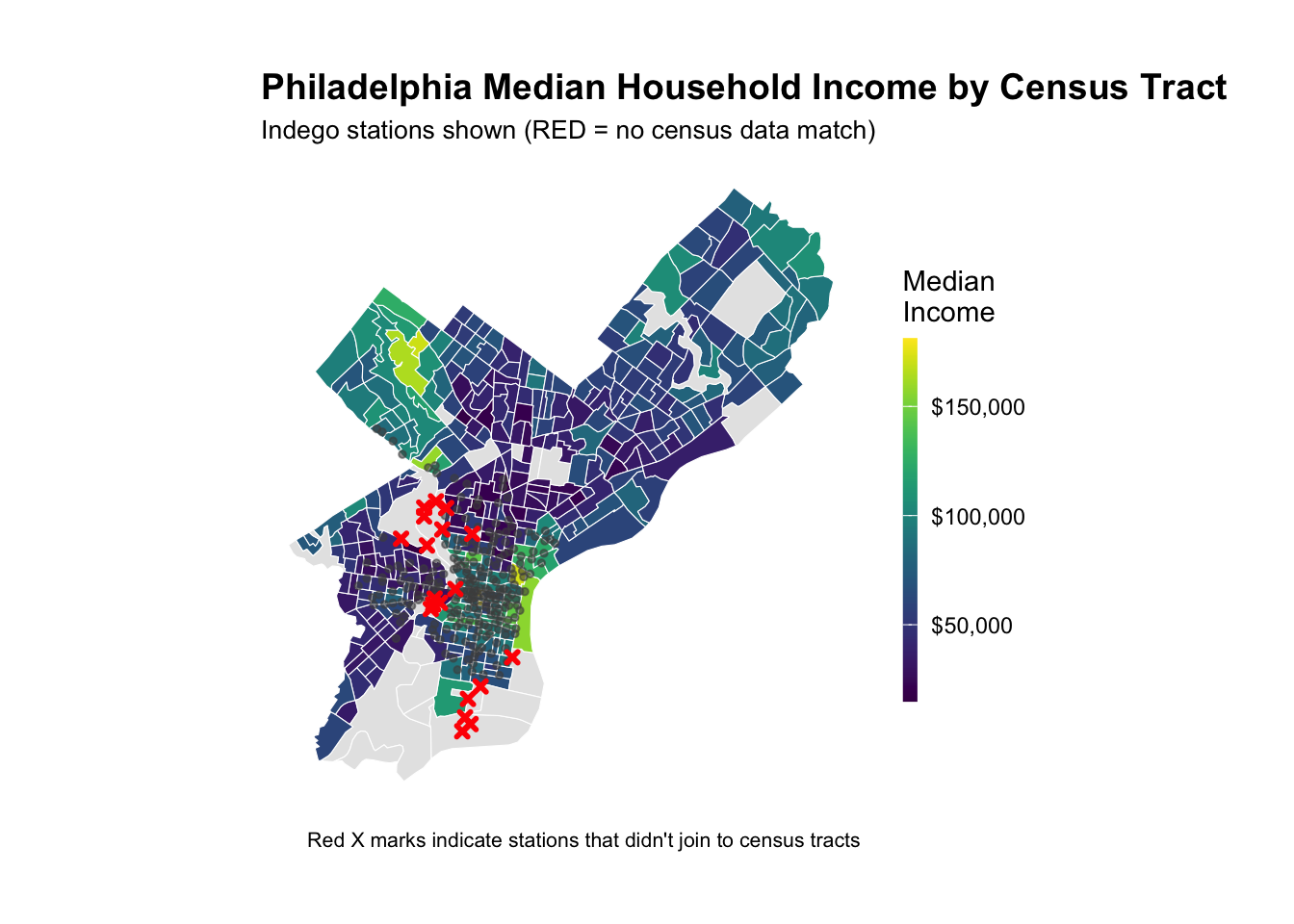
# Look at the result - investigate whether all of the stations joined to census data -- according to the map above there are stations in non-residential tracts.

stations_for_map <- indego %>%
  distinct(start_station, start_lat, start_lon) %>%
  filter(!is.na(start_lat), !is.na(start_lon)) %>%
  left_join(
    stations_census %>% select(start_station, Med_Inc),
    by = "start_station"
  ) %>%
  mutate(has_census = !is.na(Med_Inc))

# Add back to trip data
indego_census <- indego %>%
  left_join(
    stations_census %>% 
      select(start_station, Med_Inc, Percent_Taking_Transit, 
             Percent_White, Total_Pop),
    by = "start_station"
  )


# Prepare data for visualization
stations_for_map <- indego %>%
  distinct(start_station, start_lat, start_lon) %>%
  filter(!is.na(start_lat), !is.na(start_lon)) %>%
  left_join(
    stations_census %>% select(start_station, Med_Inc),
    by = "start_station"
  ) %>%
  mutate(has_census = !is.na(Med_Inc))

# Create the map showing problem stations
ggplot() +
  geom_sf(data = philly_census, aes(fill = Med_Inc), color = "white", size = 0.1) +
  scale_fill_viridis(
    option = "viridis",
    name = "Median\nIncome",
    labels = scales::dollar,
    na.value = "grey90"
  ) +
  # Stations with census data (small grey dots)
  geom_point(
    data = stations_for_map %>% filter(has_census),
    aes(x = start_lon, y = start_lat),
    color = "grey30", size = 1, alpha = 0.6
  ) +
  # Stations WITHOUT census data (red X marks the spot)
  geom_point(
    data = stations_for_map %>% filter(!has_census),
    aes(x = start_lon, y = start_lat),
    color = "red", size = 1, shape = 4, stroke = 1.5
  ) +
  labs(
    title = "Philadelphia Median Household Income by Census Tract",
    subtitle = "Indego stations shown (RED = no census data match)",
    caption = "Red X marks indicate stations that didn't join to census tracts"
  ) +
  mapTheme

Dealing with missing data

Code
# Identify which stations to keep
valid_stations <- stations_census %>%
  filter(!is.na(Med_Inc)) %>%
  pull(start_station)

# Filter trip data to valid stations only
indego_census <- indego %>%
  filter(start_station %in% valid_stations) %>%
  left_join(
    stations_census %>% 
      select(start_station, Med_Inc, Percent_Taking_Transit, 
             Percent_White, Total_Pop),
    by = "start_station"
  )

Get Weather Data

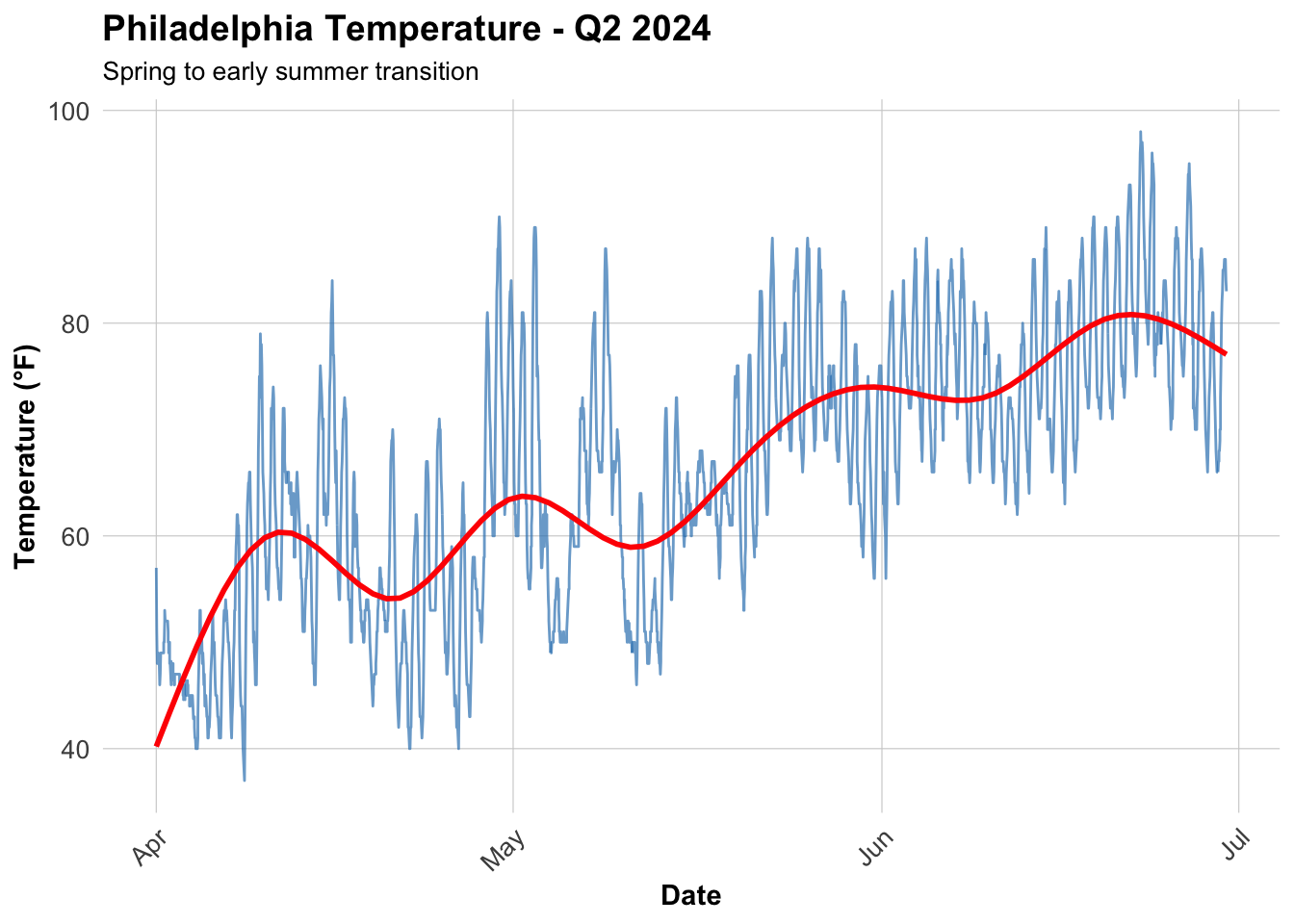
Weather significantly affects bike share demand.

Code
# Get weather from Philadelphia International Airport (KPHL)
# This covers Q1 2025: January 1 - March 31
weather_data <- riem_measures(
  station = "PHL",  # Philadelphia International Airport
  date_start = "2024-04-01",
  date_end = "2024-06-30"
)

# Process weather data
weather_processed <- weather_data %>%
  mutate(
    interval60 = floor_date(valid, unit = "hour"),
    Temperature = tmpf,  # Temperature in Fahrenheit
    Precipitation = ifelse(is.na(p01i), 0, p01i),  # Hourly precip in inches
    Wind_Speed = sknt  # Wind speed in knots
  ) %>%
  select(interval60, Temperature, Precipitation, Wind_Speed) %>%
  distinct()

# Check for missing hours and interpolate if needed
weather_complete <- weather_processed %>%
  complete(interval60 = seq(min(interval60), max(interval60), by = "hour")) %>%
  fill(Temperature, Precipitation, Wind_Speed, .direction = "down")

# Look at the weather
summary(weather_complete %>% select(Temperature, Precipitation, Wind_Speed))
  Temperature    Precipitation       Wind_Speed    
 Min.   :37.00   Min.   :0.00000   Min.   : 0.000  
 1st Qu.:54.00   1st Qu.:0.00000   1st Qu.: 5.000  
 Median :66.00   Median :0.00000   Median : 7.000  
 Mean   :65.05   Mean   :0.00794   Mean   : 7.677  
 3rd Qu.:74.00   3rd Qu.:0.00000   3rd Qu.:10.000  
 Max.   :98.00   Max.   :1.05000   Max.   :30.000  

Visualize Weather Patterns

Code
ggplot(weather_complete, aes(x = interval60, y = Temperature)) +
  geom_line(color = "#3182bd", alpha = 0.7) +
  geom_smooth(se = FALSE, color = "red") +
  labs(
    title = "Philadelphia Temperature - Q2 2024",
    subtitle = "Spring to early summer transition",
    x = "Date",
    y = "Temperature (°F)"
  ) +
  plotTheme


Create Space-Time Panel

Aggregate Trips to Station-Hour Level

Code
# Count trips by station-hour
trips_panel <- indego_census %>%
  group_by(interval60, start_station, start_lat, start_lon,
           Med_Inc, Percent_Taking_Transit, Percent_White, Total_Pop) %>%
  summarize(Trip_Count = n()) %>%
  ungroup()

# How many station-hour observations?
nrow(trips_panel)
[1] 175936
Code
# How many unique stations?
length(unique(trips_panel$start_station))
[1] 235
Code
# How many unique hours?
length(unique(trips_panel$interval60))
[1] 2184

Create Complete Panel Structure

Not every station has trips every hour. We need a complete panel where every station-hour combination exists (even if Trip_Count = 0).

Code
# Calculate expected panel size
n_stations <- length(unique(trips_panel$start_station))
n_hours <- length(unique(trips_panel$interval60))
expected_rows <- n_stations * n_hours

cat("Expected panel rows:", format(expected_rows, big.mark = ","), "\n")
Expected panel rows: 513,240 
Code
cat("Current rows:", format(nrow(trips_panel), big.mark = ","), "\n")
Current rows: 175,936 
Code
cat("Missing rows:", format(expected_rows - nrow(trips_panel), big.mark = ","), "\n")
Missing rows: 337,304 
Code
# Create complete panel
study_panel <- expand.grid(
  interval60 = unique(trips_panel$interval60),
  start_station = unique(trips_panel$start_station)
) %>%
  # Join trip counts
  left_join(trips_panel, by = c("interval60", "start_station")) %>%
  # Replace NA trip counts with 0
  mutate(Trip_Count = replace_na(Trip_Count, 0))

# Fill in station attributes (they're the same for all hours)
station_attributes <- trips_panel %>%
  group_by(start_station) %>%
  summarize(
    start_lat = first(start_lat),
    start_lon = first(start_lon),
    Med_Inc = first(Med_Inc),
    Percent_Taking_Transit = first(Percent_Taking_Transit),
    Percent_White = first(Percent_White),
    Total_Pop = first(Total_Pop)
  )

study_panel <- study_panel %>%
  left_join(station_attributes, by = "start_station")

# Verify we have complete panel
cat("Complete panel rows:", format(nrow(study_panel), big.mark = ","), "\n")
Complete panel rows: 513,240 

Add Time Features

Code
study_panel <- study_panel %>%
  mutate(
    week = week(interval60),
    month = month(interval60, label = TRUE),
    dotw = wday(interval60, label = TRUE),
    hour = hour(interval60),
    date = as.Date(interval60),
    weekend = ifelse(dotw %in% c("Sat", "Sun"), 1, 0),
    rush_hour = ifelse(hour %in% c(7, 8, 9, 16, 17, 18), 1, 0)
  )

Join Weather Data

Code
study_panel <- study_panel %>%
  left_join(weather_complete, by = "interval60")

# Check for missing values
summary(study_panel %>% select(Trip_Count, Temperature, Precipitation))
   Trip_Count       Temperature    Precipitation   
 Min.   : 0.0000   Min.   :37.00   Min.   :0.0000  
 1st Qu.: 0.0000   1st Qu.:54.00   1st Qu.:0.0000  
 Median : 0.0000   Median :66.00   Median :0.0000  
 Mean   : 0.6415   Mean   :65.05   Mean   :0.0079  
 3rd Qu.: 1.0000   3rd Qu.:74.00   3rd Qu.:0.0000  
 Max.   :22.0000   Max.   :98.00   Max.   :1.0500  
                   NA's   :5640    NA's   :5640    

Create Temporal Lag Variables

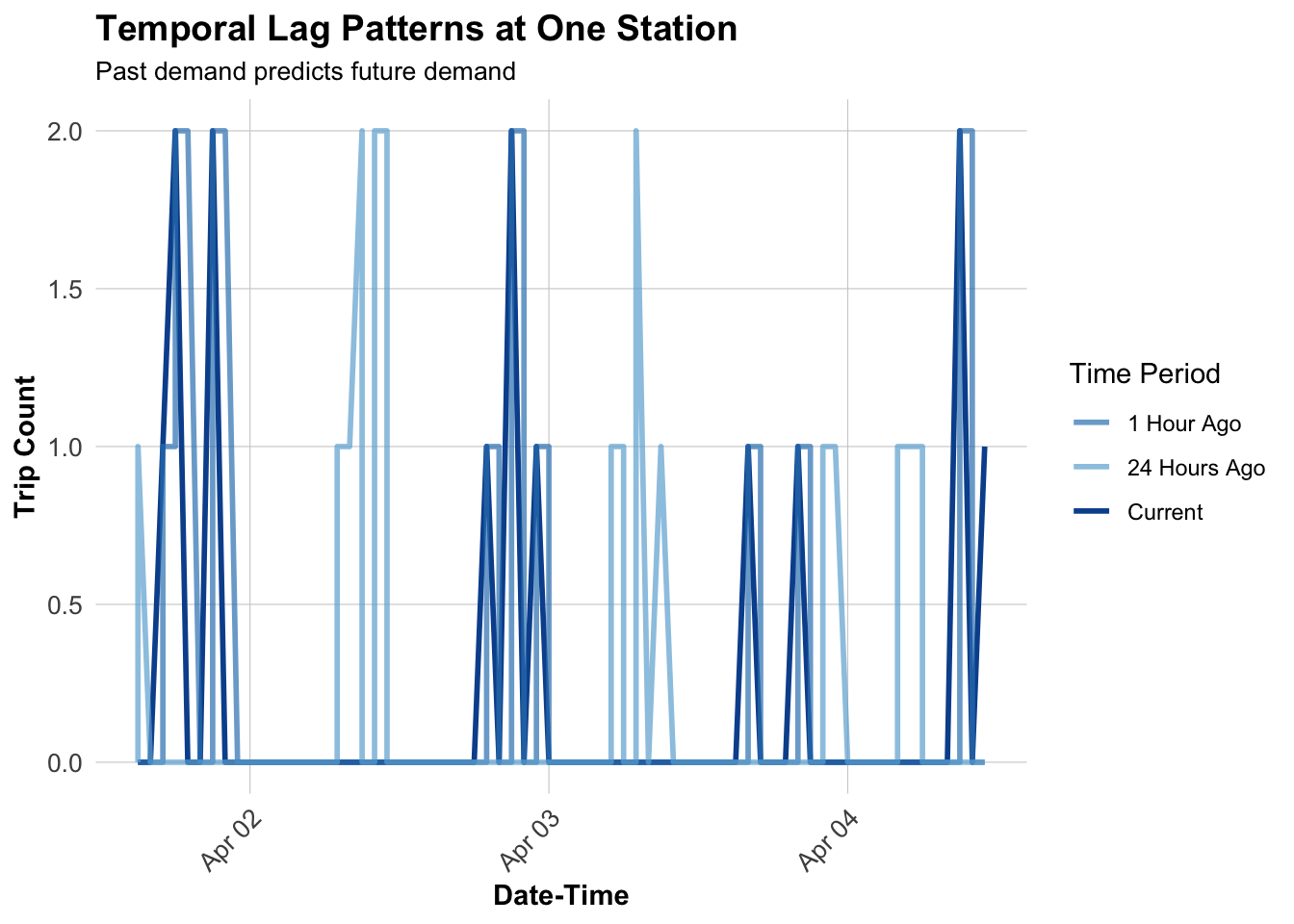
The key innovation for space-time prediction: past demand predicts future demand.

Why Lags?

If there were 15 bike trips from Station A at 8:00 AM, there will probably be ~15 trips at 9:00 AM. We can use this temporal persistence to improve predictions.

Code
# Sort by station and time
study_panel <- study_panel %>%
  arrange(start_station, interval60)

# Create lag variables WITHIN each station
study_panel <- study_panel %>%
  group_by(start_station) %>%
  mutate(
    lag1Hour = lag(Trip_Count, 1),
    lag2Hours = lag(Trip_Count, 2),
    lag3Hours = lag(Trip_Count, 3),
    lag12Hours = lag(Trip_Count, 12),
    lag1day = lag(Trip_Count, 24)
  ) %>%
  ungroup()

# Remove rows with NA lags (first 24 hours for each station)
study_panel_complete <- study_panel %>%
  filter(!is.na(lag1day))

cat("Rows after removing NA lags:", format(nrow(study_panel_complete), big.mark = ","), "\n")
Rows after removing NA lags: 632,150 

Visualize Lag Correlations

Code
# Sample one station to visualize
example_station <- study_panel_complete %>%
  filter(start_station == first(start_station)) %>%
  head(168)  # One week

# Plot actual vs lagged demand
ggplot(example_station, aes(x = interval60)) +
  geom_line(aes(y = Trip_Count, color = "Current"), linewidth = 1) +
  geom_line(aes(y = lag1Hour, color = "1 Hour Ago"), linewidth = 1, alpha = 0.7) +
  geom_line(aes(y = lag1day, color = "24 Hours Ago"), linewidth = 1, alpha = 0.7) +
  scale_color_manual(values = c(
    "Current" = "#08519c",
    "1 Hour Ago" = "#3182bd",
    "24 Hours Ago" = "#6baed6"
  )) +
  labs(
    title = "Temporal Lag Patterns at One Station",
    subtitle = "Past demand predicts future demand",
    x = "Date-Time",
    y = "Trip Count",
    color = "Time Period"
  ) +
  plotTheme


Temporal Train/Test Split

CRITICAL: We must train on PAST data and test on FUTURE data!

Why Temporal Validation Matters

In real operations, at 6:00 AM on March 15, we need to predict demand for March 15-31. We have data from Jan 1 - March 14, but NOT from March 15-31 (it hasn’t happened yet!).

Wrong approach: Train on weeks 10-13, test on weeks 1-9 (predicting past from future!)

Correct approach: Train on weeks 1-9, test on weeks 10-13 (predicting future from past)

Code
# Split by week
# Q2 has weeks 1-13 (Jan-Mar)14-26
# Train on weeks 1-9 (Jan 1 - early March)14-23
# Test on weeks 10-13 (rest of March)23-26

# Which stations have trips in BOTH early and late periods?
early_stations <- study_panel_complete %>%
  filter(week < 23) %>%
  filter(Trip_Count > 0) %>%
  distinct(start_station) %>%
  pull(start_station)

late_stations <- study_panel_complete %>%
  filter(week >= 23) %>%
  filter(Trip_Count > 0) %>%
  distinct(start_station) %>%
  pull(start_station)

# Keep only stations that appear in BOTH periods
common_stations <- intersect(early_stations, late_stations)


# Filter panel to only common stations
study_panel_complete <- study_panel_complete %>%
  filter(start_station %in% common_stations)

# NOW create train/test split
train <- study_panel_complete %>%
  filter(week < 23)

test <- study_panel_complete %>%
  filter(week >= 23)

cat("Training observations:", format(nrow(train), big.mark = ","), "\n")
Training observations: 447,528 
Code
cat("Testing observations:", format(nrow(test), big.mark = ","), "\n")
Testing observations: 176,552 
Code
cat("Training date range:", min(train$date), "to", max(train$date), "\n")
Training date range: 19814 to 19876 
Code
cat("Testing date range:", min(test$date), "to", max(test$date), "\n")
Testing date range: 19877 to 19904 

Build Predictive Models

Model 1: Baseline (Time + Weather)

Code
# Create day of week factor with treatment (dummy) coding
train <- train %>%
  mutate(dotw_simple = factor(dotw, levels = c("Mon", "Tue", "Wed", "Thu", "Fri", "Sat", "Sun")))

# Set contrasts to treatment coding (dummy variables)
contrasts(train$dotw_simple) <- contr.treatment(7)

# Now run the model
model1 <- lm(
  Trip_Count ~ as.factor(hour) + dotw_simple + Temperature + Precipitation,
  data = train
)

summary(model1)

Call:
lm(formula = Trip_Count ~ as.factor(hour) + dotw_simple + Temperature + 
    Precipitation, data = train)

Residuals:
    Min      1Q  Median      3Q     Max 
-1.7197 -0.6759 -0.2053  0.1850 20.6050 

Coefficients:
                   Estimate Std. Error t value             Pr(>|t|)    
(Intercept)       -0.623380   0.014322 -43.527 < 0.0000000000000002 ***
as.factor(hour)1  -0.072867   0.011938  -6.104 0.000000001037041260 ***
as.factor(hour)2  -0.100186   0.011862  -8.446 < 0.0000000000000002 ***
as.factor(hour)3  -0.101366   0.011827  -8.571 < 0.0000000000000002 ***
as.factor(hour)4  -0.098172   0.011994  -8.185 0.000000000000000272 ***
as.factor(hour)5   0.031520   0.011964   2.635             0.008424 ** 
as.factor(hour)6   0.251304   0.011708  21.464 < 0.0000000000000002 ***
as.factor(hour)7   0.539861   0.011720  46.065 < 0.0000000000000002 ***
as.factor(hour)8   0.854340   0.011759  72.652 < 0.0000000000000002 ***
as.factor(hour)9   0.645589   0.011734  55.020 < 0.0000000000000002 ***
as.factor(hour)10  0.548414   0.011459  47.857 < 0.0000000000000002 ***
as.factor(hour)11  0.579472   0.011564  50.111 < 0.0000000000000002 ***
as.factor(hour)12  0.626987   0.011257  55.699 < 0.0000000000000002 ***
as.factor(hour)13  0.623662   0.011744  53.104 < 0.0000000000000002 ***
as.factor(hour)14  0.656044   0.011488  57.107 < 0.0000000000000002 ***
as.factor(hour)15  0.760629   0.011788  64.526 < 0.0000000000000002 ***
as.factor(hour)16  0.862528   0.011435  75.426 < 0.0000000000000002 ***
as.factor(hour)17  1.157733   0.011763  98.420 < 0.0000000000000002 ***
as.factor(hour)18  0.930235   0.011977  77.668 < 0.0000000000000002 ***
as.factor(hour)19  0.681722   0.011792  57.813 < 0.0000000000000002 ***
as.factor(hour)20  0.432304   0.011798  36.642 < 0.0000000000000002 ***
as.factor(hour)21  0.269929   0.011696  23.078 < 0.0000000000000002 ***
as.factor(hour)22  0.191038   0.011726  16.291 < 0.0000000000000002 ***
as.factor(hour)23  0.069112   0.011871   5.822 0.000000005812931084 ***
dotw_simple2       0.061945   0.006312   9.814 < 0.0000000000000002 ***
dotw_simple3       0.021134   0.006089   3.471             0.000519 ***
dotw_simple4       0.103407   0.006324  16.352 < 0.0000000000000002 ***
dotw_simple5       0.057970   0.006276   9.237 < 0.0000000000000002 ***
dotw_simple6       0.007771   0.006527   1.191             0.233767    
dotw_simple7      -0.034128   0.006504  -5.247 0.000000154440328777 ***
Temperature        0.012729   0.000171  74.419 < 0.0000000000000002 ***
Precipitation     -2.054152   0.062168 -33.042 < 0.0000000000000002 ***
---
Signif. codes:  0 '***' 0.001 '**' 0.01 '*' 0.05 '.' 0.1 ' ' 1

Residual standard error: 1.117 on 447496 degrees of freedom
Multiple R-squared:  0.1143,    Adjusted R-squared:  0.1142 
F-statistic:  1863 on 31 and 447496 DF,  p-value: < 0.00000000000000022

The model uses Monday as the baseline. Each coefficient represents the difference in expected trips per station-hour compared to Monday - dow_simple2 = Tuesday..

Weekday Pattern (Tue-Fri):

  • All weekdays have positive coefficients (0.029 to 0.052)
  • Tuesday has the highest weekday effect (+0.052)
  • Weekdays likely benefit from concentrated commuting patterns

Weekend Pattern (Sat-Sun):

  • Both weekend days have negative coefficients (-0.061 and -0.065)
  • This means FEWER trips per station-hour than Monday

Hourly Interpretation

Hour Coefficient Interpretation 0 (baseline) 0.000 trips/hour (midnight) 1 -0.018 slightly fewer than midnight … 6 +0.151 morning activity starting 7 +0.276 morning rush building 8 +0.487 PEAK morning rush 9 +0.350 post-rush … 17 +0.568 PEAK evening rush (5 PM!) 18 +0.389 evening declining … 23 +0.034 late night minimal

Model 2: Add Temporal Lags

Code
model2 <- lm(
  Trip_Count ~ as.factor(hour) + dotw_simple + Temperature + Precipitation +
    lag1Hour + lag3Hours + lag1day,
  data = train
)

summary(model2)

Call:
lm(formula = Trip_Count ~ as.factor(hour) + dotw_simple + Temperature + 
    Precipitation + lag1Hour + lag3Hours + lag1day, data = train)

Residuals:
    Min      1Q  Median      3Q     Max 
-7.1097 -0.4314 -0.1254  0.1217 17.3211 

Coefficients:
                    Estimate Std. Error t value             Pr(>|t|)    
(Intercept)       -0.2516703  0.0123654 -20.353 < 0.0000000000000002 ***
as.factor(hour)1  -0.0315610  0.0102751  -3.072             0.002129 ** 
as.factor(hour)2  -0.0255020  0.0102137  -2.497             0.012531 *  
as.factor(hour)3  -0.0193838  0.0101872  -1.903             0.057071 .  
as.factor(hour)4  -0.0118938  0.0103351  -1.151             0.249811    
as.factor(hour)5   0.0879106  0.0103161   8.522 < 0.0000000000000002 ***
as.factor(hour)6   0.2413446  0.0101023  23.890 < 0.0000000000000002 ***
as.factor(hour)7   0.3912950  0.0101257  38.644 < 0.0000000000000002 ***
as.factor(hour)8   0.5751810  0.0101693  56.561 < 0.0000000000000002 ***
as.factor(hour)9   0.2586771  0.0101578  25.466 < 0.0000000000000002 ***
as.factor(hour)10  0.2239928  0.0099018  22.621 < 0.0000000000000002 ***
as.factor(hour)11  0.2750789  0.0099905  27.534 < 0.0000000000000002 ***
as.factor(hour)12  0.3434636  0.0097188  35.340 < 0.0000000000000002 ***
as.factor(hour)13  0.3325602  0.0101359  32.810 < 0.0000000000000002 ***
as.factor(hour)14  0.3735677  0.0099128  37.686 < 0.0000000000000002 ***
as.factor(hour)15  0.4382105  0.0101782  43.054 < 0.0000000000000002 ***
as.factor(hour)16  0.5186079  0.0098810  52.485 < 0.0000000000000002 ***
as.factor(hour)17  0.7372223  0.0101810  72.412 < 0.0000000000000002 ***
as.factor(hour)18  0.3982131  0.0103986  38.295 < 0.0000000000000002 ***
as.factor(hour)19  0.2607371  0.0102099  25.538 < 0.0000000000000002 ***
as.factor(hour)20  0.1041311  0.0102076  10.201 < 0.0000000000000002 ***
as.factor(hour)21  0.0773039  0.0100888   7.662  0.00000000000001829 ***
as.factor(hour)22  0.0804148  0.0100993   7.962  0.00000000000000169 ***
as.factor(hour)23  0.0141841  0.0102172   1.388             0.165062    
dotw_simple2       0.0186587  0.0054346   3.433             0.000596 ***
dotw_simple3      -0.0004020  0.0052441  -0.077             0.938896    
dotw_simple4       0.0308340  0.0054469   5.661  0.00000001507660401 ***
dotw_simple5       0.0029701  0.0054080   0.549             0.582861    
dotw_simple6      -0.0249257  0.0056246  -4.432  0.00000935943656590 ***
dotw_simple7      -0.0338659  0.0055995  -6.048  0.00000000146779797 ***
Temperature        0.0037869  0.0001493  25.370 < 0.0000000000000002 ***
Precipitation     -0.9449920  0.0535786 -17.637 < 0.0000000000000002 ***
lag1Hour           0.4030038  0.0013966 288.563 < 0.0000000000000002 ***
lag3Hours          0.1234155  0.0013804  89.408 < 0.0000000000000002 ***
lag1day            0.1253160  0.0012810  97.830 < 0.0000000000000002 ***
---
Signif. codes:  0 '***' 0.001 '**' 0.01 '*' 0.05 '.' 0.1 ' ' 1

Residual standard error: 0.961 on 447493 degrees of freedom
Multiple R-squared:  0.344, Adjusted R-squared:  0.344 
F-statistic:  6903 on 34 and 447493 DF,  p-value: < 0.00000000000000022

Question: Did adding lags improve R²? Why or why not?

Adding lags increases R² from 0.07592 to 0.2518. This is because past usage patterns influence future patterns.

Model 3: Add Demographics

Code
model3 <- lm(
  Trip_Count ~ as.factor(hour) + dotw_simple + Temperature + Precipitation +
    lag1Hour + lag3Hours + lag1day +
    Med_Inc.x + Percent_Taking_Transit.y + Percent_White.y,
  data = train
)

summary(model3)

Call:
lm(formula = Trip_Count ~ as.factor(hour) + dotw_simple + Temperature + 
    Precipitation + lag1Hour + lag3Hours + lag1day + Med_Inc.x + 
    Percent_Taking_Transit.y + Percent_White.y, data = train)

Residuals:
    Min      1Q  Median      3Q     Max 
-6.0962 -0.6781 -0.2691  0.4234 17.2038 

Coefficients:
                              Estimate    Std. Error t value
(Intercept)               0.3857918409  0.0371091868  10.396
as.factor(hour)1         -0.0021036158  0.0412694199  -0.051
as.factor(hour)2         -0.0088620570  0.0469025109  -0.189
as.factor(hour)3         -0.0851082042  0.0529075781  -1.609
as.factor(hour)4         -0.1044632428  0.0557223076  -1.875
as.factor(hour)5          0.0516286807  0.0371091993   1.391
as.factor(hour)6          0.2505851189  0.0312856619   8.010
as.factor(hour)7          0.4005664111  0.0294980575  13.579
as.factor(hour)8          0.6170072423  0.0287282776  21.477
as.factor(hour)9          0.1382271180  0.0288552539   4.790
as.factor(hour)10         0.1084529302  0.0287107985   3.777
as.factor(hour)11         0.1546773002  0.0286616605   5.397
as.factor(hour)12         0.2287878417  0.0281439459   8.129
as.factor(hour)13         0.2593480167  0.0286602368   9.049
as.factor(hour)14         0.2789001366  0.0282806593   9.862
as.factor(hour)15         0.3576516996  0.0284181466  12.585
as.factor(hour)16         0.4807434184  0.0279992423  17.170
as.factor(hour)17         0.8226919934  0.0281755098  29.199
as.factor(hour)18         0.3568673063  0.0285563485  12.497
as.factor(hour)19         0.1776173104  0.0286237376   6.205
as.factor(hour)20         0.0116961313  0.0293501783   0.399
as.factor(hour)21         0.0203613434  0.0299654314   0.679
as.factor(hour)22         0.0304705944  0.0307099983   0.992
as.factor(hour)23        -0.0160285584  0.0326523113  -0.491
dotw_simple2              0.0547342235  0.0119297080   4.588
dotw_simple3              0.0108137555  0.0116378166   0.929
dotw_simple4              0.0381015979  0.0117220832   3.250
dotw_simple5              0.0054589733  0.0118327085   0.461
dotw_simple6              0.0459381855  0.0125566250   3.658
dotw_simple7              0.0389827321  0.0126414408   3.084
Temperature               0.0075088185  0.0003400333  22.083
Precipitation            -2.1950253458  0.1294673174 -16.954
lag1Hour                  0.2941552792  0.0022571175 130.323
lag3Hours                 0.0851609125  0.0023233110  36.655
lag1day                   0.0958710202  0.0022118269  43.345
Med_Inc.x                 0.0000001627  0.0000001133   1.435
Percent_Taking_Transit.y -0.0032455105  0.0004140532  -7.838
Percent_White.y           0.0032869902  0.0002079131  15.809
                                     Pr(>|t|)    
(Intercept)              < 0.0000000000000002 ***
as.factor(hour)1                     0.959347    
as.factor(hour)2                     0.850135    
as.factor(hour)3                     0.107702    
as.factor(hour)4                     0.060834 .  
as.factor(hour)5                     0.164148    
as.factor(hour)6         0.000000000000001159 ***
as.factor(hour)7         < 0.0000000000000002 ***
as.factor(hour)8         < 0.0000000000000002 ***
as.factor(hour)9         0.000001666444693928 ***
as.factor(hour)10                    0.000159 ***
as.factor(hour)11        0.000000067997969457 ***
as.factor(hour)12        0.000000000000000435 ***
as.factor(hour)13        < 0.0000000000000002 ***
as.factor(hour)14        < 0.0000000000000002 ***
as.factor(hour)15        < 0.0000000000000002 ***
as.factor(hour)16        < 0.0000000000000002 ***
as.factor(hour)17        < 0.0000000000000002 ***
as.factor(hour)18        < 0.0000000000000002 ***
as.factor(hour)19        0.000000000547584341 ***
as.factor(hour)20                    0.690260    
as.factor(hour)21                    0.496826    
as.factor(hour)22                    0.321099    
as.factor(hour)23                    0.623508    
dotw_simple2             0.000004477560354566 ***
dotw_simple3                         0.352792    
dotw_simple4                         0.001153 ** 
dotw_simple5                         0.644551    
dotw_simple6                         0.000254 ***
dotw_simple7                         0.002045 ** 
Temperature              < 0.0000000000000002 ***
Precipitation            < 0.0000000000000002 ***
lag1Hour                 < 0.0000000000000002 ***
lag3Hours                < 0.0000000000000002 ***
lag1day                  < 0.0000000000000002 ***
Med_Inc.x                            0.151217    
Percent_Taking_Transit.y 0.000000000000004594 ***
Percent_White.y          < 0.0000000000000002 ***
---
Signif. codes:  0 '***' 0.001 '**' 0.01 '*' 0.05 '.' 0.1 ' ' 1

Residual standard error: 1.221 on 145195 degrees of freedom
  (302295 observations deleted due to missingness)
Multiple R-squared:  0.2319,    Adjusted R-squared:  0.2317 
F-statistic:  1185 on 37 and 145195 DF,  p-value: < 0.00000000000000022

Model 4: Add Station Fixed Effects

Code
model4 <- lm(
  Trip_Count ~ as.factor(hour) + dotw_simple + Temperature + Precipitation +
    lag1Hour + lag3Hours + lag1day +
    Med_Inc.x + Percent_Taking_Transit.y + Percent_White.y +
    as.factor(start_station),
  data = train
)

# Summary too long with all station dummies, just show key metrics
cat("Model 4 R-squared:", summary(model4)$r.squared, "\n")
Model 4 R-squared: 0.259619 
Code
cat("Model 4 Adj R-squared:", summary(model4)$adj.r.squared, "\n")
Model 4 Adj R-squared: 0.2582656 

What do station fixed effects capture? Baseline differences in demand across stations (some are just busier than others!).

Model 5: Add Rush Hour Interaction

Code
model5 <- lm(
  Trip_Count ~ as.factor(hour) + dotw_simple + Temperature + Precipitation +
    lag1Hour + lag3Hours + lag1day + rush_hour + as.factor(month) +
    Med_Inc.x + Percent_Taking_Transit.y + Percent_White.y +
    as.factor(start_station) +
    rush_hour * weekend,  # Rush hour effects different on weekends
  data = train
)

cat("Model 5 R-squared:", summary(model5)$r.squared, "\n")
Model 5 R-squared: 0.2635307 
Code
cat("Model 5 Adj R-squared:", summary(model5)$adj.r.squared, "\n")
Model 5 Adj R-squared: 0.2621691 

Model Evaluation

Calculate Predictions and MAE

Code
# Get predictions on test set

# Create day of week factor with treatment (dummy) coding
test <- test %>%
  mutate(dotw_simple = factor(dotw, levels = c("Mon", "Tue", "Wed", "Thu", "Fri", "Sat", "Sun")))

# Set contrasts to treatment coding (dummy variables)
contrasts(test$dotw_simple) <- contr.treatment(7)

test <- test %>%
  mutate(
    pred1 = predict(model1, newdata = test),
    pred2 = predict(model2, newdata = test),
    pred3 = predict(model3, newdata = test),
    pred4 = predict(model4, newdata = test),
    pred5 = predict(model5, newdata = test)
  )

# Calculate MAE for each model
mae_results <- data.frame(
  Model = c(
    "1. Time + Weather",
    "2. + Temporal Lags",
    "3. + Demographics",
    "4. + Station FE",
    "5. + Rush Hour Interaction"
  ),
  MAE = c(
    mean(abs(test$Trip_Count - test$pred1), na.rm = TRUE),
    mean(abs(test$Trip_Count - test$pred2), na.rm = TRUE),
    mean(abs(test$Trip_Count - test$pred3), na.rm = TRUE),
    mean(abs(test$Trip_Count - test$pred4), na.rm = TRUE),
    mean(abs(test$Trip_Count - test$pred5), na.rm = TRUE)
  )
)

kable(mae_results, 
      digits = 2,
      caption = "Mean Absolute Error by Model (Test Set)",
      col.names = c("Model", "MAE (trips)")) %>%
  kable_styling(bootstrap_options = c("striped", "hover"))
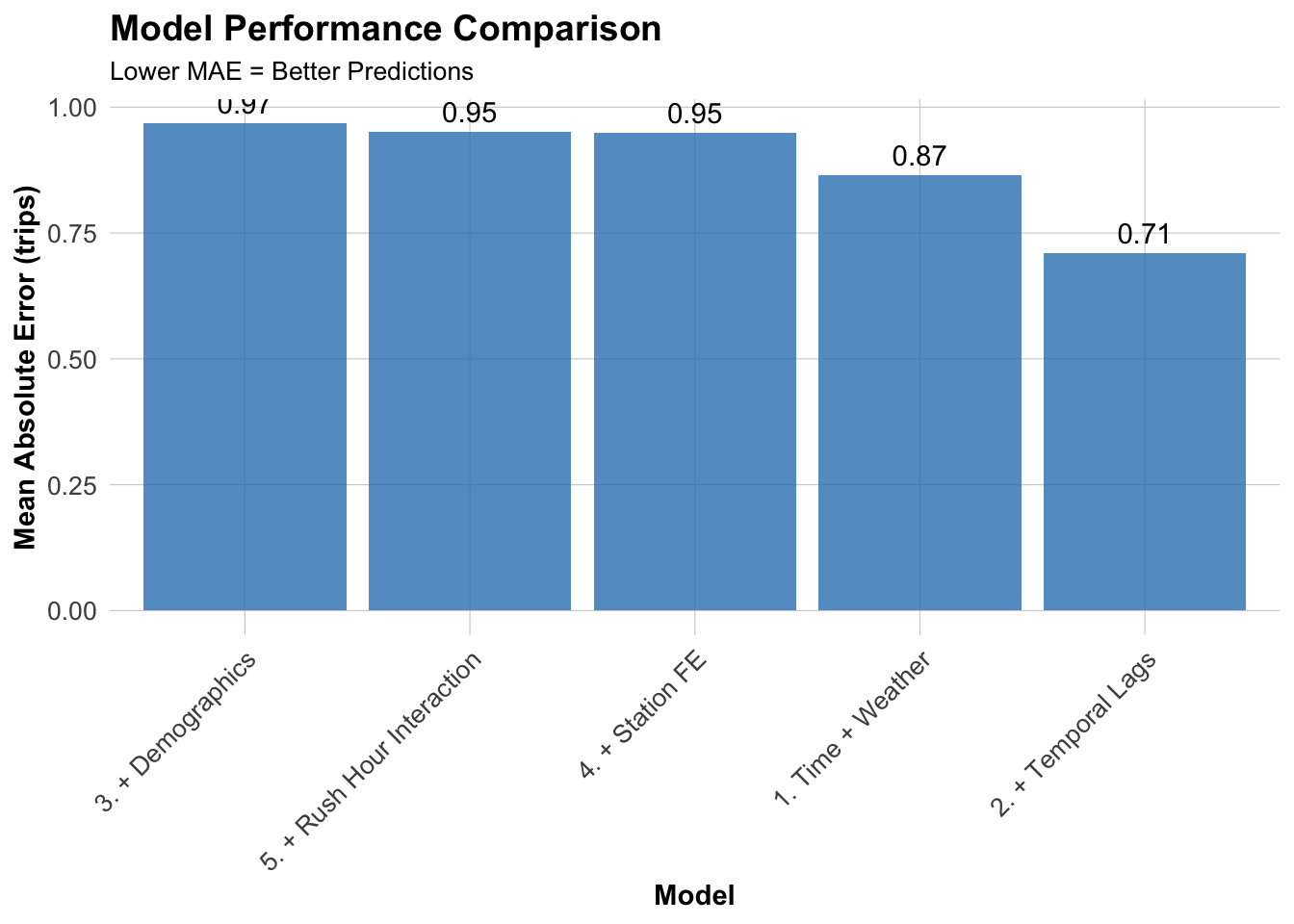
Mean Absolute Error by Model (Test Set)
Model MAE (trips)
1. Time + Weather 0.87
2. + Temporal Lags 0.71
3. + Demographics 0.97
4. + Station FE 0.95
5. + Rush Hour Interaction 0.95

Visualize Model Comparison

Code
ggplot(mae_results, aes(x = reorder(Model, -MAE), y = MAE)) +
  geom_col(fill = "#3182bd", alpha = 0.8) +
  geom_text(aes(label = round(MAE, 2)), vjust = -0.5) +
  labs(
    title = "Model Performance Comparison",
    subtitle = "Lower MAE = Better Predictions",
    x = "Model",
    y = "Mean Absolute Error (trips)"
  ) +
  plotTheme +
  theme(axis.text.x = element_text(angle = 45, hjust = 1))

  1. Compare results to Q1 2025:

    • How do MAE values compare? Why might they differ?
    • Are temporal patterns different (e.g., summer vs. winter)?
    • Which features are most important in your quarter?

Answer:

  • All models of Q2 2024 have higher MAE value compared with Q1 2025. MAE values (Q2 2024 vs Q1 2025) from lowest to highest are: Model 2 Temporal Lags (0.71 vs 0.5), Model 1 Time + Weather (0.87 vs 0.6), Model 4 Station FE (0.95 vs 0.73), Model 5 Rush Hour Interaction (0.95 vs 0.73), Model 3 Demographics (0.97 vs 0.74)
  • MAE will be larger in summer because warmer weather leads to increased usage of shared bicycles. Higher usage introduces greater uncertainty, resulting in larger errors.
  • Similar to Q1 2025, temporal is the most important feature in our quarter.

Space-Time Error Analysis

Observed vs. Predicted

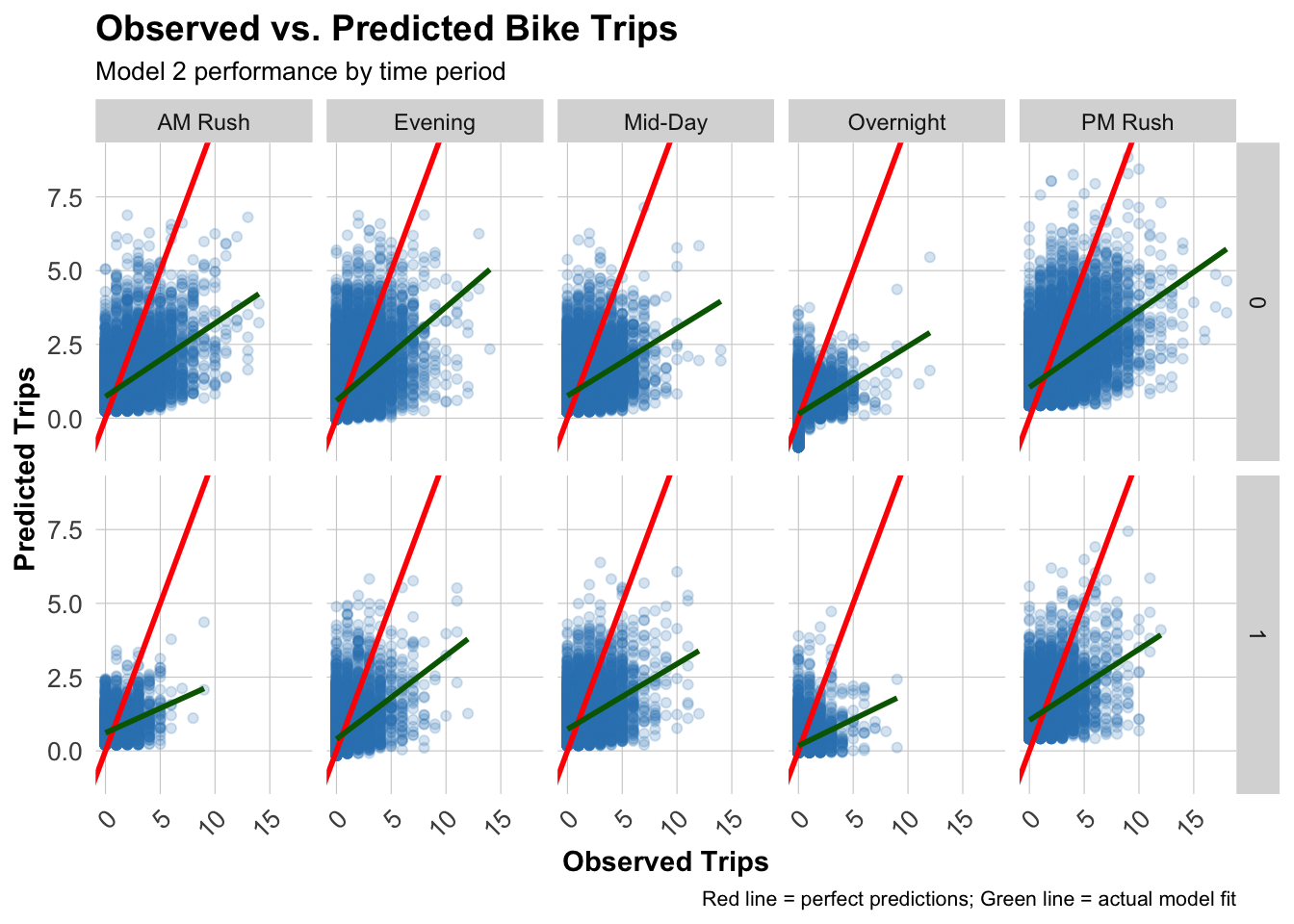
Use our best model (Model 2) for error analysis.

Code
test <- test %>%
  mutate(
    error = Trip_Count - pred2,
    abs_error = abs(error),
    time_of_day = case_when(
      hour < 7 ~ "Overnight",
      hour >= 7 & hour < 10 ~ "AM Rush",
      hour >= 10 & hour < 15 ~ "Mid-Day",
      hour >= 15 & hour <= 18 ~ "PM Rush",
      hour > 18 ~ "Evening"
    )
  )

# Scatter plot by time and day type
ggplot(test, aes(x = Trip_Count, y = pred2)) +
  geom_point(alpha = 0.2, color = "#3182bd") +
  geom_abline(slope = 1, intercept = 0, color = "red", linewidth = 1) +
  geom_smooth(method = "lm", se = FALSE, color = "darkgreen") +
  facet_grid(weekend ~ time_of_day) +
  labs(
    title = "Observed vs. Predicted Bike Trips",
    subtitle = "Model 2 performance by time period",
    x = "Observed Trips",
    y = "Predicted Trips",
    caption = "Red line = perfect predictions; Green line = actual model fit"
  ) +
  plotTheme

Question: Where is the model performing well? Where is it struggling?

Performing well: AM Rush, Evening, Struggling: Overnight, PM Rush

Spatial Error Patterns

Code
# Calculate MAE by station
station_errors <- test %>%
  group_by(start_station, start_lat.x, start_lon.y) %>%
  summarize(
    MAE = mean(abs_error, na.rm = TRUE),
    avg_demand = mean(Trip_Count, na.rm = TRUE),
    .groups = "drop"
  ) %>%
  filter(!is.na(start_lat.x), !is.na(start_lon.y))

## Create Two Maps Side-by-Side with Proper Legends (sorry these maps are ugly)

# Calculate station errors
station_errors <- test %>%
  filter(!is.na(pred2)) %>%
  group_by(start_station, start_lat.x, start_lon.y) %>%
  summarize(
    MAE = mean(abs(Trip_Count - pred2), na.rm = TRUE),
    avg_demand = mean(Trip_Count, na.rm = TRUE),
    .groups = "drop"
  ) %>%
  filter(!is.na(start_lat.x), !is.na(start_lon.y))

# Map 1: Prediction Errors
p1 <- ggplot() +
  geom_sf(data = philly_census, fill = "grey95", color = "white", size = 0.2) +
  geom_point(
    data = station_errors,
    aes(x = start_lon, y = start_lat, color = MAE),
    size = 1,
    alpha = 0.7
  ) +
  scale_color_viridis(
    option = "plasma",
    name = "MAE\n(trips)",
    direction = -1,
    breaks = c(0.5, 1.0, 1.5),  # Fewer, cleaner breaks
    labels = c("0.5", "1.0", "1.5")
  ) +
  labs(title = "Prediction Errors",
       subtitle = "Higher in Center City") +
  mapTheme +
  theme(
    legend.position = "right",
    legend.title = element_text(size = 10, face = "bold"),
    legend.text = element_text(size = 9),
    plot.title = element_text(size = 14, face = "bold"),
    plot.subtitle = element_text(size = 10)
  ) +
  guides(color = guide_colorbar(
    barwidth = 1.5,
    barheight = 12,
    title.position = "top",
    title.hjust = 0.5
  ))

# Map 2: Average Demand
p2 <- ggplot() +
  geom_sf(data = philly_census, fill = "grey95", color = "white", size = 0.2) +
  geom_point(
    data = station_errors,
    aes(x = start_lon.y, y = start_lat.x, color = avg_demand),
    size = 1,
    alpha = 0.7
  ) +
  scale_color_viridis(
    option = "viridis",
    name = "Avg\nDemand",
    direction = -1,
    breaks = c(0.5, 1.0, 1.5, 2.0, 2.5),  # Clear breaks
    labels = c("0.5", "1.0", "1.5", "2.0", "2.5")
  ) +
  labs(title = "Average Demand",
       subtitle = "Trips per station-hour") +
  mapTheme +
  theme(
    legend.position = "right",
    legend.title = element_text(size = 10, face = "bold"),
    legend.text = element_text(size = 9),
    plot.title = element_text(size = 14, face = "bold"),
    plot.subtitle = element_text(size = 10)
  ) +
  guides(color = guide_colorbar(
    barwidth = 1.5,
    barheight = 12,
    title.position = "top",
    title.hjust = 0.5
  ))


# Map 1: Prediction Errors
p1 <- ggplot() +
  geom_sf(data = philly_census, fill = "grey95", color = "white", size = 0.1) +
  geom_point(
    data = station_errors,
    aes(x = start_lon.y, y = start_lat.x, color = MAE),
    size = 1,
    alpha = 0.7
  ) +
  scale_color_viridis(
    option = "plasma",
    name = "MAE (trips)",
    direction = -1,
    breaks = c(0.5, 1.0, 1.5),
    labels = c("0.5", "1.0", "1.5")
  ) +
  labs(title = "Prediction Errors") +
  mapTheme +
  theme(
    legend.position = "bottom",
    legend.title = element_text(size = 10, face = "bold"),
    legend.text = element_text(size = 9),
    plot.title = element_text(size = 14, face = "bold", hjust = 0.5)
  ) +
  guides(color = guide_colorbar(
    barwidth = 12,
    barheight = 1,
    title.position = "top",
    title.hjust = 0.5
  ))

# Map 2: Average Demand  
p2 <- ggplot() +
  geom_sf(data = philly_census, fill = "grey95", color = "white", size = 0.1) +
  geom_point(
    data = station_errors,
    aes(x = start_lon.y, y = start_lat.x, color = avg_demand),
    size = 1,
    alpha = 0.7
  ) +
  scale_color_viridis(
    option = "viridis",
    name = "Avg Demand (trips/hour)",
    direction = -1,
    breaks = c(0.5, 1.0, 1.5, 2.0, 2.5),
    labels = c("0.5", "1.0", "1.5", "2.0", "2.5")
  ) +
  labs(title = "Average Demand") +
  mapTheme +
  theme(
    legend.position = "bottom",
    legend.title = element_text(size = 10, face = "bold"),
    legend.text = element_text(size = 9),
    plot.title = element_text(size = 14, face = "bold", hjust = 0.5)
  ) +
  guides(color = guide_colorbar(
    barwidth = 12,
    barheight = 1,
    title.position = "top",
    title.hjust = 0.5
  ))

# Combine
grid.arrange(
  p1, p2,
  ncol = 2
  )
Code
p1

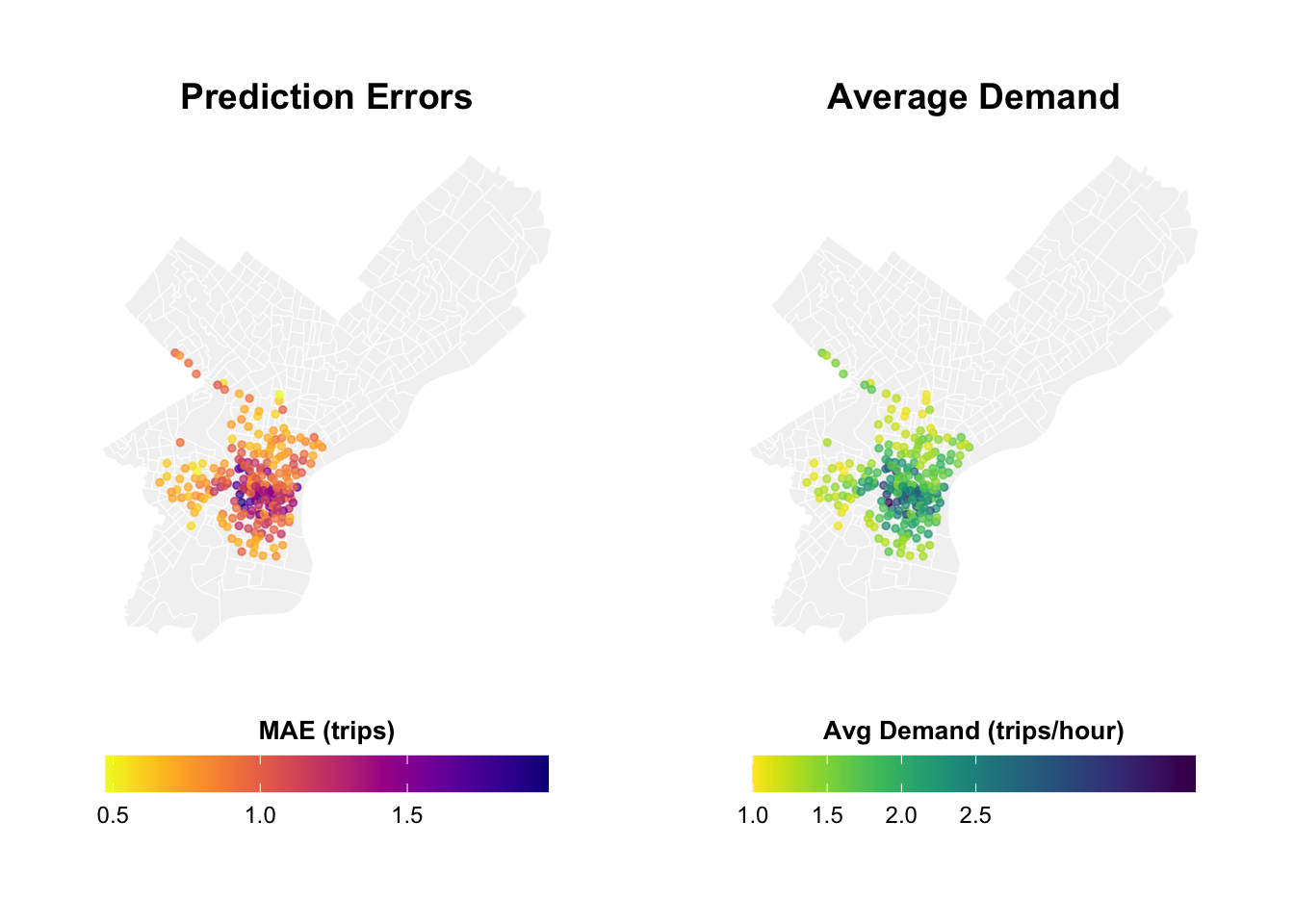
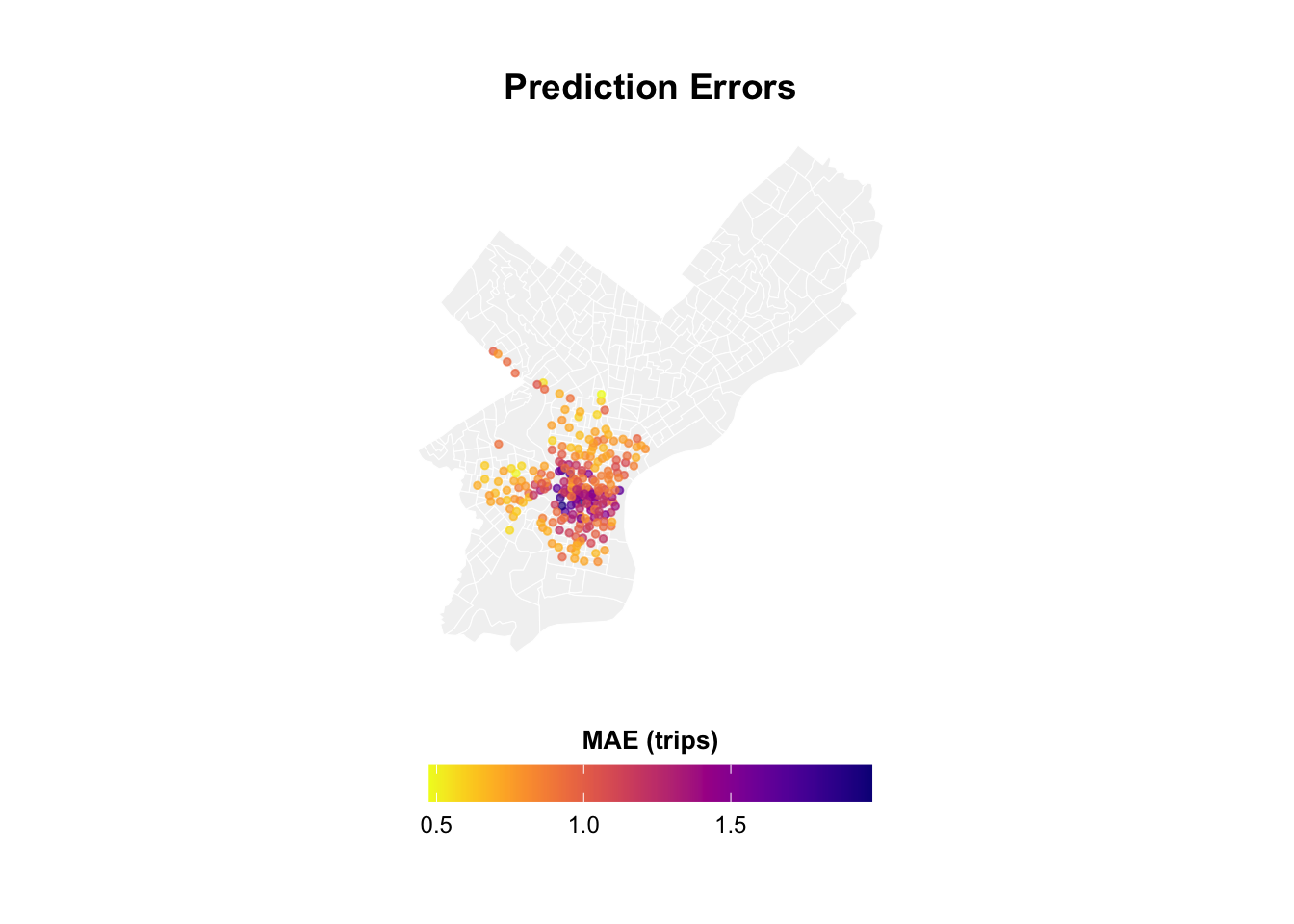
Question: Hypothesize why (missing features? different demand patterns?)

Answer:

  • Neighborhoods in city center have high errors
  • Because stations in the city center have higher average demand. Higher usage brings significant uncertainty. Usage patterns may be influenced by numerous factors beyond the variables selected in our model.

Temporal Error Patterns

Code
# MAE by time of day and day type
temporal_errors <- test %>%
  group_by(time_of_day, weekend) %>%
  summarize(
    MAE = mean(abs_error, na.rm = TRUE),
    .groups = "drop"
  ) %>%
  mutate(day_type = ifelse(weekend == 1, "Weekend", "Weekday"))

ggplot(temporal_errors, aes(x = time_of_day, y = MAE, fill = day_type)) +
  geom_col(position = "dodge") +
  scale_fill_manual(values = c("Weekday" = "#08519c", "Weekend" = "#6baed6")) +
  labs(
    title = "Prediction Errors by Time Period",
    subtitle = "When is the model struggling most?",
    x = "Time of Day",
    y = "Mean Absolute Error (trips)",
    fill = "Day Type"
  ) +
  plotTheme +
  theme(axis.text.x = element_text(angle = 45, hjust = 1))

Question:

  • When are errors highest?
  • Do certain hours/days have systematic under/over-prediction?
  • Are there seasonal patterns?

Answer:

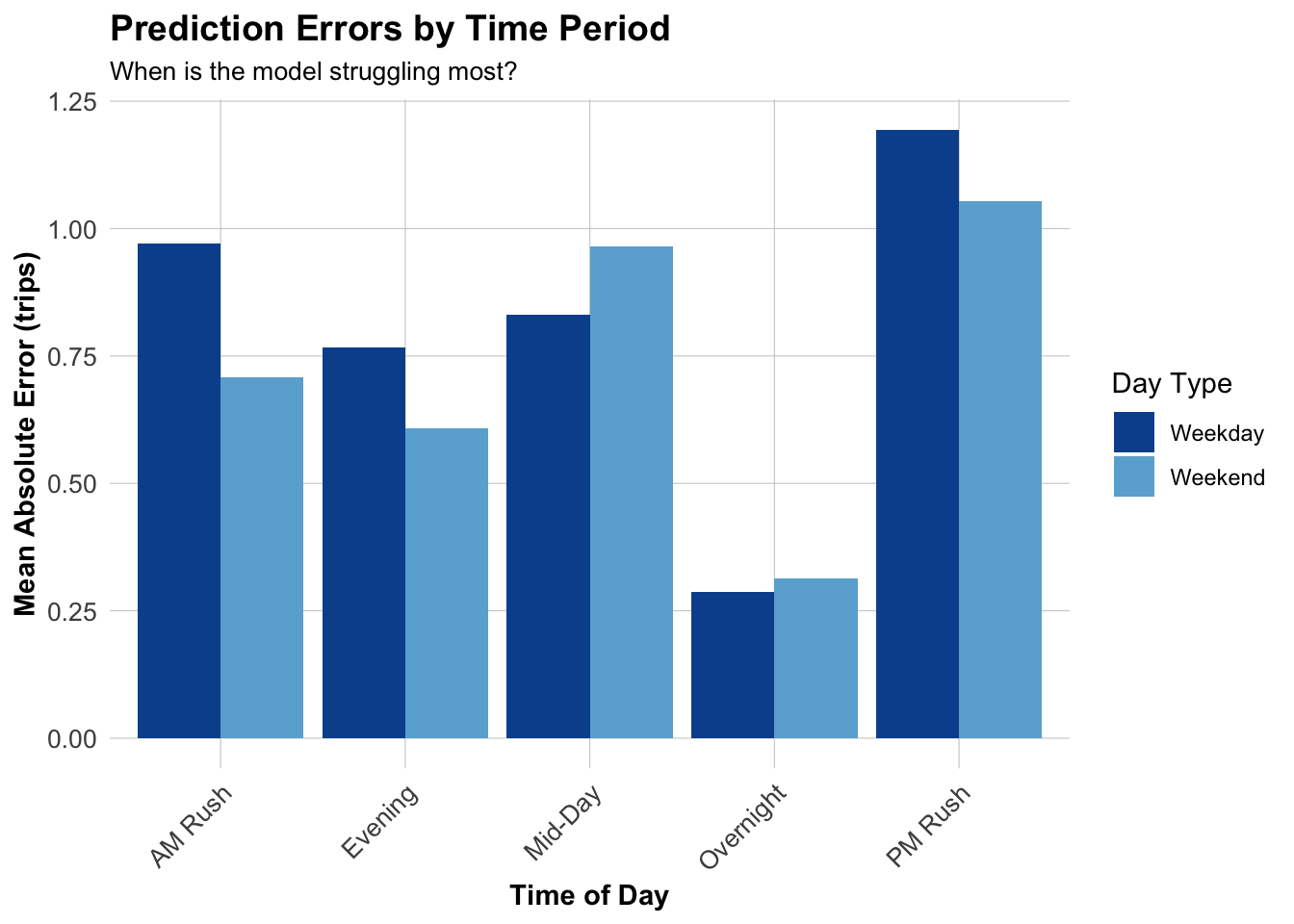
  • PM Rush has the highest errors.
  • Weekday has relatively higher errors than weekend
  • Summer (warmer season) has higher errors

Errors and Demographics

Code
# Join demographic data to station errors
station_errors_demo <- station_errors %>%
  left_join(
    station_attributes %>% select(start_station, Med_Inc, Percent_Taking_Transit, Percent_White),
    by = "start_station"
  ) %>%
  filter(!is.na(Med_Inc))

# Create plots
p1 <- ggplot(station_errors_demo, aes(x = Med_Inc, y = MAE)) +
  geom_point(alpha = 0.5, color = "#3182bd") +
  geom_smooth(method = "lm", se = FALSE, color = "red") +
  scale_x_continuous(labels = scales::dollar) +
  labs(title = "Errors vs. Median Income", x = "Median Income", y = "MAE") +
  plotTheme

p2 <- ggplot(station_errors_demo, aes(x = Percent_Taking_Transit, y = MAE)) +
  geom_point(alpha = 0.5, color = "#3182bd") +
  geom_smooth(method = "lm", se = FALSE, color = "red") +
  labs(title = "Errors vs. Transit Usage", x = "% Taking Transit", y = "MAE") +
  plotTheme

p3 <- ggplot(station_errors_demo, aes(x = Percent_White, y = MAE)) +
  geom_point(alpha = 0.5, color = "#3182bd") +
  geom_smooth(method = "lm", se = FALSE, color = "red") +
  labs(title = "Errors vs. Race", x = "% White", y = "MAE") +
  plotTheme

grid.arrange(p1, p2, p3, ncol = 2)

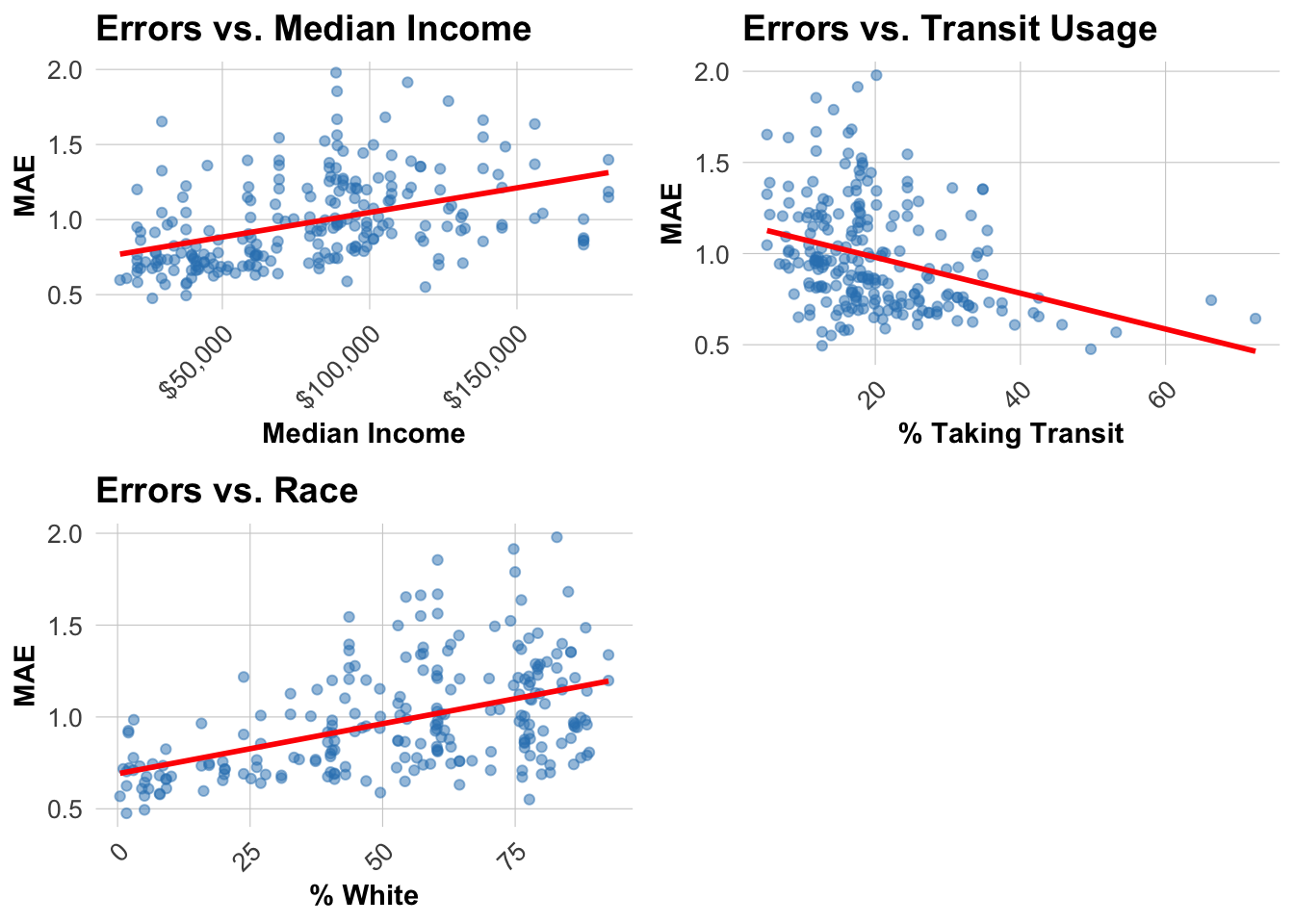
Critical Question: - Are certain communities systematically harder to predict? - What are the equity implications?

Answer:

  • Neighborhoods with higher income levels, higher percentage of public transit, and higher percentage of white people are harder to predict (higher MAE)
  • Although these neighborhoods are not traditionally considered disadvantaged communities, the model’s inaccuracies can negatively impact the user experience.Some potential users of shared bicycles may be forced to drive due to insufficient bike availability, thereby increasing energy waste. Or deploying large numbers of bikes in car-oriented neighborhoods,which leads to inefficient operations.

Adding more features

Code
# Add rolling 7-day average and same-hour-last-week demand by station
study_panel_enhanced <- study_panel_complete %>%
  group_by(start_station) %>%
  arrange(interval60, .by_group = TRUE) %>%
  mutate(
    rolling7day = as.numeric(stats::filter(Trip_Count, rep(1 / 168, 168), sides = 1)),
    same_hour_last_week = lag(Trip_Count, 24 * 7)
  ) %>%
  ungroup() %>%
  filter(!is.na(rolling7day), !is.na(same_hour_last_week))

# Recreate temporal train/test split with new features
train_enh <- study_panel_enhanced %>% filter(week < 23)
test_enh <- study_panel_enhanced %>% filter(week >= 23)

# Day-of-week factor coding
train_enh <- train_enh %>%
  mutate(dotw_simple = factor(dotw, levels = c("Mon", "Tue", "Wed", "Thu", "Fri", "Sat", "Sun")))
contrasts(train_enh$dotw_simple) <- contr.treatment(7)

test_enh <- test_enh %>%
  mutate(dotw_simple = factor(dotw, levels = c("Mon", "Tue", "Wed", "Thu", "Fri", "Sat", "Sun")))
contrasts(test_enh$dotw_simple) <- contr.treatment(7)

# Model 2 plus the two new temporal features
model2_enh <- lm(
  Trip_Count ~ as.factor(hour) + dotw_simple + Temperature + Precipitation +
    lag1Hour + lag3Hours + lag1day + rolling7day + same_hour_last_week,
  data = train_enh
)

summary(model2_enh)

Call:
lm(formula = Trip_Count ~ as.factor(hour) + dotw_simple + Temperature + 
    Precipitation + lag1Hour + lag3Hours + lag1day + rolling7day + 
    same_hour_last_week, data = train_enh)

Residuals:
    Min      1Q  Median      3Q     Max 
-5.7762 -0.4741 -0.1198  0.2489 17.5906 

Coefficients:
                      Estimate Std. Error t value             Pr(>|t|)    
(Intercept)         -0.3573201  0.0139668 -25.583 < 0.0000000000000002 ***
as.factor(hour)1    -0.0436793  0.0107732  -4.054   0.0000502662528070 ***
as.factor(hour)2    -0.0523612  0.0108257  -4.837   0.0000013203786965 ***
as.factor(hour)3    -0.0601095  0.0107587  -5.587   0.0000000231085947 ***
as.factor(hour)4    -0.0490023  0.0109291  -4.484   0.0000073391903942 ***
as.factor(hour)5     0.0672363  0.0108812   6.179   0.0000000006451743 ***
as.factor(hour)6     0.2412399  0.0107118  22.521 < 0.0000000000000002 ***
as.factor(hour)7     0.4123337  0.0107378  38.400 < 0.0000000000000002 ***
as.factor(hour)8     0.6317936  0.0107524  58.759 < 0.0000000000000002 ***
as.factor(hour)9     0.3394337  0.0107794  31.489 < 0.0000000000000002 ***
as.factor(hour)10    0.3055771  0.0104912  29.127 < 0.0000000000000002 ***
as.factor(hour)11    0.3667699  0.0106209  34.533 < 0.0000000000000002 ***
as.factor(hour)12    0.4452404  0.0102915  43.263 < 0.0000000000000002 ***
as.factor(hour)13    0.4311386  0.0106786  40.374 < 0.0000000000000002 ***
as.factor(hour)14    0.4912939  0.0104997  46.791 < 0.0000000000000002 ***
as.factor(hour)15    0.5651463  0.0108112  52.274 < 0.0000000000000002 ***
as.factor(hour)16    0.6831487  0.0105573  64.708 < 0.0000000000000002 ***
as.factor(hour)17    0.9210305  0.0109090  84.429 < 0.0000000000000002 ***
as.factor(hour)18    0.5602527  0.0110552  50.678 < 0.0000000000000002 ***
as.factor(hour)19    0.4049418  0.0109072  37.126 < 0.0000000000000002 ***
as.factor(hour)20    0.2077502  0.0108717  19.109 < 0.0000000000000002 ***
as.factor(hour)21    0.1495363  0.0107326  13.933 < 0.0000000000000002 ***
as.factor(hour)22    0.1296927  0.0107756  12.036 < 0.0000000000000002 ***
as.factor(hour)23    0.0406452  0.0107477   3.782             0.000156 ***
dotw_simple2         0.0792962  0.0059509  13.325 < 0.0000000000000002 ***
dotw_simple3         0.0477619  0.0056836   8.403 < 0.0000000000000002 ***
dotw_simple4         0.0293298  0.0056903   5.154   0.0000002546263911 ***
dotw_simple5        -0.0078262  0.0055809  -1.402             0.160822    
dotw_simple6        -0.0528971  0.0057839  -9.146 < 0.0000000000000002 ***
dotw_simple7        -0.0596471  0.0057479 -10.377 < 0.0000000000000002 ***
Temperature          0.0013074  0.0001728   7.566   0.0000000000000386 ***
Precipitation       -2.9416620  0.1184383 -24.837 < 0.0000000000000002 ***
lag1Hour             0.3333336  0.0014946 223.024 < 0.0000000000000002 ***
lag3Hours            0.0608733  0.0014893  40.874 < 0.0000000000000002 ***
lag1day              0.0611907  0.0014029  43.618 < 0.0000000000000002 ***
rolling7day          0.5337144  0.0040731 131.035 < 0.0000000000000002 ***
same_hour_last_week -0.0071541  0.0014270  -5.013   0.0000005355246776 ***
---
Signif. codes:  0 '***' 0.001 '**' 0.01 '*' 0.05 '.' 0.1 ' ' 1

Residual standard error: 0.9703 on 408515 degrees of freedom
Multiple R-squared:  0.3657,    Adjusted R-squared:  0.3657 
F-statistic:  6543 on 36 and 408515 DF,  p-value: < 0.00000000000000022
Code
# Predictions and MAE on the held-out set
test_enh <- test_enh %>%
  mutate(pred2_enh = predict(model2_enh, newdata = test_enh))

mae_model2_enh <- mean(abs(test_enh$Trip_Count - test_enh$pred2_enh), na.rm = TRUE)
cat("MAE for Model 2 with new features:", round(mae_model2_enh, 3), "\n")
MAE for Model 2 with new features: 0.731 

Question:

  • Explain why you chose these features
  • Did they improve predictions? Where?

Answer:

  • We chose “Rolling 7-day average demand” and “Same hour last week” as our additional features
  • MAE remains the same but R square was improved from 0.34 to 0.36, maning more data are explained in our model.
  • We selected these features because model 2 performed best as adding temporal features, so we assume that the shared bike usage pattern are strongly related to temporal features.

Try poisson model

Code
# Fit a Poisson regression using the enhanced feature set
poisson_model <- glm(
  Trip_Count ~ as.factor(hour) + dotw_simple + Temperature + Precipitation +
    lag1Hour + lag3Hours + lag1day + rolling7day + same_hour_last_week,
  data = train_enh,
  family = poisson(link = "log")
)

# Predict on the held-out set and compute MAE
test_enh <- test_enh %>%
  mutate(pred_poisson = predict(poisson_model, newdata = test_enh, type = "response"))

mae_poisson <- mean(abs(test_enh$Trip_Count - test_enh$pred_poisson), na.rm = TRUE)
cat("MAE for Poisson model:", round(mae_poisson, 3), "\n")
MAE for Poisson model: 0.725 
Code
summary(poisson_model)

Call:
glm(formula = Trip_Count ~ as.factor(hour) + dotw_simple + Temperature + 
    Precipitation + lag1Hour + lag3Hours + lag1day + rolling7day + 
    same_hour_last_week, family = poisson(link = "log"), data = train_enh)

Coefficients:
                      Estimate Std. Error  z value             Pr(>|z|)    
(Intercept)         -2.5254170  0.0233483 -108.163 < 0.0000000000000002 ***
as.factor(hour)1    -0.5135331  0.0291059  -17.644 < 0.0000000000000002 ***
as.factor(hour)2    -0.9273089  0.0339990  -27.275 < 0.0000000000000002 ***
as.factor(hour)3    -1.4043993  0.0408177  -34.407 < 0.0000000000000002 ***
as.factor(hour)4    -1.4857270  0.0436050  -34.072 < 0.0000000000000002 ***
as.factor(hour)5    -0.1445565  0.0269275   -5.368         0.0000000795 ***
as.factor(hour)6     0.7098268  0.0217285   32.668 < 0.0000000000000002 ***
as.factor(hour)7     1.1810768  0.0200614   58.873 < 0.0000000000000002 ***
as.factor(hour)8     1.5046904  0.0193702   77.681 < 0.0000000000000002 ***
as.factor(hour)9     1.2037054  0.0197842   60.842 < 0.0000000000000002 ***
as.factor(hour)10    1.1446699  0.0197834   57.860 < 0.0000000000000002 ***
as.factor(hour)11    1.2284903  0.0197093   62.331 < 0.0000000000000002 ***
as.factor(hour)12    1.3302985  0.0193014   68.922 < 0.0000000000000002 ***
as.factor(hour)13    1.3132967  0.0195082   67.320 < 0.0000000000000002 ***
as.factor(hour)14    1.3847953  0.0192934   71.775 < 0.0000000000000002 ***
as.factor(hour)15    1.4666912  0.0192945   76.016 < 0.0000000000000002 ***
as.factor(hour)16    1.5718990  0.0189870   82.788 < 0.0000000000000002 ***
as.factor(hour)17    1.7403120  0.0189307   91.930 < 0.0000000000000002 ***
as.factor(hour)18    1.4081785  0.0193174   72.897 < 0.0000000000000002 ***
as.factor(hour)19    1.2683257  0.0194637   65.164 < 0.0000000000000002 ***
as.factor(hour)20    0.9960781  0.0200791   49.608 < 0.0000000000000002 ***
as.factor(hour)21    0.8172347  0.0205846   39.701 < 0.0000000000000002 ***
as.factor(hour)22    0.6961282  0.0211404   32.929 < 0.0000000000000002 ***
as.factor(hour)23    0.3532942  0.0226143   15.623 < 0.0000000000000002 ***
dotw_simple2         0.1297790  0.0073219   17.725 < 0.0000000000000002 ***
dotw_simple3         0.0795613  0.0071602   11.112 < 0.0000000000000002 ***
dotw_simple4         0.0590945  0.0071312    8.287 < 0.0000000000000002 ***
dotw_simple5        -0.0254385  0.0072896   -3.490             0.000484 ***
dotw_simple6        -0.1029802  0.0076764  -13.415 < 0.0000000000000002 ***
dotw_simple7        -0.1339641  0.0077126  -17.370 < 0.0000000000000002 ***
Temperature          0.0033083  0.0002215   14.933 < 0.0000000000000002 ***
Precipitation       -5.8236111  0.1819010  -32.015 < 0.0000000000000002 ***
lag1Hour             0.1486368  0.0010467  142.005 < 0.0000000000000002 ***
lag3Hours            0.0290323  0.0012620   23.005 < 0.0000000000000002 ***
lag1day              0.0230650  0.0011796   19.554 < 0.0000000000000002 ***
rolling7day          0.8025392  0.0041082  195.350 < 0.0000000000000002 ***
same_hour_last_week  0.0032587  0.0014147    2.304             0.021248 *  
---
Signif. codes:  0 '***' 0.001 '**' 0.01 '*' 0.05 '.' 0.1 ' ' 1

(Dispersion parameter for poisson family taken to be 1)

    Null deviance: 680495  on 408551  degrees of freedom
Residual deviance: 417429  on 408515  degrees of freedom
AIC: 750707

Number of Fisher Scoring iterations: 6

Answer:

  • MAE improved slightly from 0.731 to 0.725

Conclusion

  • We think this model still need to be improved before deploying. The model exhibits higher MAE during peak periods and high demand areas, which is the most tricky parts for rebalanceing. Therefore, the model still struggles to accurately predict these parts with the highest demand.Incorrect use of the model may result in some high-demand stations failing to rebalance in a timely manner, worsening users’ experience.We should continuously compare model data with actual conditions to identify stations with low error rates for pilot implementation.
  • We observe that neighborhoods with higher incomes, lower public transit usage, and higher proportions of white residents exhibit greater MAE. Although these neighborhoods are not traditionally considered disadvantaged communities, the model’s inaccuracies can negatively impact the user experience.Some potential users of shared bicycles may be forced to drive due to insufficient bike availability, thereby increasing energy waste. Or deploying large numbers of bikes in car-oriented neighborhoods,which leads to inefficient operations. Field research should be conducted to identify the reasons for discrepancies between predictions and actual conditions.
  • Error maps show higher MAE in Center City and some outlying high-demand stations, which suggests the model is not fully capturing local land-use patterns or station capacity/nearby station density. Linear effects and mostly may be too simple: true responses to weather, time, and lags are likely non-linear with thresholds and strong interactions. To improve the model performing, we could add more features (like holiday and event calendars, station capacity, distance to CBD) and using more complicated models (non-linear models, machine leraning models).