Space-Time Prediction of Bike Share Demand: Philadelphia Indego

Author

Ryan Drake

Published

November 30, 2025

Introduction

The Rebalancing Challenge in Philadelphia

Philadelphia’s Indego bike share system faces the same operational challenge as every bike share system: rebalancing bikes to meet anticipated demand.

Learning Objectives

This assignment will be able to:

  1. Understand panel data structure for space-time analysis
  2. Create temporal lag variables to capture demand persistence
  3. Build multiple predictive models with increasing complexity
  4. Validate models temporally (train on past, test on future)
  5. Analyze prediction errors in both space and time
  6. Engineer new features based on error patterns
  7. Critically evaluate when prediction errors matter most

Setup

Load Libraries

Code
# Core tidyverse
library(tidyverse)
library(lubridate)

# Spatial data
library(sf)
library(tigris)

# Census data
library(tidycensus)

# Weather data
library(riem)  # For Philadelphia weather from ASOS stations

# Visualization
library(viridis)
library(gridExtra)
library(knitr)
library(kableExtra)

# here!
library(here)
# Get rid of scientific notation. We gotta look good!
options(scipen = 999)

Define Themes

Code
plotTheme <- theme(
  plot.title = element_text(size = 14, face = "bold"),
  plot.subtitle = element_text(size = 10),
  plot.caption = element_text(size = 8),
  axis.text.x = element_text(size = 10, angle = 45, hjust = 1),
  axis.text.y = element_text(size = 10),
  axis.title = element_text(size = 11, face = "bold"),
  panel.background = element_blank(),
  panel.grid.major = element_line(colour = "#D0D0D0", size = 0.2),
  panel.grid.minor = element_blank(),
  axis.ticks = element_blank(),
  legend.position = "right"
)

mapTheme <- theme(
  plot.title = element_text(size = 14, face = "bold"),
  plot.subtitle = element_text(size = 10),
  plot.caption = element_text(size = 8),
  axis.line = element_blank(),
  axis.text = element_blank(),
  axis.ticks = element_blank(),
  axis.title = element_blank(),
  panel.background = element_blank(),
  panel.border = element_blank(),
  panel.grid.major = element_line(colour = 'transparent'),
  panel.grid.minor = element_blank(),
  legend.position = "right",
  plot.margin = margin(1, 1, 1, 1, 'cm'),
  legend.key.height = unit(1, "cm"),
  legend.key.width = unit(0.2, "cm")
)

palette5 <- c("#eff3ff", "#bdd7e7", "#6baed6", "#3182bd", "#08519c")

Set Census API Key

Code
census_api_key("a55638f442ab081818dbf0ae29a32549253a2ab0", overwrite = TRUE, install = TRUE)

Data Import & Preparation

Load Indego Trip Data (Q3 2025)

Quarter three was chosen to investigate the summer months in comparison to winter months bike share usage. Increased usage and more sporadic usage is expected since people tend to bike more during the summer than the winter - and more for leisure during the summer.

Code
# Read Q3 2025 data
indego <- read_csv("C:/Users/rydra/OneDrive - PennO365/CPLN 5080 Public Policy/portfolio-setup-rdrake251/Assignments/assignment_05/indego-trips-2025-q3.csv")


# Quick look at the data
glimpse(indego)
Rows: 465,464
Columns: 15
$ trip_id             <dbl> 1203073573, 1203073759, 1203073753, 1203073877, 12…
$ duration            <dbl> 10, 19, 16, 19, 2, 6, 20, 4, 52, 3, 31, 9, 10, 9, …
$ start_time          <chr> "7/1/2025 0:06", "7/1/2025 0:11", "7/1/2025 0:13",…
$ end_time            <chr> "7/1/2025 0:16", "7/1/2025 0:30", "7/1/2025 0:29",…
$ start_station       <dbl> 3163, 3304, 3394, 3207, 3061, 3320, 3201, 3078, 32…
$ start_lat           <dbl> 39.94974, 39.94234, 39.92400, 39.95441, 39.95425, …
$ start_lon           <dbl> -75.18097, -75.15399, -75.16959, -75.19200, -75.17…
$ end_station         <dbl> 3374, 3315, 3394, 3368, 3156, 3320, 3196, 3235, 32…
$ end_lat             <dbl> 39.97280, 39.94235, 39.92400, 39.97647, 39.95381, …
$ end_lon             <dbl> -75.17971, -75.21138, -75.16959, -75.17362, -75.17…
$ bike_id             <chr> "31674", "29473", "27889", "31825", "25400", "3172…
$ plan_duration       <dbl> 30, 1, 30, 30, 30, 30, 30, 30, 30, 30, 30, 30, 30,…
$ trip_route_category <chr> "One Way", "One Way", "Round Trip", "One Way", "On…
$ passholder_type     <chr> "Indego30", "Walk-up", "Indego30", "Indego30", "In…
$ bike_type           <chr> "electric", "electric", "electric", "electric", "e…

Examine the Data Structure

Code
# How many trips?
cat("Total trips in Q3 2025:", nrow(indego), "\n")
Total trips in Q3 2025: 465464 
Code
# Date range
cat("Date range:", 
    min(mdy_hm(indego$start_time)), "to", 
    max(mdy_hm(indego$start_time)), "\n")
Date range: 1751328360 to 1759276680 
Code
# How many unique stations?
cat("Unique start stations:", length(unique(indego$start_station)), "\n")
Unique start stations: 284 
Code
# Trip types
table(indego$trip_route_category)

   One Way Round Trip 
    434518      30946 
Code
# Passholder types
table(indego$passholder_type)

 Day Pass  Indego30 Indego365      NULL   Walk-up 
    18418    252897    157695         5     36449 
Code
# Bike types
table(indego$bike_type)

electric standard 
  299515   165949 

Create Time Bins

We need to aggregate trips into hourly intervals for our panel data structure.

Code
indego <- indego %>%
  mutate(
    # Parse datetime
    start_datetime = mdy_hm(start_time),
    end_datetime = mdy_hm(end_time),
    
    # Create hourly bins
    interval60 = floor_date(start_datetime, unit = "hour"),
    
    # Extract time features
    week = week(interval60),
    month = month(interval60, label = TRUE),
    dotw = wday(interval60, label = TRUE),
    hour = hour(interval60),
    date = as.Date(interval60),
    
    # Create useful indicators
    weekend = ifelse(dotw %in% c("Sat", "Sun"), 1, 0),
    rush_hour = ifelse(hour %in% c(7, 8, 9, 16, 17, 18), 1, 0)
  )

# Look at temporal features
head(indego %>% select(start_datetime, interval60, week, dotw, hour, weekend))
# A tibble: 6 × 6
  start_datetime      interval60           week dotw   hour weekend
  <dttm>              <dttm>              <dbl> <ord> <int>   <dbl>
1 2025-07-01 00:06:00 2025-07-01 00:00:00    26 Tue       0       0
2 2025-07-01 00:11:00 2025-07-01 00:00:00    26 Tue       0       0
3 2025-07-01 00:13:00 2025-07-01 00:00:00    26 Tue       0       0
4 2025-07-01 00:16:00 2025-07-01 00:00:00    26 Tue       0       0
5 2025-07-01 00:16:00 2025-07-01 00:00:00    26 Tue       0       0
6 2025-07-01 00:18:00 2025-07-01 00:00:00    26 Tue       0       0

Exploratory Analysis

Trips Over Time

Code
# Daily trip counts
daily_trips <- indego %>%
  group_by(date) %>%
  summarize(trips = n())

ggplot(daily_trips, aes(x = date, y = trips)) +
  geom_line(color = "#3182bd", linewidth = 1) +
  geom_smooth(se = FALSE, color = "red", linetype = "dashed") +
  labs(
    title = "Indego Daily Ridership - Q3 2025",
    subtitle = "Summer demand patterns in Philadelphia",
    x = "Date",
    y = "Daily Trips",
    caption = "Source: Indego bike share"
  ) +
  plotTheme

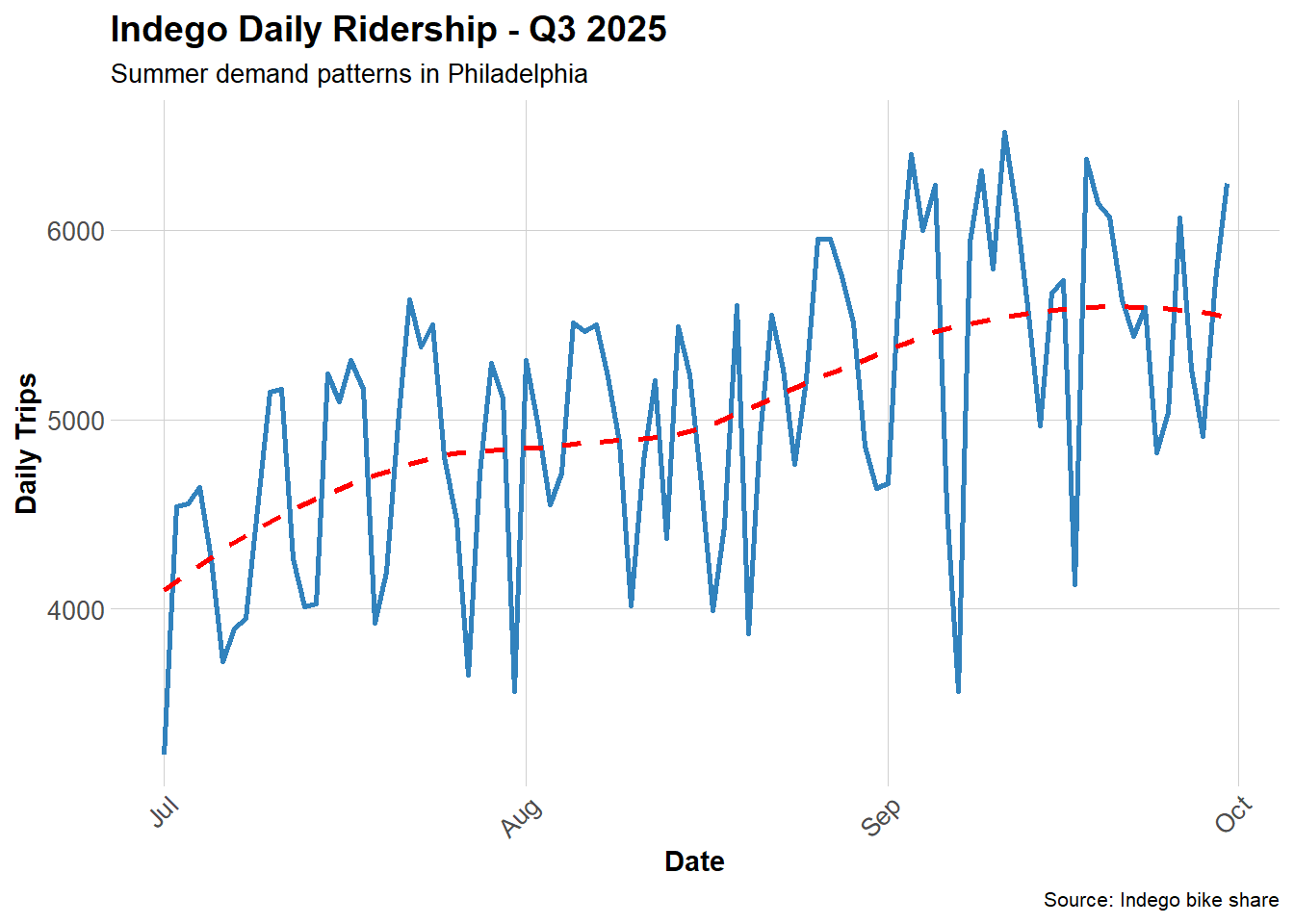
Question: What patterns do you see? How does ridership change over time?

Ridership increased overall from July to October. I would have thought they are very popular in the summer and ridership would be highest but of course the increase coincides with the school year and move in during late August. It may be that when students, who often don’t have cars, need to get around the city they may turn to bike share options.

Hourly Patterns

Code
# Average trips by hour and day type
hourly_patterns <- indego %>%
  group_by(hour, weekend) %>%
  summarize(avg_trips = n() / n_distinct(date)) %>%
  mutate(day_type = ifelse(weekend == 1, "Weekend", "Weekday"))

ggplot(hourly_patterns, aes(x = hour, y = avg_trips, color = day_type)) +
  geom_line(linewidth = 1.2) +
  scale_color_manual(values = c("Weekday" = "#08519c", "Weekend" = "#6baed6")) +
  labs(
    title = "Average Hourly Ridership Patterns",
    subtitle = "Clear commute patterns on weekdays",
    x = "Hour of Day",
    y = "Average Trips per Hour",
    color = "Day Type"
  ) +
  plotTheme

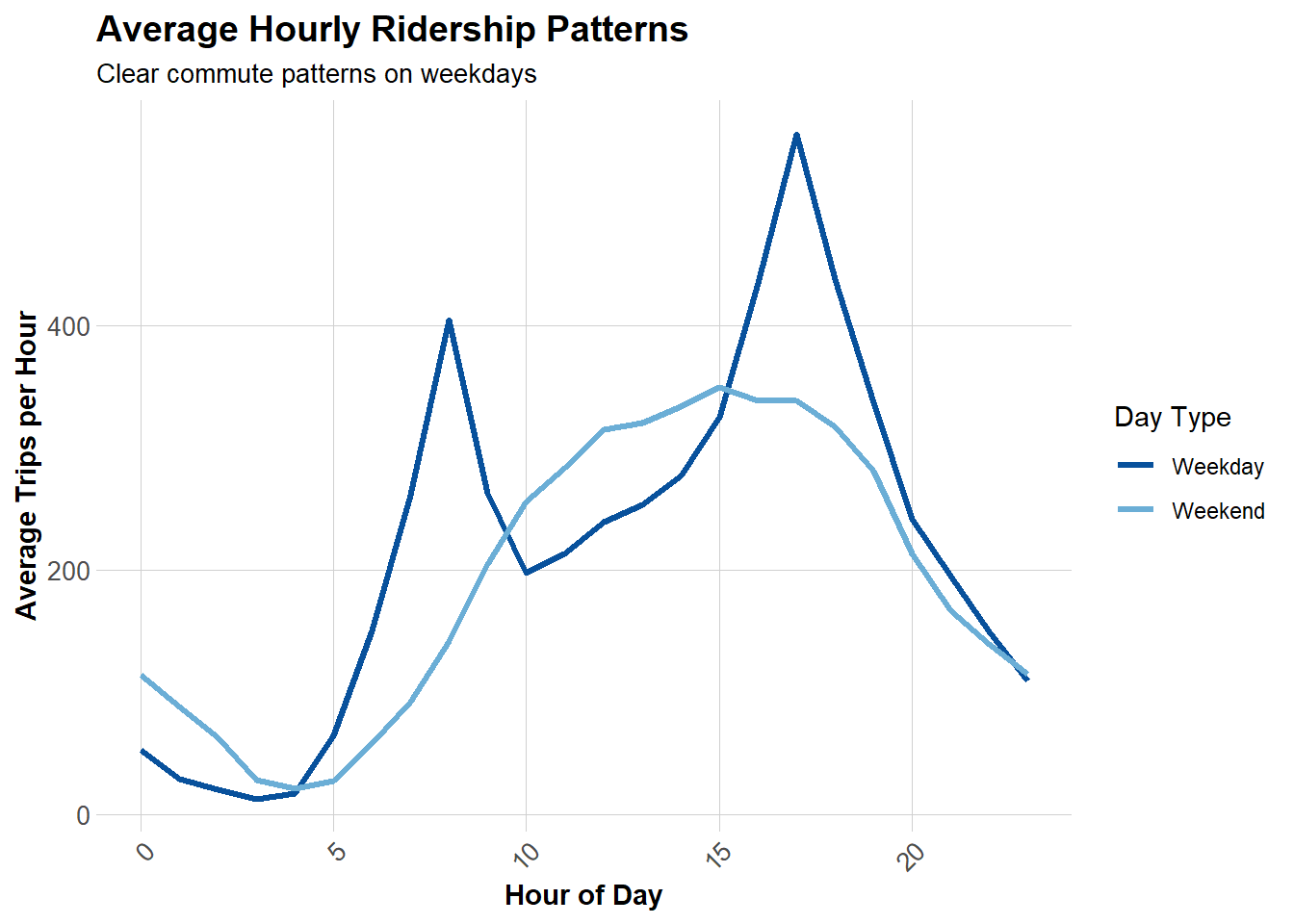
Question: When are the peak hours? How do weekends differ from weekdays?

These results are as expected. Weekdays see peak hours during morning and evening rush hours as people are getting to and from work. The weekends have a more gradual rise and fall during the day as there are not generally rush hours for people. Also ridership goes later in the night on the weekend with the weekend night crowds.

Top Stations

Code
# Most popular origin stations
top_stations <- indego %>%
  count(start_station, start_lat, start_lon, name = "trips") %>%
  arrange(desc(trips)) %>%
  head(20)

kable(top_stations, 
      caption = "Top 20 Indego Stations by Trip Origins",
      format.args = list(big.mark = ",")) %>%
  kable_styling(bootstrap_options = c("striped", "hover"))
Top 20 Indego Stations by Trip Origins
start_station start_lat start_lon trips
3,010 39.94711 -75.16618 7,716
3,032 39.94527 -75.17971 5,884
3,213 39.93887 -75.16663 5,660
3,163 39.94974 -75.18097 5,174
3,359 39.94888 -75.16978 4,681
3,185 39.95169 -75.15888 4,670
3,028 39.94061 -75.14958 4,607
3,020 39.94855 -75.19007 4,556
3,022 39.95472 -75.18323 4,475
3,066 39.94561 -75.17348 4,353
3,059 39.96244 -75.16121 4,265
3,063 39.94633 -75.16980 4,230
3,161 39.95486 -75.18091 4,223
3,101 39.94295 -75.15955 4,183
3,054 39.96250 -75.17420 4,117
3,030 39.93935 -75.15716 3,986
3,362 39.94816 -75.16226 3,965
3,061 39.95425 -75.17761 3,716
3,057 39.96439 -75.17987 3,668
3,296 39.95134 -75.16758 3,665

Get Philadelphia Spatial Context

Load Philadelphia Census Data

We’ll get census tract data to add demographic context to our stations.

Code
# Get Philadelphia census tracts
philly_census <- get_acs(
  geography = "tract",
  variables = c(
    "B01003_001",  # Total population
    "B19013_001",  # Median household income
    "B08301_001",  # Total commuters
    "B08301_010",  # Commute by transit
    "B02001_002",  # White alone
    "B25077_001"   # Median home value
  ),
  state = "PA",
  county = "Philadelphia",
  year = 2022,
  geometry = TRUE,
  output = "wide"
) %>%
  rename(
    Total_Pop = B01003_001E,
    Med_Inc = B19013_001E,
    Total_Commuters = B08301_001E,
    Transit_Commuters = B08301_010E,
    White_Pop = B02001_002E,
    Med_Home_Value = B25077_001E
  ) %>%
  mutate(
    Percent_Taking_Transit = (Transit_Commuters / Total_Commuters) * 100,
    Percent_White = (White_Pop / Total_Pop) * 100
  ) %>%
  st_transform(crs = 4326)  # WGS84 for lat/lon matching

  |                                                                            
  |                                                                      |   0%
  |                                                                            
  |=                                                                     |   1%
  |                                                                            
  |=                                                                     |   2%
  |                                                                            
  |==                                                                    |   2%
  |                                                                            
  |==                                                                    |   3%
  |                                                                            
  |===                                                                   |   4%
  |                                                                            
  |===                                                                   |   5%
  |                                                                            
  |====                                                                  |   5%
  |                                                                            
  |====                                                                  |   6%
  |                                                                            
  |=====                                                                 |   6%
  |                                                                            
  |=====                                                                 |   7%
  |                                                                            
  |======                                                                |   8%
  |                                                                            
  |======                                                                |   9%
  |                                                                            
  |=======                                                               |  10%
  |                                                                            
  |=======                                                               |  11%
  |                                                                            
  |========                                                              |  11%
  |                                                                            
  |========                                                              |  12%
  |                                                                            
  |=========                                                             |  13%
  |                                                                            
  |==========                                                            |  14%
  |                                                                            
  |===========                                                           |  15%
  |                                                                            
  |===========                                                           |  16%
  |                                                                            
  |============                                                          |  17%
  |                                                                            
  |=============                                                         |  18%
  |                                                                            
  |=============                                                         |  19%
  |                                                                            
  |==============                                                        |  20%
  |                                                                            
  |===============                                                       |  21%
  |                                                                            
  |===============                                                       |  22%
  |                                                                            
  |================                                                      |  23%
  |                                                                            
  |=================                                                     |  24%
  |                                                                            
  |==================                                                    |  25%
  |                                                                            
  |==================                                                    |  26%
  |                                                                            
  |===================                                                   |  27%
  |                                                                            
  |====================                                                  |  28%
  |                                                                            
  |====================                                                  |  29%
  |                                                                            
  |=====================                                                 |  30%
  |                                                                            
  |======================                                                |  31%
  |                                                                            
  |======================                                                |  32%
  |                                                                            
  |=======================                                               |  33%
  |                                                                            
  |========================                                              |  34%
  |                                                                            
  |========================                                              |  35%
  |                                                                            
  |=========================                                             |  36%
  |                                                                            
  |==========================                                            |  37%
  |                                                                            
  |==========================                                            |  38%
  |                                                                            
  |===========================                                           |  39%
  |                                                                            
  |============================                                          |  40%
  |                                                                            
  |=============================                                         |  41%
  |                                                                            
  |=============================                                         |  42%
  |                                                                            
  |==============================                                        |  43%
  |                                                                            
  |===============================                                       |  44%
  |                                                                            
  |===============================                                       |  45%
  |                                                                            
  |================================                                      |  46%
  |                                                                            
  |=================================                                     |  47%
  |                                                                            
  |=================================                                     |  48%
  |                                                                            
  |==================================                                    |  49%
  |                                                                            
  |===================================                                   |  50%
  |                                                                            
  |===================================                                   |  51%
  |                                                                            
  |====================================                                  |  52%
  |                                                                            
  |=====================================                                 |  53%
  |                                                                            
  |=====================================                                 |  54%
  |                                                                            
  |======================================                                |  54%
  |                                                                            
  |=======================================                               |  55%
  |                                                                            
  |========================================                              |  56%
  |                                                                            
  |========================================                              |  57%
  |                                                                            
  |=========================================                             |  58%
  |                                                                            
  |==========================================                            |  59%
  |                                                                            
  |==========================================                            |  60%
  |                                                                            
  |===========================================                           |  61%
  |                                                                            
  |============================================                          |  62%
  |                                                                            
  |============================================                          |  63%
  |                                                                            
  |=============================================                         |  64%
  |                                                                            
  |==============================================                        |  65%
  |                                                                            
  |==============================================                        |  66%
  |                                                                            
  |===============================================                       |  67%
  |                                                                            
  |================================================                      |  68%
  |                                                                            
  |================================================                      |  69%
  |                                                                            
  |=================================================                     |  70%
  |                                                                            
  |==================================================                    |  71%
  |                                                                            
  |===================================================                   |  72%
  |                                                                            
  |===================================================                   |  73%
  |                                                                            
  |====================================================                  |  74%
  |                                                                            
  |=====================================================                 |  75%
  |                                                                            
  |=====================================================                 |  76%
  |                                                                            
  |======================================================                |  77%
  |                                                                            
  |=======================================================               |  78%
  |                                                                            
  |=======================================================               |  79%
  |                                                                            
  |========================================================              |  80%
  |                                                                            
  |=========================================================             |  81%
  |                                                                            
  |=========================================================             |  82%
  |                                                                            
  |==========================================================            |  83%
  |                                                                            
  |===========================================================           |  84%
  |                                                                            
  |===========================================================           |  85%
  |                                                                            
  |============================================================          |  86%
  |                                                                            
  |=============================================================         |  87%
  |                                                                            
  |=============================================================         |  88%
  |                                                                            
  |==============================================================        |  89%
  |                                                                            
  |===============================================================       |  90%
  |                                                                            
  |================================================================      |  91%
  |                                                                            
  |================================================================      |  92%
  |                                                                            
  |=================================================================     |  93%
  |                                                                            
  |==================================================================    |  94%
  |                                                                            
  |==================================================================    |  95%
  |                                                                            
  |===================================================================   |  96%
  |                                                                            
  |====================================================================  |  97%
  |                                                                            
  |====================================================================  |  98%
  |                                                                            
  |===================================================================== |  99%
  |                                                                            
  |======================================================================| 100%
Code
# Check the data
glimpse(philly_census)
Rows: 408
Columns: 17
$ GEOID                  <chr> "42101001500", "42101001800", "42101002802", "4…
$ NAME                   <chr> "Census Tract 15; Philadelphia County; Pennsylv…
$ Total_Pop              <dbl> 3251, 3300, 5720, 4029, 4415, 1815, 3374, 2729,…
$ B01003_001M            <dbl> 677, 369, 796, 437, 853, 210, 480, 734, 763, 11…
$ Med_Inc                <dbl> 110859, 114063, 78871, 61583, 32347, 48581, 597…
$ B19013_001M            <dbl> 24975, 30714, 20396, 22293, 4840, 13812, 6278, …
$ Total_Commuters        <dbl> 2073, 2255, 3032, 2326, 1980, 969, 2427, 708, 2…
$ B08301_001M            <dbl> 387, 308, 478, 383, 456, 189, 380, 281, 456, 68…
$ Transit_Commuters      <dbl> 429, 123, 685, 506, 534, 192, 658, 218, 438, 51…
$ B08301_010M            <dbl> 188, 66, 219, 144, 285, 71, 278, 184, 176, 235,…
$ White_Pop              <dbl> 2185, 2494, 3691, 3223, 182, 984, 2111, 231, 35…
$ B02001_002M            <dbl> 268, 381, 592, 380, 88, 190, 463, 112, 238, 778…
$ Med_Home_Value         <dbl> 568300, 605000, 350600, 296400, 76600, 289700, …
$ B25077_001M            <dbl> 58894, 34876, 12572, 22333, 10843, 118720, 1506…
$ geometry               <MULTIPOLYGON [°]> MULTIPOLYGON (((-75.16558 3..., MU…
$ Percent_Taking_Transit <dbl> 20.694645, 5.454545, 22.592348, 21.754084, 26.9…
$ Percent_White          <dbl> 67.2100892, 75.5757576, 64.5279720, 79.9950360,…

Map Philadelphia Context

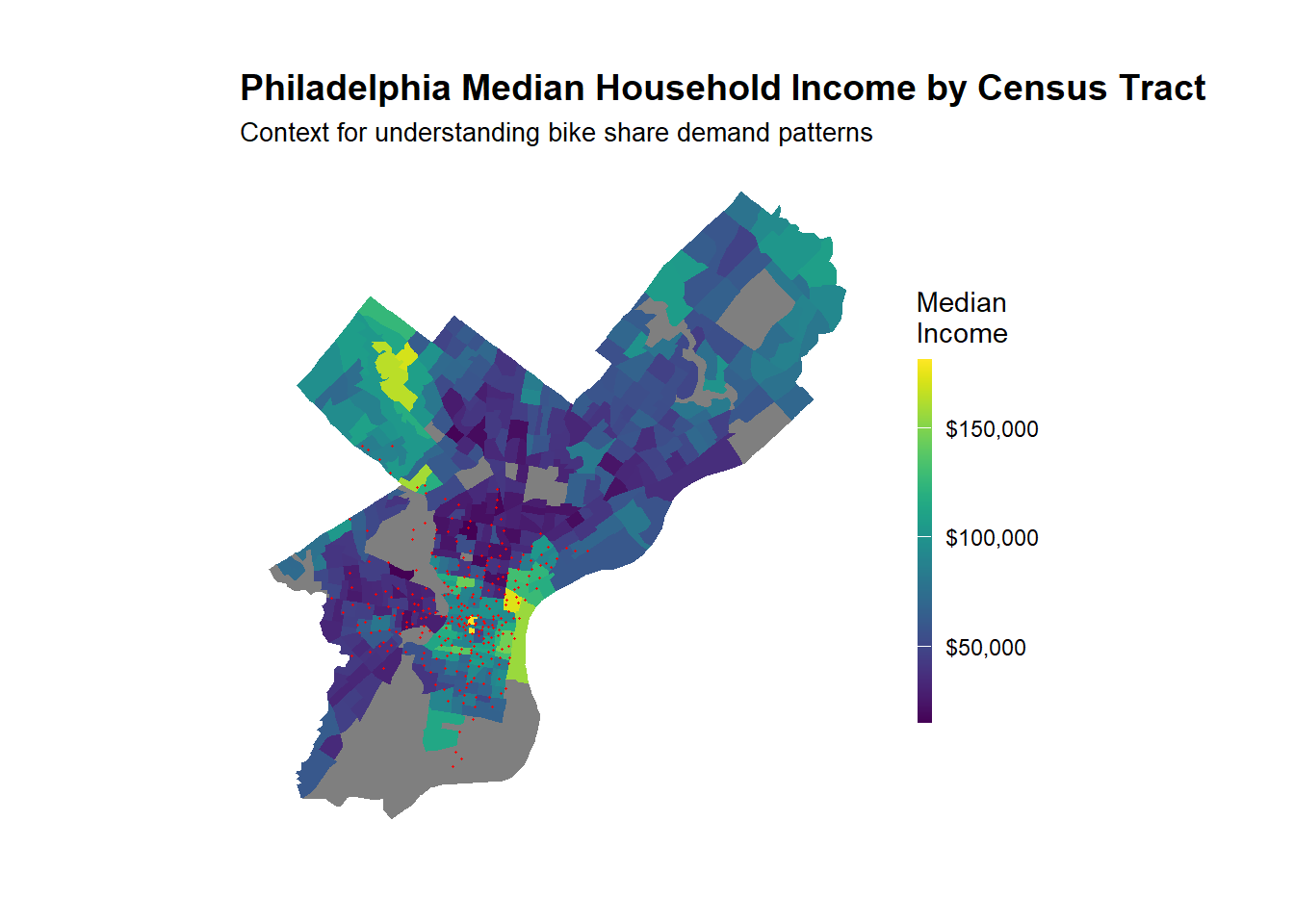
Code
# Map median income
ggplot() +
  geom_sf(data = philly_census, aes(fill = Med_Inc), color = NA) +
  scale_fill_viridis(
    option = "viridis",
    name = "Median\nIncome",
    labels = scales::dollar
  ) +
  labs(
    title = "Philadelphia Median Household Income by Census Tract",
    subtitle = "Context for understanding bike share demand patterns"
  ) +
  # Stations 
  geom_point(
    data = indego,
    aes(x = start_lon, y = start_lat),
    color = "red", size = 0.25, alpha = 0.6
  ) +
  mapTheme

Join Census Data to Stations

We’ll spatially join census characteristics to each bike station.

Code
# Create sf object for stations
stations_sf <- indego %>%
  distinct(start_station, start_lat, start_lon) %>%
  filter(!is.na(start_lat), !is.na(start_lon)) %>%
  st_as_sf(coords = c("start_lon", "start_lat"), crs = 4326)

# Spatial join to get census tract for each station
stations_census <- st_join(stations_sf, philly_census, left = TRUE) %>%
  st_drop_geometry()

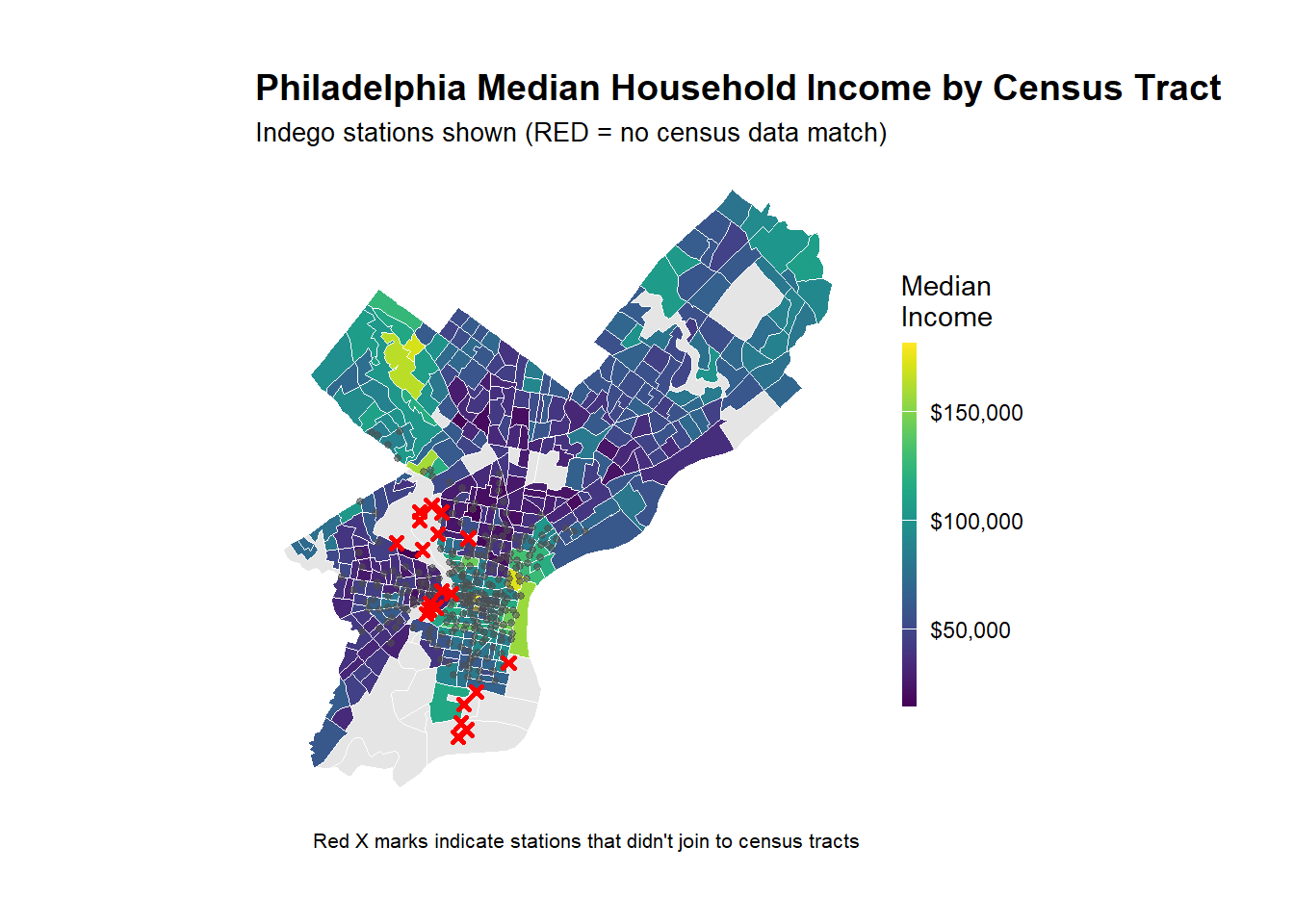
# Look at the result - investigate whether all of the stations joined to census data -- according to the map above there are stations in non-residential tracts.

stations_for_map <- indego %>%
  distinct(start_station, start_lat, start_lon) %>%
  filter(!is.na(start_lat), !is.na(start_lon)) %>%
  left_join(
    stations_census %>% select(start_station, Med_Inc),
    by = "start_station"
  ) %>%
  mutate(has_census = !is.na(Med_Inc))

# Add back to trip data
indego_census <- indego %>%
  left_join(
    stations_census %>% 
      select(start_station, Med_Inc, Percent_Taking_Transit, 
             Percent_White, Total_Pop),
    by = "start_station"
  )


# Prepare data for visualization
stations_for_map <- indego %>%
  distinct(start_station, start_lat, start_lon) %>%
  filter(!is.na(start_lat), !is.na(start_lon)) %>%
  left_join(
    stations_census %>% select(start_station, Med_Inc),
    by = "start_station"
  ) %>%
  mutate(has_census = !is.na(Med_Inc))

# Create the map showing problem stations
ggplot() +
  geom_sf(data = philly_census, aes(fill = Med_Inc), color = "white", size = 0.1) +
  scale_fill_viridis(
    option = "viridis",
    name = "Median\nIncome",
    labels = scales::dollar,
    na.value = "grey90"
  ) +
  # Stations with census data (small grey dots)
  geom_point(
    data = stations_for_map %>% filter(has_census),
    aes(x = start_lon, y = start_lat),
    color = "grey30", size = 1, alpha = 0.6
  ) +
  # Stations WITHOUT census data (red X marks the spot)
  geom_point(
    data = stations_for_map %>% filter(!has_census),
    aes(x = start_lon, y = start_lat),
    color = "red", size = 1, shape = 4, stroke = 1.5
  ) +
  labs(
    title = "Philadelphia Median Household Income by Census Tract",
    subtitle = "Indego stations shown (RED = no census data match)",
    caption = "Red X marks indicate stations that didn't join to census tracts"
  ) +
  mapTheme

Dealing with missing data

We need to decide what to do with the non-residential bike share stations. For this example, we are going to remove them – this is not necessarily the right way to do things always, but for the sake of simplicity, we are narrowing our scope to only stations in residential neighborhoods. We might opt to create a separate model for non-residential stations..

Code
# Identify which stations to keep
valid_stations <- stations_census %>%
  filter(!is.na(Med_Inc)) %>%
  pull(start_station)

# Filter trip data to valid stations only
indego_census <- indego %>%
  filter(start_station %in% valid_stations) %>%
  left_join(
    stations_census %>% 
      select(start_station, Med_Inc, Percent_Taking_Transit, 
             Percent_White, Total_Pop),
    by = "start_station"
  )

Get Weather Data

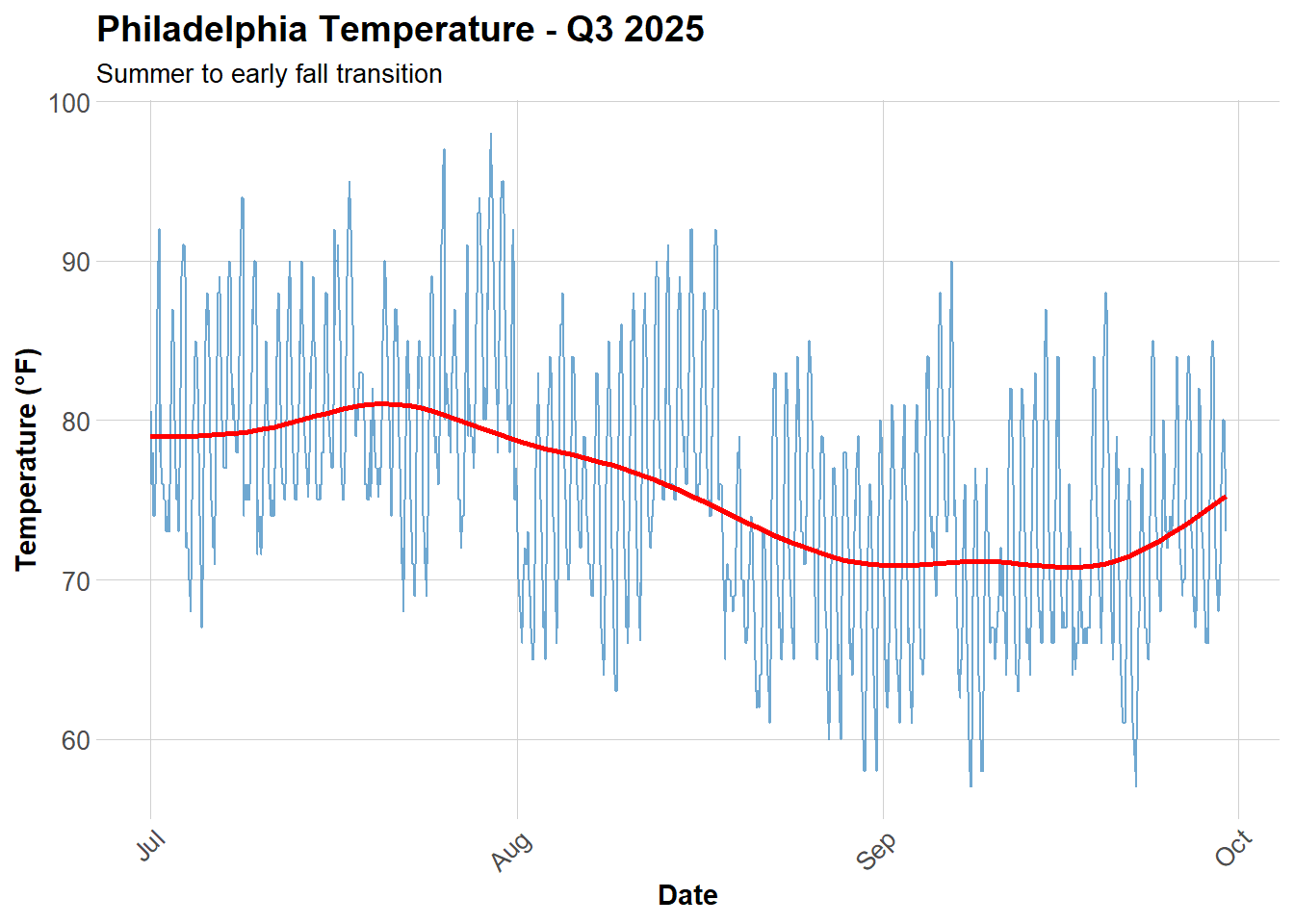
Weather significantly affects bike share demand! Let’s get hourly weather for Philadelphia.

Code
# Get weather from Philadelphia International Airport (KPHL)
# This covers Q1 2025: January 1 - March 31
weather_data <- riem_measures(
  station = "PHL",  # Philadelphia International Airport
  date_start = "2025-07-01",
  date_end = "2025-09-30"
)

# Process weather data
weather_processed <- weather_data %>%
  mutate(
    interval60 = floor_date(valid, unit = "hour"),
    Temperature = tmpf,  # Temperature in Fahrenheit
    Feel = feel, #Feels like temperature in Fahrenheit
    Precipitation = ifelse(is.na(p01i), 0, p01i),  # Hourly precip in inches
    Wind_Speed = sknt  # Wind speed in knots
  ) %>%
  select(interval60, Temperature, Precipitation, Feel, Wind_Speed) %>%
  distinct()

# Check for missing hours and interpolate if needed
weather_complete <- weather_processed %>%
  complete(interval60 = seq(min(interval60), max(interval60), by = "hour")) %>%
  fill(Temperature, Precipitation, Feel, Wind_Speed, .direction = "down")

# Look at the weather
summary(weather_complete %>% select(Temperature, Precipitation, Feel, Wind_Speed))
  Temperature    Precipitation           Feel          Wind_Speed    
 Min.   :57.00   Min.   :0.000000   Min.   : 57.00   Min.   : 0.000  
 1st Qu.:70.00   1st Qu.:0.000000   1st Qu.: 70.00   1st Qu.: 4.000  
 Median :76.00   Median :0.000000   Median : 76.00   Median : 6.000  
 Mean   :75.73   Mean   :0.008013   Mean   : 76.96   Mean   : 6.421  
 3rd Qu.:81.00   3rd Qu.:0.000000   3rd Qu.: 82.32   3rd Qu.: 9.000  
 Max.   :98.00   Max.   :1.390000   Max.   :108.59   Max.   :29.000  

Visualize Weather Patterns

Who is ready for a Philly winter?!

Code
ggplot(weather_complete, aes(x = interval60, y = Temperature)) +
  geom_line(color = "#3182bd", alpha = 0.7) +
  geom_smooth(se = FALSE, color = "red") +
  labs(
    title = "Philadelphia Temperature - Q3 2025",
    subtitle = "Summer to early fall transition",
    x = "Date",
    y = "Temperature (°F)"
  ) +
  plotTheme


Create Space-Time Panel

Aggregate Trips to Station-Hour Level

Code
# Count trips by station-hour
trips_panel <- indego_census %>%
  group_by(interval60, start_station, start_lat, start_lon,
           Med_Inc, Percent_Taking_Transit, Percent_White, Total_Pop) %>%
  summarize(Trip_Count = n()) %>%
  ungroup()

# How many station-hour observations?
nrow(trips_panel)
[1] 214178
Code
# How many unique stations?
length(unique(trips_panel$start_station))
[1] 263
Code
# How many unique hours?
length(unique(trips_panel$interval60))
[1] 2208

Create Complete Panel Structure

Not every station has trips every hour. We need a complete panel where every station-hour combination exists (even if Trip_Count = 0).

Code
# Calculate expected panel size
n_stations <- length(unique(trips_panel$start_station))
n_hours <- length(unique(trips_panel$interval60))
expected_rows <- n_stations * n_hours

cat("Expected panel rows:", format(expected_rows, big.mark = ","), "\n")
Expected panel rows: 580,704 
Code
cat("Current rows:", format(nrow(trips_panel), big.mark = ","), "\n")
Current rows: 214,178 
Code
cat("Missing rows:", format(expected_rows - nrow(trips_panel), big.mark = ","), "\n")
Missing rows: 366,526 
Code
# Create complete panel
study_panel <- expand.grid(
  interval60 = unique(trips_panel$interval60),
  start_station = unique(trips_panel$start_station)
) %>%
  # Join trip counts
  left_join(trips_panel, by = c("interval60", "start_station")) %>%
  # Replace NA trip counts with 0
  mutate(Trip_Count = replace_na(Trip_Count, 0))

# Fill in station attributes (they're the same for all hours)
station_attributes <- trips_panel %>%
  group_by(start_station) %>%
  summarize(
    start_lat = first(start_lat),
    start_lon = first(start_lon),
    Med_Inc = first(Med_Inc),
    Percent_Taking_Transit = first(Percent_Taking_Transit),
    Percent_White = first(Percent_White),
    Total_Pop = first(Total_Pop)
  )

study_panel <- study_panel %>%
  left_join(station_attributes, by = "start_station")

# Verify we have complete panel
cat("Complete panel rows:", format(nrow(study_panel), big.mark = ","), "\n")
Complete panel rows: 580,704 

Add Time Features

Code
study_panel <- study_panel %>%
  mutate(
    week = week(interval60),
    month = month(interval60, label = TRUE),
    dotw = wday(interval60, label = TRUE),
    hour = hour(interval60),
    date = as.Date(interval60),
    weekend = ifelse(dotw %in% c("Sat", "Sun"), 1, 0),
    rush_hour = ifelse(hour %in% c(7, 8, 9, 16, 17, 18), 1, 0)
  )

Join Weather Data

Code
study_panel <- study_panel %>%
  left_join(weather_complete, by = "interval60")

# Check for missing values
summary(study_panel %>% select(Trip_Count, Temperature, Precipitation, Feel))
   Trip_Count       Temperature    Precipitation        Feel       
 Min.   : 0.0000   Min.   :57.00   Min.   :0.000   Min.   : 57.00  
 1st Qu.: 0.0000   1st Qu.:70.00   1st Qu.:0.000   1st Qu.: 70.00  
 Median : 0.0000   Median :76.00   Median :0.000   Median : 76.00  
 Mean   : 0.7236   Mean   :75.73   Mean   :0.008   Mean   : 76.96  
 3rd Qu.: 1.0000   3rd Qu.:81.00   3rd Qu.:0.000   3rd Qu.: 82.32  
 Max.   :22.0000   Max.   :98.00   Max.   :1.390   Max.   :108.59  
                   NA's   :6312    NA's   :6312    NA's   :6312    

Create Temporal Lag Variables

Code
# Sort by station and time
study_panel <- study_panel %>%
  arrange(start_station, interval60)

# Create lag variables WITHIN each station
study_panel <- study_panel %>%
  group_by(start_station) %>%
  mutate(
    lag1Hour = lag(Trip_Count, 1),
    lag2Hours = lag(Trip_Count, 2),
    lag3Hours = lag(Trip_Count, 3),
    lag12Hours = lag(Trip_Count, 12),
    lag1day = lag(Trip_Count, 24),
    lag1week = lag(Trip_Count, 168),
  ) %>%
  ungroup()

# Remove rows with NA lags (first 24 hours for each station)
study_panel_complete <- study_panel %>%
  filter(!is.na(lag1week))

cat("Rows after removing NA lags:", format(nrow(study_panel_complete), big.mark = ","), "\n")
Rows after removing NA lags: 671,439 

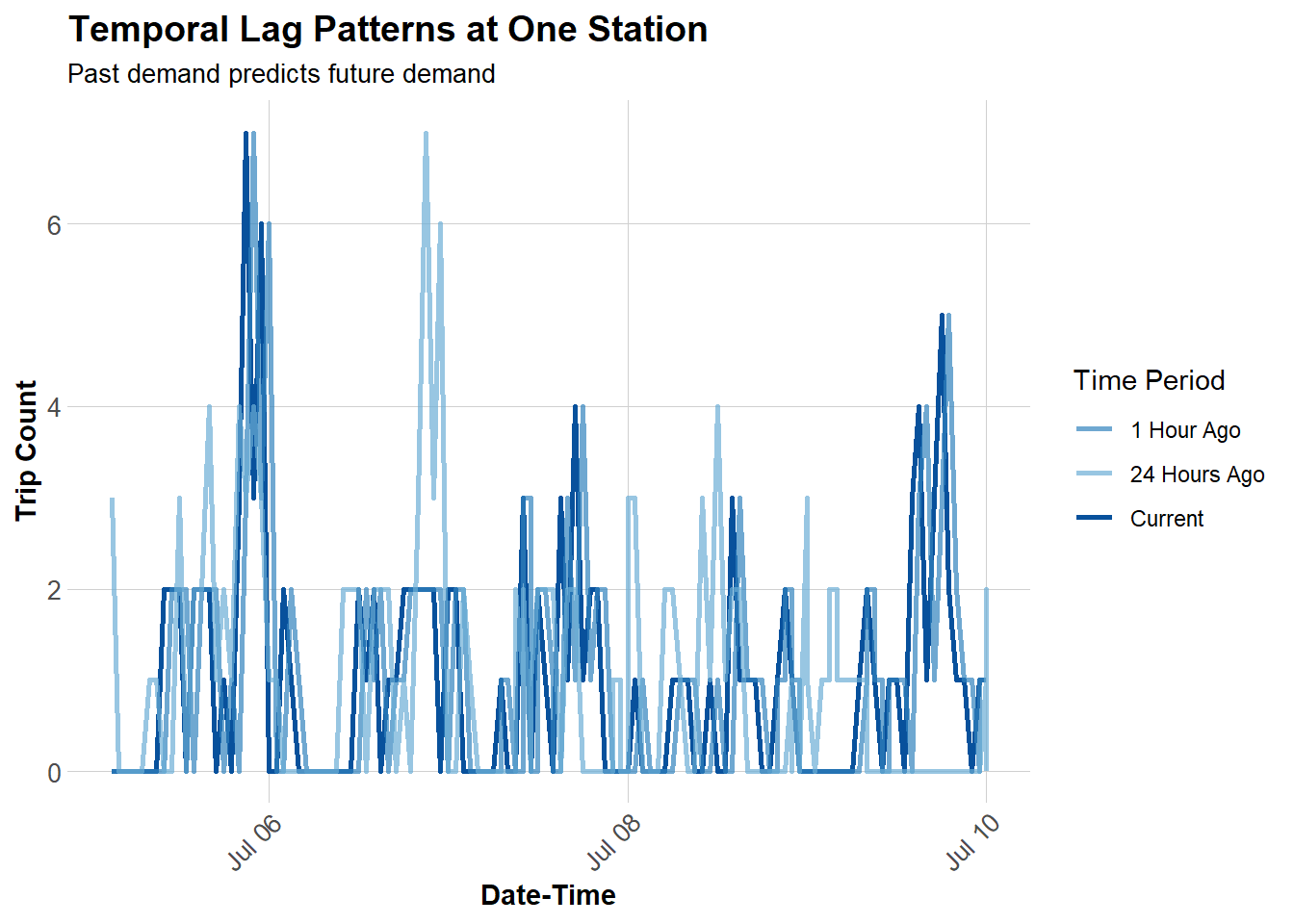
Visualize Lag Correlations

Code
# Sample one station to visualize
example_station <- study_panel_complete %>%
  filter(start_station == first(start_station)) %>%
  head(168)  # One week

# Plot actual vs lagged demand
ggplot(example_station, aes(x = interval60)) +
  geom_line(aes(y = Trip_Count, color = "Current"), linewidth = 1) +
  geom_line(aes(y = lag1Hour, color = "1 Hour Ago"), linewidth = 1, alpha = 0.7) +
  geom_line(aes(y = lag1day, color = "24 Hours Ago"), linewidth = 1, alpha = 0.7) +
  scale_color_manual(values = c(
    "Current" = "#08519c",
    "1 Hour Ago" = "#3182bd",
    "24 Hours Ago" = "#6baed6"
  )) +
  labs(
    title = "Temporal Lag Patterns at One Station",
    subtitle = "Past demand predicts future demand",
    x = "Date-Time",
    y = "Trip Count",
    color = "Time Period"
  ) +
  plotTheme


Temporal Train/Test Split

CRITICAL: We must train on PAST data and test on FUTURE data!

Why Temporal Validation Matters

In real operations, at 6:00 AM on March 15, we need to predict demand for March 15-31. We have data from Jan 1 - March 14, but NOT from March 15-31 (it hasn’t happened yet!).

Wrong approach: Train on weeks 10-13, test on weeks 1-9 (predicting past from future!)

Correct approach: Train on weeks 1-9, test on weeks 10-13 (predicting future from past)

Code
# Split by week
# Q3 has weeks 27-39 (July-Sep)
# Train on weeks 27-36 (July 1 - early Sep)
# Test on weeks 36-39 (rest of Sep)

# Which stations have trips in BOTH early and late periods?
early_stations <- study_panel_complete %>%
  filter(week < 36) %>%
  filter(Trip_Count > 0) %>%
  distinct(start_station) %>%
  pull(start_station)

late_stations <- study_panel_complete %>%
  filter(week >= 36) %>%
  filter(Trip_Count > 0) %>%
  distinct(start_station) %>%
  pull(start_station)

# Keep only stations that appear in BOTH periods
common_stations <- intersect(early_stations, late_stations)


# Filter panel to only common stations
study_panel_complete <- study_panel_complete %>%
  filter(start_station %in% common_stations)

# NOW create train/test split
train <- study_panel_complete %>%
  filter(week < 36)

test <- study_panel_complete %>%
  filter(week >= 36)

cat("Training observations:", format(nrow(train), big.mark = ","), "\n")
Training observations: 464,195 
Code
cat("Testing observations:", format(nrow(test), big.mark = ","), "\n")
Testing observations: 207,244 
Code
cat("Training date range:", min(train$date), "to", max(train$date), "\n")
Training date range: 20274 to 20333 
Code
cat("Testing date range:", min(test$date), "to", max(test$date), "\n")
Testing date range: 20334 to 20361 

Build Predictive Models

We’ll build 5 models with increasing complexity to see what improves predictions.

Model 1: Baseline (Time + Weather)

Code
# Create day of week factor with treatment (dummy) coding
train <- train %>%
  mutate(dotw_simple = factor(dotw, levels = c("Mon", "Tue", "Wed", "Thu", "Fri", "Sat", "Sun")))

# Set contrasts to treatment coding (dummy variables)
contrasts(train$dotw_simple) <- contr.treatment(7)

# Now run the model
model1 <- lm(
  Trip_Count ~ as.factor(hour) + dotw_simple + Temperature + Precipitation,
  data = train
)

summary(model1)

Call:
lm(formula = Trip_Count ~ as.factor(hour) + dotw_simple + Temperature + 
    Precipitation, data = train)

Residuals:
    Min      1Q  Median      3Q     Max 
-1.7488 -0.7597 -0.2079  0.2120 21.1050 

Coefficients:
                    Estimate Std. Error t value             Pr(>|t|)    
(Intercept)        0.3682491  0.0270944  13.591 < 0.0000000000000002 ***
as.factor(hour)1  -0.0524469  0.0126346  -4.151     0.00003309870185 ***
as.factor(hour)2  -0.1258408  0.0127281  -9.887 < 0.0000000000000002 ***
as.factor(hour)3  -0.1768582  0.0127195 -13.905 < 0.0000000000000002 ***
as.factor(hour)4  -0.1658679  0.0125123 -13.256 < 0.0000000000000002 ***
as.factor(hour)5  -0.0547020  0.0128611  -4.253     0.00002106887679 ***
as.factor(hour)6   0.1873902  0.0125605  14.919 < 0.0000000000000002 ***
as.factor(hour)7   0.4560745  0.0125870  36.234 < 0.0000000000000002 ***
as.factor(hour)8   0.9416129  0.0125198  75.210 < 0.0000000000000002 ***
as.factor(hour)9   0.6276052  0.0127047  49.400 < 0.0000000000000002 ***
as.factor(hour)10  0.4834604  0.0125652  38.476 < 0.0000000000000002 ***
as.factor(hour)11  0.5281827  0.0121913  43.325 < 0.0000000000000002 ***
as.factor(hour)12  0.6158844  0.0123947  49.689 < 0.0000000000000002 ***
as.factor(hour)13  0.6891155  0.0125768  54.792 < 0.0000000000000002 ***
as.factor(hour)14  0.7559300  0.0124246  60.841 < 0.0000000000000002 ***
as.factor(hour)15  0.8648970  0.0125051  69.163 < 0.0000000000000002 ***
as.factor(hour)16  1.0831084  0.0126702  85.485 < 0.0000000000000002 ***
as.factor(hour)17  1.4375105  0.0128842 111.572 < 0.0000000000000002 ***
as.factor(hour)18  1.0852029  0.0128307  84.579 < 0.0000000000000002 ***
as.factor(hour)19  0.8735245  0.0129826  67.284 < 0.0000000000000002 ***
as.factor(hour)20  0.6011154  0.0127982  46.969 < 0.0000000000000002 ***
as.factor(hour)21  0.4227890  0.0125658  33.646 < 0.0000000000000002 ***
as.factor(hour)22  0.2879695  0.0124415  23.146 < 0.0000000000000002 ***
as.factor(hour)23  0.1280527  0.0124667  10.272 < 0.0000000000000002 ***
dotw_simple2       0.1042901  0.0066564  15.668 < 0.0000000000000002 ***
dotw_simple3       0.0366454  0.0067196   5.454     0.00000004940690 ***
dotw_simple4       0.0458157  0.0066479   6.892     0.00000000000552 ***
dotw_simple5       0.0989077  0.0070119  14.106 < 0.0000000000000002 ***
dotw_simple6       0.0041096  0.0069015   0.595                0.552    
dotw_simple7      -0.0648442  0.0066994  -9.679 < 0.0000000000000002 ***
Temperature       -0.0021649  0.0003221  -6.721     0.00000000001810 ***
Precipitation     -0.3599307  0.0270714 -13.296 < 0.0000000000000002 ***
---
Signif. codes:  0 '***' 0.001 '**' 0.01 '*' 0.05 '.' 0.1 ' ' 1

Residual standard error: 1.237 on 464163 degrees of freedom
Multiple R-squared:  0.1089,    Adjusted R-squared:  0.1088 
F-statistic:  1830 on 31 and 464163 DF,  p-value: < 0.00000000000000022

The model uses Monday as the baseline. Each coefficient represents the difference in expected trips per station-hour compared to Monday - dow_simple2 = Tuesday.

Weekday Pattern (Tue-Fri):

  • All weekdays have positive coefficients (0.026 to 0.088)
  • Friday has the highest weekday effect (+0.088)
  • Weekdays likely benefit from concentrated commuting patterns

Weekend Pattern (Sat-Sun):

  • Only Sunday weekend days have a negative coefficient (-0.065) while Saturday has a positive (+0.0064)

Hourly Interpretation

Hour Coefficient Interpretation 0 (baseline) 0.000 trips/hour (midnight) 1 -0.054 slightly fewer than midnight … 6 +0.184 morning activity starting 7 +0.450 morning rush building 8 +0.937 PEAK morning rush 9 +0.614 post-rush … 17 +1.401 PEAK evening rush (5 PM) 18 +1.058 evening declining … 23 +0.131 late night minimal

Model 2: Add Temporal Lags

Code
model2 <- lm(
  Trip_Count ~ as.factor(hour) + dotw_simple + Temperature + Precipitation +
    lag1Hour + lag3Hours + lag1day,
  data = train
)

summary(model2)

Call:
lm(formula = Trip_Count ~ as.factor(hour) + dotw_simple + Temperature + 
    Precipitation + lag1Hour + lag3Hours + lag1day, data = train)

Residuals:
    Min      1Q  Median      3Q     Max 
-8.0652 -0.4805 -0.1328  0.1699 17.4097 

Coefficients:
                    Estimate Std. Error t value             Pr(>|t|)    
(Intercept)        0.1517212  0.0231242   6.561      0.0000000000534 ***
as.factor(hour)1   0.0050328  0.0107803   0.467              0.64060    
as.factor(hour)2  -0.0138561  0.0108633  -1.276              0.20213    
as.factor(hour)3  -0.0321651  0.0108597  -2.962              0.00306 ** 
as.factor(hour)4  -0.0004616  0.0106885  -0.043              0.96555    
as.factor(hour)5   0.0967690  0.0109891   8.806 < 0.0000000000000002 ***
as.factor(hour)6   0.2704594  0.0107360  25.192 < 0.0000000000000002 ***
as.factor(hour)7   0.4132746  0.0107637  38.395 < 0.0000000000000002 ***
as.factor(hour)8   0.7128398  0.0107183  66.507 < 0.0000000000000002 ***
as.factor(hour)9   0.2635703  0.0108823  24.220 < 0.0000000000000002 ***
as.factor(hour)10  0.1961770  0.0107428  18.261 < 0.0000000000000002 ***
as.factor(hour)11  0.2828768  0.0104193  27.149 < 0.0000000000000002 ***
as.factor(hour)12  0.3467520  0.0105967  32.723 < 0.0000000000000002 ***
as.factor(hour)13  0.3904312  0.0107558  36.300 < 0.0000000000000002 ***
as.factor(hour)14  0.4453933  0.0106272  41.911 < 0.0000000000000002 ***
as.factor(hour)15  0.5177799  0.0107026  48.379 < 0.0000000000000002 ***
as.factor(hour)16  0.6693837  0.0108560  61.660 < 0.0000000000000002 ***
as.factor(hour)17  0.9030493  0.0110698  81.578 < 0.0000000000000002 ***
as.factor(hour)18  0.4893097  0.0110539  44.266 < 0.0000000000000002 ***
as.factor(hour)19  0.3743646  0.0111577  33.552 < 0.0000000000000002 ***
as.factor(hour)20  0.1886039  0.0109998  17.146 < 0.0000000000000002 ***
as.factor(hour)21  0.1666560  0.0107593  15.489 < 0.0000000000000002 ***
as.factor(hour)22  0.1298422  0.0106320  12.212 < 0.0000000000000002 ***
as.factor(hour)23  0.0638527  0.0106388   6.002      0.0000000019524 ***
dotw_simple2       0.0385025  0.0056813   6.777      0.0000000000123 ***
dotw_simple3      -0.0040894  0.0057344  -0.713              0.47577    
dotw_simple4       0.0183779  0.0056725   3.240              0.00120 ** 
dotw_simple5       0.0191991  0.0059886   3.206              0.00135 ** 
dotw_simple6      -0.0282515  0.0058924  -4.795      0.0000016307921 ***
dotw_simple7      -0.0488761  0.0057166  -8.550 < 0.0000000000000002 ***
Temperature       -0.0026041  0.0002749  -9.472 < 0.0000000000000002 ***
Precipitation     -0.0924507  0.0231301  -3.997      0.0000641644538 ***
lag1Hour           0.3997495  0.0013675 292.320 < 0.0000000000000002 ***
lag3Hours          0.1256638  0.0013447  93.451 < 0.0000000000000002 ***
lag1day            0.1416324  0.0012445 113.804 < 0.0000000000000002 ***
---
Signif. codes:  0 '***' 0.001 '**' 0.01 '*' 0.05 '.' 0.1 ' ' 1

Residual standard error: 1.056 on 464160 degrees of freedom
Multiple R-squared:  0.3514,    Adjusted R-squared:  0.3514 
F-statistic:  7397 on 34 and 464160 DF,  p-value: < 0.00000000000000022

Question: Did adding lags improve R²? Why or why not?

Yes, adding lag variables greatly improved the R² from 0.1062 to 0.3526. This is because ridership is strongly auto correlated meaning that the number of trips in a given hour depend on trips that happened previously - bike demand is temporal and also patterned and cyclical (rush hours, time of year like students coming back in August, and adding time is less noisy than the weather variable).

Model 3: Add Demographics

Code
model3 <- lm(
  Trip_Count ~ as.factor(hour) + dotw_simple + Temperature + Precipitation +
    lag1Hour + lag3Hours + lag1day +
    Med_Inc.x + Percent_Taking_Transit.y + Percent_White.y,
  data = train
)

summary(model3)

Call:
lm(formula = Trip_Count ~ as.factor(hour) + dotw_simple + Temperature + 
    Precipitation + lag1Hour + lag3Hours + lag1day + Med_Inc.x + 
    Percent_Taking_Transit.y + Percent_White.y, data = train)

Residuals:
    Min      1Q  Median      3Q     Max 
-6.7333 -0.7395 -0.2690  0.4612 17.0509 

Coefficients:
                              Estimate    Std. Error t value
(Intercept)               0.9124583540  0.0518050679  17.613
as.factor(hour)1          0.0908102512  0.0372008493   2.441
as.factor(hour)2         -0.0168983180  0.0412507019  -0.410
as.factor(hour)3         -0.1090948792  0.0484549671  -2.251
as.factor(hour)4         -0.0824845255  0.0441874329  -1.867
as.factor(hour)5          0.0483567208  0.0348432205   1.388
as.factor(hour)6          0.2395443810  0.0296970726   8.066
as.factor(hour)7          0.3614287436  0.0281316543  12.848
as.factor(hour)8          0.7185249130  0.0270794670  26.534
as.factor(hour)9          0.0973848673  0.0275035768   3.541
as.factor(hour)10         0.0565382169  0.0276687465   2.043
as.factor(hour)11         0.1408814346  0.0271324155   5.192
as.factor(hour)12         0.2279907560  0.0272051962   8.380
as.factor(hour)13         0.2727282649  0.0272704651  10.001
as.factor(hour)14         0.3221692226  0.0269756701  11.943
as.factor(hour)15         0.4004098876  0.0269313573  14.868
as.factor(hour)16         0.6365484724  0.0269780592  23.595
as.factor(hour)17         0.9343347246  0.0269879403  34.620
as.factor(hour)18         0.4204094079  0.0272368975  15.435
as.factor(hour)19         0.2963802784  0.0276344611  10.725
as.factor(hour)20         0.0958521108  0.0280349078   3.419
as.factor(hour)21         0.1075895157  0.0283460496   3.796
as.factor(hour)22         0.1008011517  0.0290615724   3.469
as.factor(hour)23         0.0226518792  0.0304195344   0.745
dotw_simple2              0.0711711700  0.0118514838   6.005
dotw_simple3             -0.0158120091  0.0120194501  -1.316
dotw_simple4              0.0303529206  0.0119195442   2.546
dotw_simple5              0.0131942165  0.0123166648   1.071
dotw_simple6              0.0280243274  0.0123672199   2.266
dotw_simple7             -0.0180702320  0.0122886648  -1.470
Temperature              -0.0008759491  0.0005530565  -1.584
Precipitation            -0.7625965365  0.0745475135 -10.230
lag1Hour                  0.2997553139  0.0021213871 141.302
lag3Hours                 0.0894704552  0.0021875613  40.900
lag1day                   0.1130869851  0.0020583035  54.942
Med_Inc.x                 0.0000008997  0.0000001155   7.790
Percent_Taking_Transit.y -0.0041528216  0.0004234566  -9.807
Percent_White.y           0.0025077079  0.0002063528  12.153
                                     Pr(>|t|)    
(Intercept)              < 0.0000000000000002 ***
as.factor(hour)1                     0.014644 *  
as.factor(hour)2                     0.682064    
as.factor(hour)3                     0.024357 *  
as.factor(hour)4                     0.061946 .  
as.factor(hour)5                     0.165188    
as.factor(hour)6          0.00000000000000073 ***
as.factor(hour)7         < 0.0000000000000002 ***
as.factor(hour)8         < 0.0000000000000002 ***
as.factor(hour)9                     0.000399 ***
as.factor(hour)10                    0.041015 *  
as.factor(hour)11         0.00000020788321907 ***
as.factor(hour)12        < 0.0000000000000002 ***
as.factor(hour)13        < 0.0000000000000002 ***
as.factor(hour)14        < 0.0000000000000002 ***
as.factor(hour)15        < 0.0000000000000002 ***
as.factor(hour)16        < 0.0000000000000002 ***
as.factor(hour)17        < 0.0000000000000002 ***
as.factor(hour)18        < 0.0000000000000002 ***
as.factor(hour)19        < 0.0000000000000002 ***
as.factor(hour)20                    0.000629 ***
as.factor(hour)21                    0.000147 ***
as.factor(hour)22                    0.000523 ***
as.factor(hour)23                    0.456485    
dotw_simple2              0.00000000191429276 ***
dotw_simple3                         0.188332    
dotw_simple4                         0.010882 *  
dotw_simple5                         0.284059    
dotw_simple6                         0.023452 *  
dotw_simple7                         0.141434    
Temperature                          0.113234    
Precipitation            < 0.0000000000000002 ***
lag1Hour                 < 0.0000000000000002 ***
lag3Hours                < 0.0000000000000002 ***
lag1day                  < 0.0000000000000002 ***
Med_Inc.x                 0.00000000000000675 ***
Percent_Taking_Transit.y < 0.0000000000000002 ***
Percent_White.y          < 0.0000000000000002 ***
---
Signif. codes:  0 '***' 0.001 '**' 0.01 '*' 0.05 '.' 0.1 ' ' 1

Residual standard error: 1.313 on 165327 degrees of freedom
  (298830 observations deleted due to missingness)
Multiple R-squared:  0.2464,    Adjusted R-squared:  0.2462 
F-statistic:  1461 on 37 and 165327 DF,  p-value: < 0.00000000000000022

Question: Did demographics improve R²?

No, demographics decreased the R² from 0.3526 to 0.247. This was an NA data issue where around two thirds of the data set was dropped from the training set. The temporal autocorrelation still dominates the model so demographics don’t add much to the predictive value of the model.

Model 4: Add Station Fixed Effects

Code
model4 <- lm(
  Trip_Count ~ as.factor(hour) + dotw_simple + Temperature + Precipitation +
    lag1Hour + lag3Hours + lag1day +
    Med_Inc.x + Percent_Taking_Transit.y + Percent_White.y +
    as.factor(start_station),
  data = train
)

# Summary too long with all station dummies, just show key metrics
cat("Model 4 R-squared:", summary(model4)$r.squared, "\n")
Model 4 R-squared: 0.2761157 
Code
cat("Model 4 Adj R-squared:", summary(model4)$adj.r.squared, "\n")
Model 4 Adj R-squared: 0.2748176 

What do station fixed effects capture? Baseline differences in demand across stations.

They remove the noise of all time invariable characteristics like access, land-use context, neighborhood density, proximity to amenities etc. This controls for these factors so the model can just compare within-station variation over time.

Model 5: Add Rush Hour Interaction

Code
model5 <- lm(
  Trip_Count ~ as.factor(hour) + dotw_simple + Temperature + Precipitation +
    lag1Hour + lag3Hours + lag1day + rush_hour + as.factor(month) +
    Med_Inc.x + Percent_Taking_Transit.y + Percent_White.y +
    as.factor(start_station) +
    rush_hour * weekend,  # Rush hour effects different on weekends
  data = train
)

cat("Model 5 R-squared:", summary(model5)$r.squared, "\n")
Model 5 R-squared: 0.2815065 
Code
cat("Model 5 Adj R-squared:", summary(model5)$adj.r.squared, "\n")
Model 5 Adj R-squared: 0.2802051 

Model Evaluation

Calculate Predictions and MAE

Code
# Get predictions on test set

# Create day of week factor with treatment (dummy) coding
test <- test %>%
  mutate(dotw_simple = factor(dotw, levels = c("Mon", "Tue", "Wed", "Thu", "Fri", "Sat", "Sun")))

# Set contrasts to treatment coding (dummy variables)
contrasts(test$dotw_simple) <- contr.treatment(7)

test <- test %>%
  mutate(
    pred1 = predict(model1, newdata = test),
    pred2 = predict(model2, newdata = test),
    pred3 = predict(model3, newdata = test),
    pred4 = predict(model4, newdata = test),
    pred5 = predict(model5, newdata = test)
  )

# Calculate MAE for each model
mae_results <- data.frame(
  Model = c(
    "1. Time + Weather",
    "2. + Temporal Lags",
    "3. + Demographics",
    "4. + Station FE",
    "5. + Rush Hour Interaction"
  ),
  MAE = c(
    mean(abs(test$Trip_Count - test$pred1), na.rm = TRUE),
    mean(abs(test$Trip_Count - test$pred2), na.rm = TRUE),
    mean(abs(test$Trip_Count - test$pred3), na.rm = TRUE),
    mean(abs(test$Trip_Count - test$pred4), na.rm = TRUE),
    mean(abs(test$Trip_Count - test$pred5), na.rm = TRUE)
  )
)

kable(mae_results, 
      digits = 2,
      caption = "Mean Absolute Error by Model (Test Set)",
      col.names = c("Model", "MAE (trips)")) %>%
  kable_styling(bootstrap_options = c("striped", "hover"))
Mean Absolute Error by Model (Test Set)
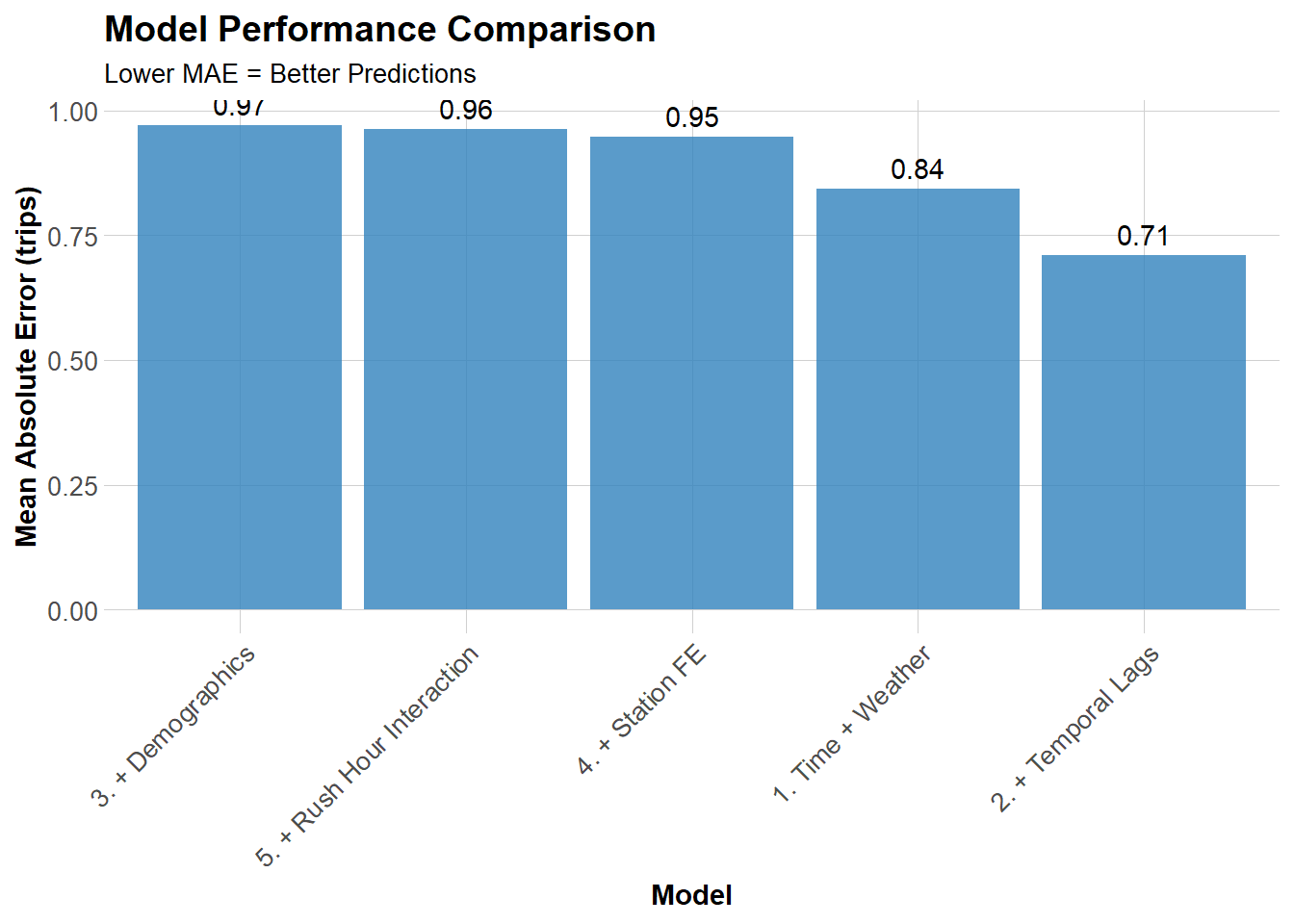
Model MAE (trips)
1. Time + Weather 0.84
2. + Temporal Lags 0.71
3. + Demographics 0.97
4. + Station FE 0.95
5. + Rush Hour Interaction 0.96

Visualize Model Comparison

Code
ggplot(mae_results, aes(x = reorder(Model, -MAE), y = MAE)) +
  geom_col(fill = "#3182bd", alpha = 0.8) +
  geom_text(aes(label = round(MAE, 2)), vjust = -0.5) +
  labs(
    title = "Model Performance Comparison",
    subtitle = "Lower MAE = Better Predictions",
    x = "Model",
    y = "Mean Absolute Error (trips)"
  ) +
  plotTheme +
  theme(axis.text.x = element_text(angle = 45, hjust = 1))

Question: Which features gave us the biggest improvement?

The second model: temporal lag gave the best performance, lowest MAE, at 0.71 because bike share demand is temporal and this model best captures this dependance.


Space-Time Error Analysis

Observed vs. Predicted

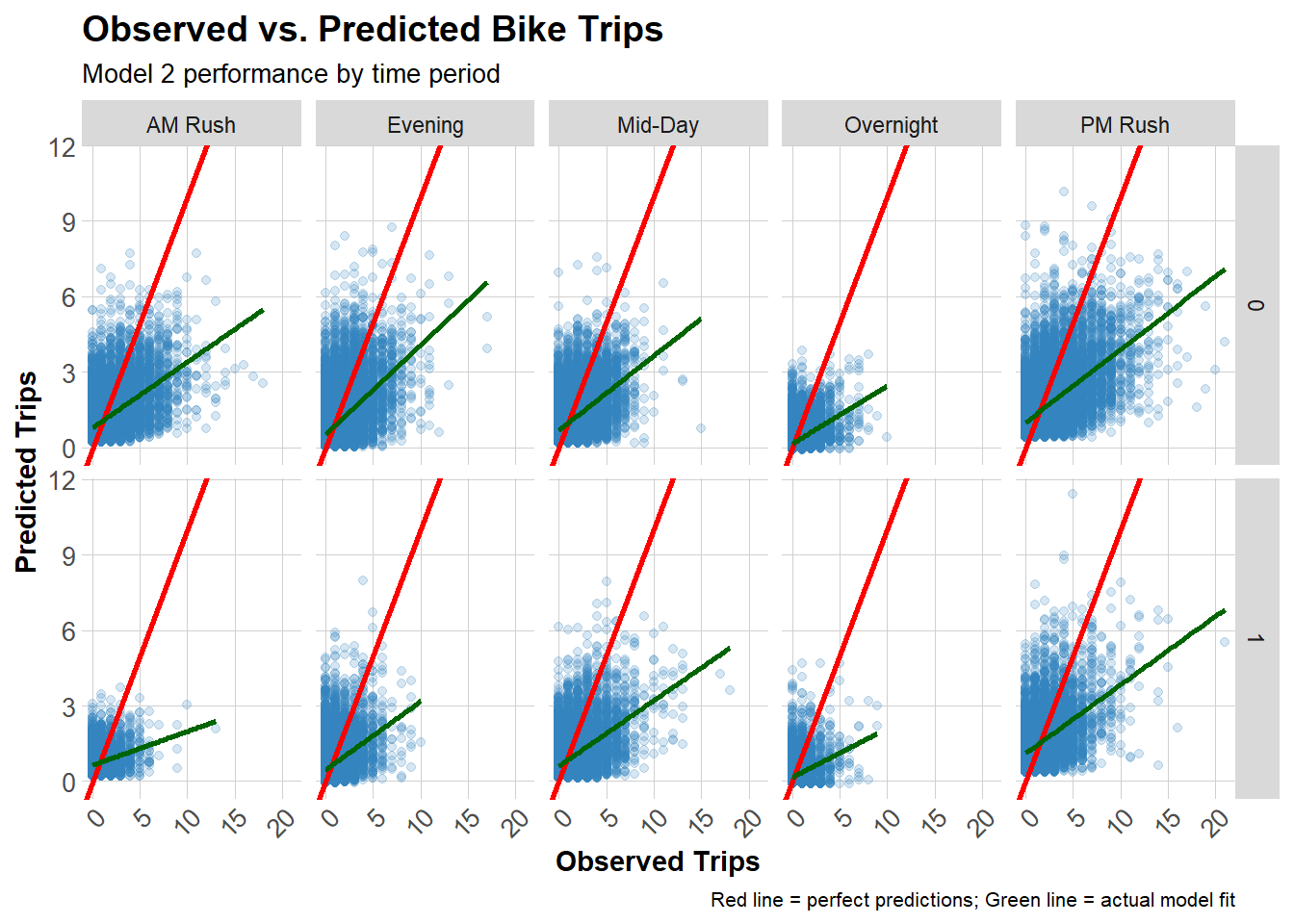
Let’s use our best model (Model 2) for error analysis.

Code
test <- test %>%
  mutate(
    error = Trip_Count - pred2,
    abs_error = abs(error),
    time_of_day = case_when(
      hour < 7 ~ "Overnight",
      hour >= 7 & hour < 10 ~ "AM Rush",
      hour >= 10 & hour < 15 ~ "Mid-Day",
      hour >= 15 & hour <= 18 ~ "PM Rush",
      hour > 18 ~ "Evening"
    )
  )

# Scatter plot by time and day type
ggplot(test, aes(x = Trip_Count, y = pred2)) +
  geom_point(alpha = 0.2, color = "#3182bd") +
  geom_abline(slope = 1, intercept = 0, color = "red", linewidth = 1) +
  geom_smooth(method = "lm", se = FALSE, color = "darkgreen") +
  facet_grid(weekend ~ time_of_day) +
  labs(
    title = "Observed vs. Predicted Bike Trips",
    subtitle = "Model 2 performance by time period",
    x = "Observed Trips",
    y = "Predicted Trips",
    caption = "Red line = perfect predictions; Green line = actual model fit"
  ) +
  plotTheme

Question: Where is the model performing well? Where is it struggling?

The model really only performs well at stations with low volume demand (such as below 5 observed trips). Unfortunately, the model under predicts high demand periods like rush hour and high volume stations (those that are greater than 5 or so observed trips). This could be due to the model missing non-linear dynamics that impact ridership.

Spatial Error Patterns

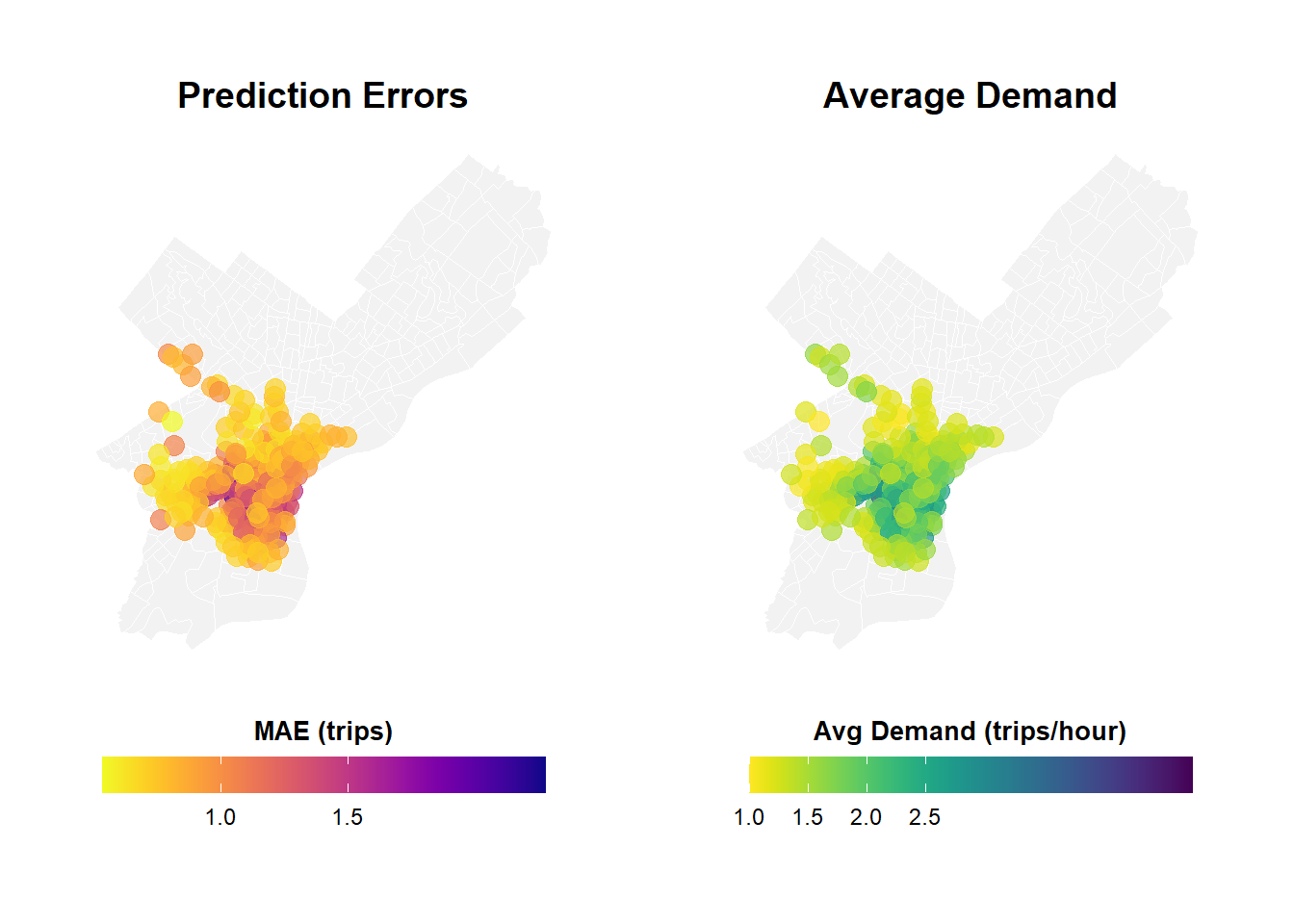
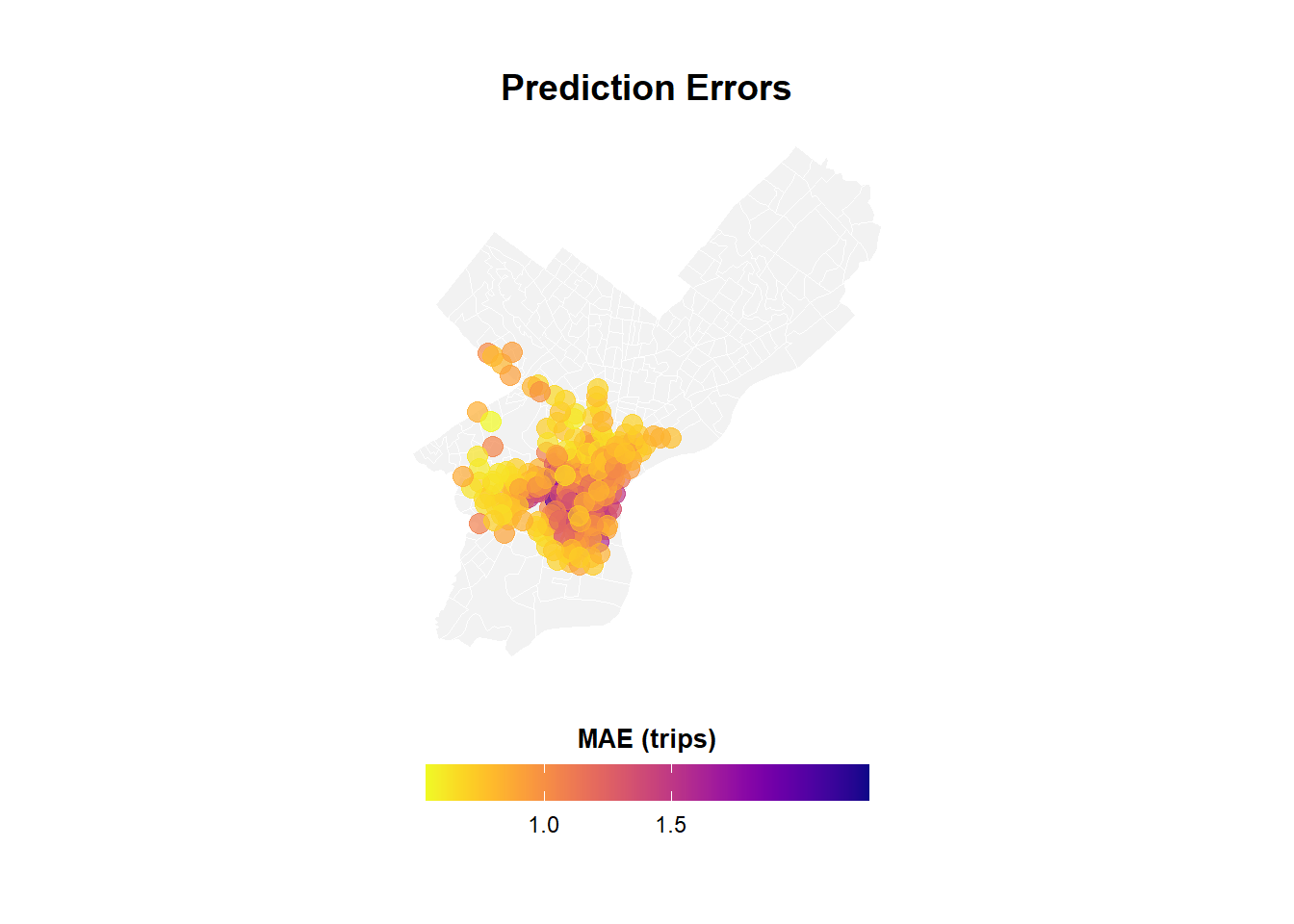
Are prediction errors clustered in certain parts of Philadelphia?

Code
# Calculate MAE by station
station_errors <- test %>%
  group_by(start_station, start_lat.x, start_lon.y) %>%
  summarize(
    MAE = mean(abs_error, na.rm = TRUE),
    avg_demand = mean(Trip_Count, na.rm = TRUE),
    .groups = "drop"
  ) %>%
  filter(!is.na(start_lat.x), !is.na(start_lon.y))

## Create Two Maps Side-by-Side with Proper Legends (sorry these maps are ugly)

# Calculate station errors
station_errors <- test %>%
  filter(!is.na(pred2)) %>%
  group_by(start_station, start_lat.x, start_lon.y) %>%
  summarize(
    MAE = mean(abs(Trip_Count - pred2), na.rm = TRUE),
    avg_demand = mean(Trip_Count, na.rm = TRUE),
    .groups = "drop"
  ) %>%
  filter(!is.na(start_lat.x), !is.na(start_lon.y))

# Map 1: Prediction Errors
p1 <- ggplot() +
  geom_sf(data = philly_census, fill = "grey95", color = "white", size = 0.2) +
  geom_point(
    data = station_errors,
    aes(x = start_lon, y = start_lat, color = MAE),
    size = 3.5,
    alpha = 0.7
  ) +
  scale_color_viridis(
    option = "plasma",
    name = "MAE\n(trips)",
    direction = -1,
    breaks = c(0.5, 1.0, 1.5),  # Fewer, cleaner breaks
    labels = c("0.5", "1.0", "1.5")
  ) +
  labs(title = "Prediction Errors",
       subtitle = "Higher in Center City") +
  mapTheme +
  theme(
    legend.position = "right",
    legend.title = element_text(size = 10, face = "bold"),
    legend.text = element_text(size = 9),
    plot.title = element_text(size = 14, face = "bold"),
    plot.subtitle = element_text(size = 10)
  ) +
  guides(color = guide_colorbar(
    barwidth = 1.5,
    barheight = 12,
    title.position = "top",
    title.hjust = 0.5
  ))

# Map 2: Average Demand
p2 <- ggplot() +
  geom_sf(data = philly_census, fill = "grey95", color = "white", size = 0.2) +
  geom_point(
    data = station_errors,
    aes(x = start_lon.y, y = start_lat.x, color = avg_demand),
    size = 3.5,
    alpha = 0.7
  ) +
  scale_color_viridis(
    option = "viridis",
    name = "Avg\nDemand",
    direction = -1,
    breaks = c(0.5, 1.0, 1.5, 2.0, 2.5),  # Clear breaks
    labels = c("0.5", "1.0", "1.5", "2.0", "2.5")
  ) +
  labs(title = "Average Demand",
       subtitle = "Trips per station-hour") +
  mapTheme +
  theme(
    legend.position = "right",
    legend.title = element_text(size = 10, face = "bold"),
    legend.text = element_text(size = 9),
    plot.title = element_text(size = 14, face = "bold"),
    plot.subtitle = element_text(size = 10)
  ) +
  guides(color = guide_colorbar(
    barwidth = 1.5,
    barheight = 12,
    title.position = "top",
    title.hjust = 0.5
  ))


# Map 1: Prediction Errors
p1 <- ggplot() +
  geom_sf(data = philly_census, fill = "grey95", color = "white", size = 0.1) +
  geom_point(
    data = station_errors,
    aes(x = start_lon.y, y = start_lat.x, color = MAE),
    size = 3.5,
    alpha = 0.7
  ) +
  scale_color_viridis(
    option = "plasma",
    name = "MAE (trips)",
    direction = -1,
    breaks = c(0.5, 1.0, 1.5),
    labels = c("0.5", "1.0", "1.5")
  ) +
  labs(title = "Prediction Errors") +
  mapTheme +
  theme(
    legend.position = "bottom",
    legend.title = element_text(size = 10, face = "bold"),
    legend.text = element_text(size = 9),
    plot.title = element_text(size = 14, face = "bold", hjust = 0.5)
  ) +
  guides(color = guide_colorbar(
    barwidth = 12,
    barheight = 1,
    title.position = "top",
    title.hjust = 0.5
  ))

# Map 2: Average Demand  
p2 <- ggplot() +
  geom_sf(data = philly_census, fill = "grey95", color = "white", size = 0.1) +
  geom_point(
    data = station_errors,
    aes(x = start_lon.y, y = start_lat.x, color = avg_demand),
    size = 3.5,
    alpha = 0.7
  ) +
  scale_color_viridis(
    option = "viridis",
    name = "Avg Demand (trips/hour)",
    direction = -1,
    breaks = c(0.5, 1.0, 1.5, 2.0, 2.5),
    labels = c("0.5", "1.0", "1.5", "2.0", "2.5")
  ) +
  labs(title = "Average Demand") +
  mapTheme +
  theme(
    legend.position = "bottom",
    legend.title = element_text(size = 10, face = "bold"),
    legend.text = element_text(size = 9),
    plot.title = element_text(size = 14, face = "bold", hjust = 0.5)
  ) +
  guides(color = guide_colorbar(
    barwidth = 12,
    barheight = 1,
    title.position = "top",
    title.hjust = 0.5
  ))

# Combine
grid.arrange(
  p1, p2,
  ncol = 2
  )
Code
p1

Question: Do you see spatial clustering of errors? What neighborhoods have high errors?

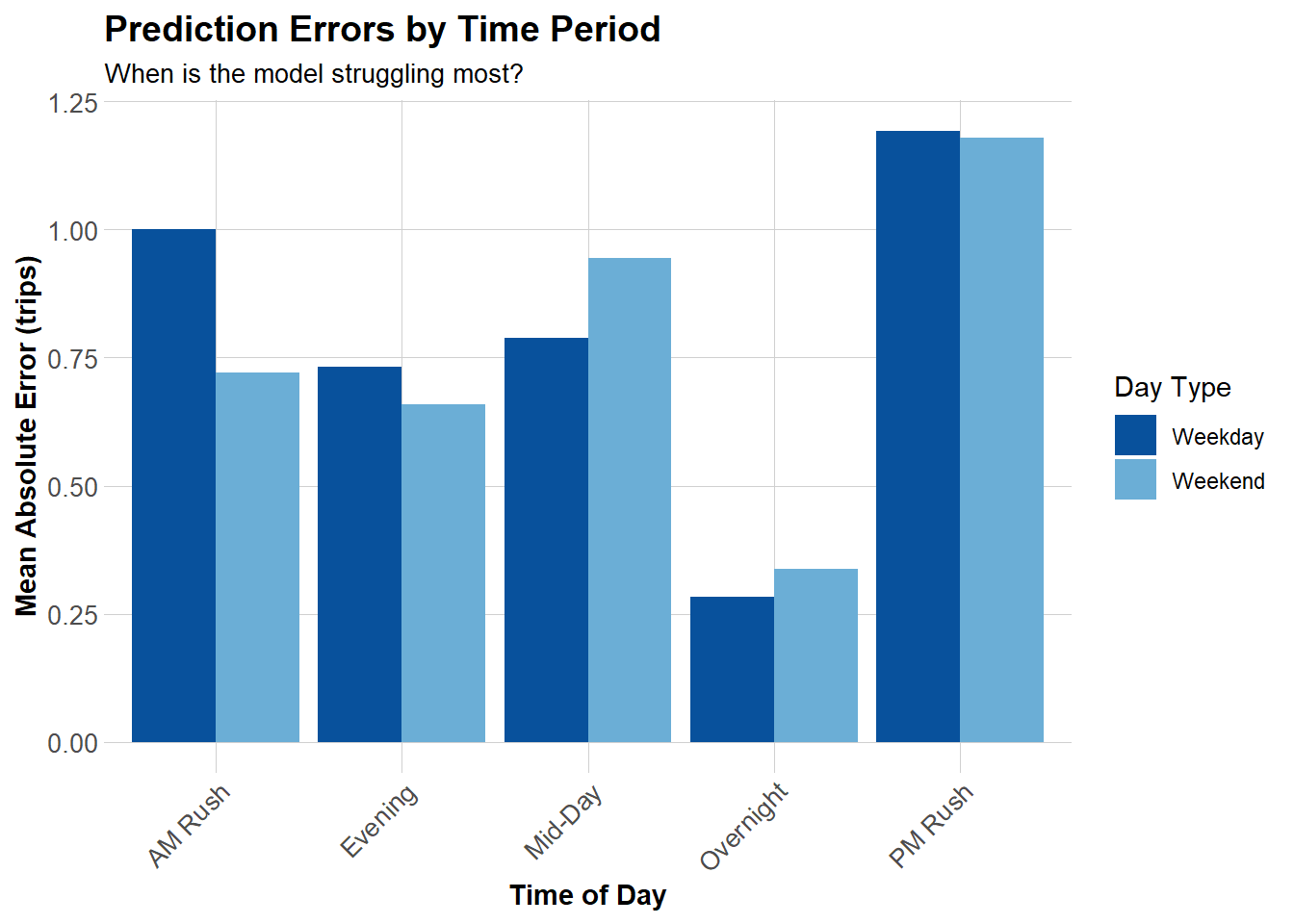
The areas such as center city and university city have the highest demand and also highest MAE. This is expected based on the model performance where it cannot account for large volume stations or other non-linear aspects of the problem. For example, 30th street station or bike shares around the universities may have different peak or surge behaviors from other variables aside from what we used in the model like train arrival times or large university events etc.

Temporal Error Patterns

When are we most wrong?

Code
# MAE by time of day and day type
temporal_errors <- test %>%
  group_by(time_of_day, weekend) %>%
  summarize(
    MAE = mean(abs_error, na.rm = TRUE),
    .groups = "drop"
  ) %>%
  mutate(day_type = ifelse(weekend == 1, "Weekend", "Weekday"))

ggplot(temporal_errors, aes(x = time_of_day, y = MAE, fill = day_type)) +
  geom_col(position = "dodge") +
  scale_fill_manual(values = c("Weekday" = "#08519c", "Weekend" = "#6baed6")) +
  labs(
    title = "Prediction Errors by Time Period",
    subtitle = "When is the model struggling most?",
    x = "Time of Day",
    y = "Mean Absolute Error (trips)",
    fill = "Day Type"
  ) +
  plotTheme +
  theme(axis.text.x = element_text(angle = 45, hjust = 1))

Errors and Demographics

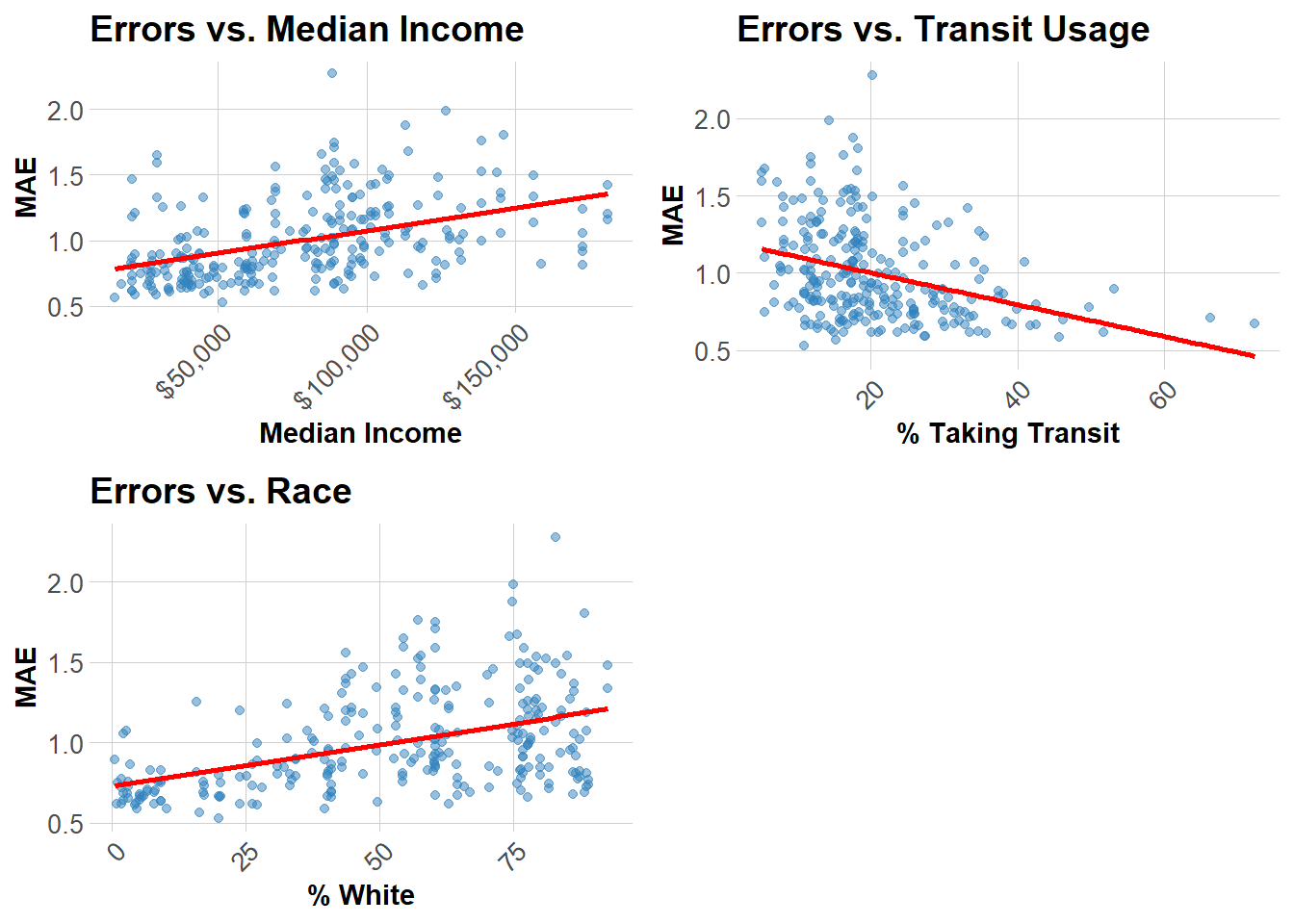
Are prediction errors related to neighborhood characteristics?

Code
# Join demographic data to station errors
station_errors_demo <- station_errors %>%
  left_join(
    station_attributes %>% select(start_station, Med_Inc, Percent_Taking_Transit, Percent_White),
    by = "start_station"
  ) %>%
  filter(!is.na(Med_Inc))

# Create plots
p1 <- ggplot(station_errors_demo, aes(x = Med_Inc, y = MAE)) +
  geom_point(alpha = 0.5, color = "#3182bd") +
  geom_smooth(method = "lm", se = FALSE, color = "red") +
  scale_x_continuous(labels = scales::dollar) +
  labs(title = "Errors vs. Median Income", x = "Median Income", y = "MAE") +
  plotTheme

p2 <- ggplot(station_errors_demo, aes(x = Percent_Taking_Transit, y = MAE)) +
  geom_point(alpha = 0.5, color = "#3182bd") +
  geom_smooth(method = "lm", se = FALSE, color = "red") +
  labs(title = "Errors vs. Transit Usage", x = "% Taking Transit", y = "MAE") +
  plotTheme

p3 <- ggplot(station_errors_demo, aes(x = Percent_White, y = MAE)) +
  geom_point(alpha = 0.5, color = "#3182bd") +
  geom_smooth(method = "lm", se = FALSE, color = "red") +
  labs(title = "Errors vs. Race", x = "% White", y = "MAE") +
  plotTheme

grid.arrange(p1, p2, p3, ncol = 2)

Critical Question: Are prediction errors systematically higher in certain demographic groups? What are the equity implications?

These prediction errors are consistent with the spatial clustering seen.The model performs best in transit-heavy, often lower-income/majority-minority neighborhoods, and worse in affluent/Whiter neighborhoods with irregular trip patterns.


Compare results to Q1 2025 (Winter):

  • How do MAE values compare? Why might they differ?

The MAE in Q1 for Model 2 was 0.50 compared to Q3 Model 3 of 0.71. The summer months are higher demand seasons versus the winter months. This makes predicting summer bike patterns harder because of the higher variance leading to higher MAE.

  • Are temporal patterns different (e.g., summer vs. winter)?

Summer and Winter are two very different seasons. Weather is a portion of why summer months are harder to predict as well. Rainstorms and other weather are more sporadic and with higher ridership can disrupt the predictive pattern more easily. Winter is cold everyday, assuming people still riding in the winter are consistent with this aspect, the weather patterns are less interruptive. There are also midday increases in ridership during the summer which could be tourists riding around the city.

  • Which features are most important in your quarter?

Again, distance to universities and center city (as seen in the prediction errors maps) spike more in the summer months than in winter months could be helpful. Weather is actually the most important feature (or one of them) as heat and rain coupled with the higher ridership makes it harder to predict summer patters over winter patterns.

Part 3: Feature Engineering & model improvement: Adding 2-3 new features to improve the model:

Add Feature 1: same hour last week

Added code to lines 581 chunk to add the lag1week variable:

[lag1week = lag(Trip_Count, 168)] and [filter(!is.na(lag1week))]

Model 6: Add same hour one week lag

This variable was chosen based on the predictive value of the temporal lag models. It could potentially improve the model to look back even further in time to predict the future. This was true but only incrementally. The R2 slightly increased to 0.3578 from 0.3513.

Code
model6 <- lm(
  Trip_Count ~ as.factor(hour) + dotw_simple + Temperature + Precipitation + lag1week + lag1Hour + lag3Hours + lag1day,
  data = train
)

summary(model6)

Call:
lm(formula = Trip_Count ~ as.factor(hour) + dotw_simple + Temperature + 
    Precipitation + lag1week + lag1Hour + lag3Hours + lag1day, 
    data = train)

Residuals:
    Min      1Q  Median      3Q     Max 
-7.8958 -0.4845 -0.1391  0.1704 17.4782 

Coefficients:
                    Estimate Std. Error t value             Pr(>|t|)    
(Intercept)        0.0855497  0.0230243   3.716             0.000203 ***
as.factor(hour)1   0.0009293  0.0107247   0.087             0.930947    
as.factor(hour)2  -0.0218567  0.0108077  -2.022             0.043144 *  
as.factor(hour)3  -0.0436470  0.0108048  -4.040  0.00005355257608722 ***
as.factor(hour)4  -0.0129719  0.0106348  -1.220             0.222557    
as.factor(hour)5   0.0796475  0.0109351   7.284  0.00000000000032546 ***
as.factor(hour)6   0.2605243  0.0106815  24.390 < 0.0000000000000002 ***
as.factor(hour)7   0.4130357  0.0107081  38.572 < 0.0000000000000002 ***
as.factor(hour)8   0.7197802  0.0106634  67.500 < 0.0000000000000002 ***
as.factor(hour)9   0.2789224  0.0108283  25.759 < 0.0000000000000002 ***
as.factor(hour)10  0.2140525  0.0106904  20.023 < 0.0000000000000002 ***
as.factor(hour)11  0.2981352  0.0103678  28.756 < 0.0000000000000002 ***
as.factor(hour)12  0.3494794  0.0105420  33.151 < 0.0000000000000002 ***
as.factor(hour)13  0.3843570  0.0107006  35.919 < 0.0000000000000002 ***
as.factor(hour)14  0.4351710  0.0105733  41.157 < 0.0000000000000002 ***
as.factor(hour)15  0.5117392  0.0106476  48.061 < 0.0000000000000002 ***
as.factor(hour)16  0.6646401  0.0108001  61.540 < 0.0000000000000002 ***
as.factor(hour)17  0.9059036  0.0110127  82.260 < 0.0000000000000002 ***
as.factor(hour)18  0.4937868  0.0109969  44.902 < 0.0000000000000002 ***
as.factor(hour)19  0.3804739  0.0111004  34.276 < 0.0000000000000002 ***
as.factor(hour)20  0.1939857  0.0109432  17.727 < 0.0000000000000002 ***
as.factor(hour)21  0.1705066  0.0107039  15.929 < 0.0000000000000002 ***
as.factor(hour)22  0.1346820  0.0105773  12.733 < 0.0000000000000002 ***
as.factor(hour)23  0.0660513  0.0105839   6.241  0.00000000043592416 ***
dotw_simple2       0.0360465  0.0056520   6.378  0.00000000018004396 ***
dotw_simple3      -0.0033892  0.0057048  -0.594             0.552446    
dotw_simple4       0.0236186  0.0056437   4.185  0.00002852853883764 ***
dotw_simple5       0.0290188  0.0059593   4.870  0.00000111914468811 ***
dotw_simple6      -0.0180855  0.0058638  -3.084             0.002041 ** 
dotw_simple7      -0.0444085  0.0056874  -7.808  0.00000000000000582 ***
Temperature       -0.0022464  0.0002735  -8.212 < 0.0000000000000002 ***
Precipitation     -0.1206957  0.0230142  -5.244  0.00000015685361078 ***
lag1week           0.0873478  0.0012562  69.536 < 0.0000000000000002 ***
lag1Hour           0.3873746  0.0013720 282.336 < 0.0000000000000002 ***
lag3Hours          0.1135726  0.0013490  84.190 < 0.0000000000000002 ***
lag1day            0.1312334  0.0012471 105.231 < 0.0000000000000002 ***
---
Signif. codes:  0 '***' 0.001 '**' 0.01 '*' 0.05 '.' 0.1 ' ' 1

Residual standard error: 1.05 on 464159 degrees of freedom
Multiple R-squared:  0.3581,    Adjusted R-squared:  0.3581 
F-statistic:  7398 on 35 and 464159 DF,  p-value: < 0.00000000000000022

Add Feature 2: “feels-like” weather

This feature was selected because of the heat aspect of summer months increasing variability and decreasing prediction value. Added Feel variable for feels like temperature in chunk 439. This didn’t change the R2 at all. The Feel variable had very little predictive influence even if it was significant.

Model 7: Add “feels-like” weather

Code
model7 <- lm(
  Trip_Count ~ as.factor(hour) + dotw_simple + Temperature + Precipitation + Feel + lag1week + lag1Hour + lag3Hours + lag1day,
  data = train
)

summary(model7)

Call:
lm(formula = Trip_Count ~ as.factor(hour) + dotw_simple + Temperature + 
    Precipitation + Feel + lag1week + lag1Hour + lag3Hours + 
    lag1day, data = train)

Residuals:
    Min      1Q  Median      3Q     Max 
-7.8912 -0.4844 -0.1390  0.1687 17.4738 

Coefficients:
                     Estimate  Std. Error t value             Pr(>|t|)    
(Intercept)        0.02006073  0.02762163   0.726              0.46767    
as.factor(hour)1  -0.00002092  0.01072682  -0.002              0.99844    
as.factor(hour)2  -0.02219227  0.01080782  -2.053              0.04004 *  
as.factor(hour)3  -0.04496122  0.01080894  -4.160   0.0000318817014825 ***
as.factor(hour)4  -0.01425428  0.01063880  -1.340              0.18030    
as.factor(hour)5   0.07925602  0.01093531   7.248   0.0000000000004245 ***
as.factor(hour)6   0.25999822  0.01068202  24.340 < 0.0000000000000002 ***
as.factor(hour)7   0.41311368  0.01070793  38.580 < 0.0000000000000002 ***
as.factor(hour)8   0.71986062  0.01066318  67.509 < 0.0000000000000002 ***
as.factor(hour)9   0.27921512  0.01082832  25.786 < 0.0000000000000002 ***
as.factor(hour)10  0.21462128  0.01069101  20.075 < 0.0000000000000002 ***
as.factor(hour)11  0.29870886  0.01036850  28.809 < 0.0000000000000002 ***
as.factor(hour)12  0.35000087  0.01054254  33.199 < 0.0000000000000002 ***
as.factor(hour)13  0.38466370  0.01070061  35.948 < 0.0000000000000002 ***
as.factor(hour)14  0.43577598  0.01057409  41.212 < 0.0000000000000002 ***
as.factor(hour)15  0.51211343  0.01064778  48.096 < 0.0000000000000002 ***
as.factor(hour)16  0.66332595  0.01080428  61.395 < 0.0000000000000002 ***
as.factor(hour)17  0.90376877  0.01102372  81.984 < 0.0000000000000002 ***
as.factor(hour)18  0.49151142  0.01100951  44.644 < 0.0000000000000002 ***
as.factor(hour)19  0.37656336  0.01113754  33.810 < 0.0000000000000002 ***
as.factor(hour)20  0.19145239  0.01095894  17.470 < 0.0000000000000002 ***
as.factor(hour)21  0.16790069  0.01072088  15.661 < 0.0000000000000002 ***
as.factor(hour)22  0.13316625  0.01058302  12.583 < 0.0000000000000002 ***
as.factor(hour)23  0.06641658  0.01058407   6.275   0.0000000003496090 ***
dotw_simple2       0.03674567  0.00565428   6.499   0.0000000000810770 ***
dotw_simple3      -0.00122939  0.00572687  -0.215              0.83002    
dotw_simple4       0.02690932  0.00569545   4.725   0.0000023051338008 ***
dotw_simple5       0.03036320  0.00596741   5.088   0.0000003616785514 ***
dotw_simple6      -0.01801058  0.00586369  -3.072              0.00213 ** 
dotw_simple7      -0.04317578  0.00569459  -7.582   0.0000000000000341 ***
Temperature        0.00158774  0.00093432   1.699              0.08925 .  
Precipitation     -0.12331679  0.02302185  -5.357   0.0000000848840438 ***
Feel              -0.00292645  0.00068189  -4.292   0.0000177368666740 ***
lag1week           0.08769128  0.00125868  69.669 < 0.0000000000000002 ***
lag1Hour           0.38726884  0.00137223 282.219 < 0.0000000000000002 ***
lag3Hours          0.11341801  0.00134946  84.047 < 0.0000000000000002 ***
lag1day            0.13076172  0.00125191 104.450 < 0.0000000000000002 ***
---
Signif. codes:  0 '***' 0.001 '**' 0.01 '*' 0.05 '.' 0.1 ' ' 1

Residual standard error: 1.05 on 464158 degrees of freedom
Multiple R-squared:  0.3581,    Adjusted R-squared:  0.3581 
F-statistic:  7194 on 36 and 464158 DF,  p-value: < 0.00000000000000022

Model 7: Predictive Errors

Code
# Create day of week factor with treatment (dummy) coding
test <- test %>%
  mutate(dotw_simple = factor(dotw, 
                              levels = c("Mon", "Tue", "Wed", "Thu", "Fri", "Sat", "Sun")))
contrasts(test$dotw_simple) <- contr.treatment(7)

# Generate predictions
test$pred7 <- predict(model7, newdata = test)

# Calculate MAE for Model 7
mae_model7 <- mean(abs(test$Trip_Count - test$pred7), na.rm = TRUE)

cat("Model 7 MAE:", round(mae_model7, 4), "trips\n")
Model 7 MAE: 0.7117 trips
Code
mae_results <- mae_results %>%
  add_row(Model = "7. + Weekly Lag + Feel", MAE = mae_model7)

Part 4: Critical Reflection

Write 1-2 paragraphs addressing:

  1. Operational implications:

    • Is your final MAE “good enough” for Indego to use?

    My final MAE for model 7 was 0.712. This shapes overall demand still. This may be “good enough” since it is off less than a bike per hour which is better than naive baselines. Though good enough for Indego would be dependent on their goals. This model is really only good for steady, low-volume demand stations.

    • When do prediction errors cause problems for re balancing?

    The errors come with stations with heavy use, sporadic weather like summer rain fall, heat waves, distance to amenities like universities or center city which have more non-linear usage like large events, or during rush hours.

    • Would you recommend deploying this system? Under what conditions?

    This system could be helpful in re balancing from and over all stand point. However, there are some conditions in which it is not useful as stated above. There would still need to be real-time demand monitoring, adding weather forecasts like time lags into the prediction would be interesting?

  2. Equity considerations:

    • Do prediction errors disproportionately affect certain neighborhoods?

    Yes, however it is largely wealthy/whiter neighborhoods that this model poorly predicts. Instead it does a better job of predicting low-volume/lower-income neighborhoods. Demand is more stable in low-volume areas than in higher, more volatile areas.

    • Could this system worsen existing disparities in bike access?

    Yes, this model, without safeguards, could worsen existing disparities. Low volume/low income areas could also be a reflection of poor service not just low demand. The existing service seen in the locations map doesn’t represent many lower income neighborhoods already. Predicting demand alone could just reinforce this structure. These models should only be used as guidance.

    • What safeguards would you recommend?

    Check in’s on predictive capacity by race and income etc. should be done regularly. Also, the city could institute minimum service guarantees that should be encoded and applied to Indego/the city for servicing the city overall.

  3. Model limitations:

    • What patterns is your model missing?

    Although the model functions and is “good enough” for use, it still does not encompass non-linear aspects like distance to universities and center city which have nonlinear event patterns and crowd patterns or weather events that are more sporadic throughout the seasons, like summer rain events.

    • What assumptions might not hold in real deployment?

    The lag week assumption is interesting to add since it improved model performance, yet weekly weather can drastically different than day by day weather. Also, station demand is connected and the model doesn’t account for this. It treats each station individually as an assumption instead.

    • How would you improve this with more time/data?

    I would add more information to the model like holidays, large events from universities or center city like the convention center, station capacities, or even try more machine learning techniques that can go beyond non-linear modelling.


knitr::convert_chunk_header(“assignment_5.Rmd”, “assignment_5.qmd”)